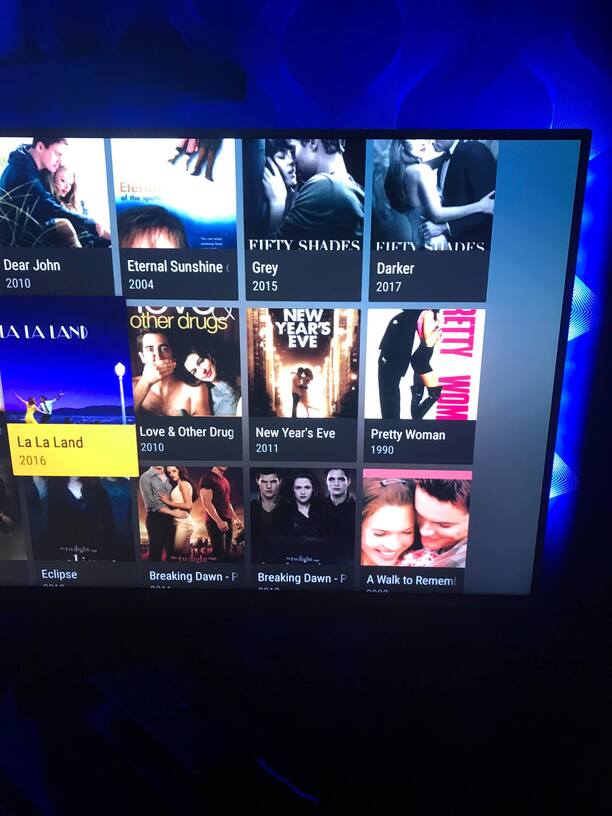
This is very wierd and I can’t even understand how this is possible…
This problem just appear on the TV plex app not on the web (!)
When I view the movies in the standard movie folder with all the movies,
the covers looks like they should do.
Adding a picture just so you can see the difference
But I like to sort my movies in my own way so I know where to find them easier.
So when I view the movies in my own sorted folder on the TV the covers are like to big or something.
I am using an Android 4K smart tv if you need to know and I just updated the app on both the TV and my media server on the computer.
I just sorted and added all my movies to folders so I have never seen this problem before.
Edit: I just watched plex on my moms and dads Samsung smart TV and this problem dosen’t appear and there is an alternative to change the view of list to…
Can’t find anything like that on my Philips 4K smart tv…
Again how can this even be possible…
Edit 2: I bought the XPLAY app on my tv and the app is so much easier and so much more options to choose between.
Like you could choose your list view and how many lines it should show as BUT…
You can’t sort as folder and that really sucks so this app wont work for me anyway.
So why haven’t plex added things like this when they have been running this app since December 2009 (!!!)
Im not trying to be rude but how can so simple things be so hard to fix? I don’t get it…
There is so many threads out there with problems that have been out for YEARS but still no solutions in so many cases?
I feel like you guys just don’t give a ■■■■ and just milking money, it’s sad since this is a wonderful awesome app in so many ways, but so many problems and it takes ages for solutions…
There is not a temp solution except not using folder view or use libraries instead for whatever you are using for main top level folder.s I don’t know how you have your folders set up, but for example some have a Kids movies folder and make a kids movies library. Some have content in folders by genre and make like a Horror library because they don’t like using filters, sorts etc.
Yeah maybe I can make a library for each genre,
but then I guess that I have to fix the order for the films again and ■■■■?
Or is it possible to like save settings for each movie somehow?
I have picked different covers and changed titles and stuff on all my 1300 movies so there is HOURS AND HOURS of work haha…
Check out the filters available in the default library view.
Plex is already downloading Genre information for each of your movies… you can keep all those movies in the same library and simply filter e.g. by “Comedy” movies.
Open the library as usually
Click All Movies instead of By Folder
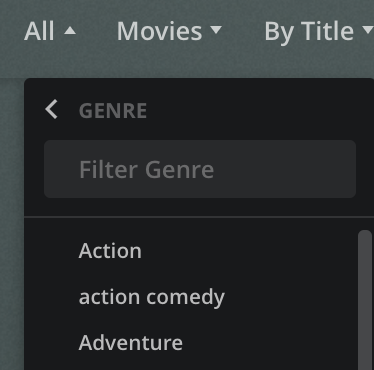
In the library header click on All (in AllMoviesBy Title), then By Genre and select the Genre you want to filter by
Now you see your full library filtered by all movies of that Genre (the library header will e.g. read ComedyMoviesBy Title)
The same way you can filter your movies by year/decade, content rating, actors/directors/writers…
I know all that but if I filter by Genre and pick like Action then I see Action comedy movies to.
That’s why I have done my own folders with for example Action and Actioncomedy.
If you understand how I mean
Is it possible to somehow mass remove tags to? I can add Action comedy to all movies at the same time but then I still have to go back on everyone and remove the other tags one by one!
It will take like ages to do…