Hi !
Plex has read hundreds of movies in the movies folder, but this was not done on my instructions. I wanted to delete them in the Actions - Library Management option, but in the edit - add folders section, these movies aren’t there, so I can’t delete them.
on the other hand, if I select the movie in the movies menu, a small window will open, at the end of which the “delete all selected” function will not work. this feature doesn’t work for movies that I’ve actually added to the list
Question, how can i delete movies that i didn’t put in the movie list and why it starts scanning movies from a source unknown to me.
thx
Andrew
Are you talking about movies which are supposedly stored on your own server?
If so, look at their Plex media info.
It will show you the location of the file and its file name.
That way you can see if this is a “mis-match” or something else.
You can reduce the chance of mismatches drastically by following some basic rules for folder organization and file names. https://support.plex.tv/articles/201543057-why-is-some-of-my-content-not-found/
Or are you talking about the “Movies & Shows on plex” library?
(The one which shows adverts during playback)
If you don’t want to see this, you can either “un-pin” the library from the side bar https://support.plex.tv/articles/customizing-plex-web/
or disable the online media source completely for your whole user account https://app.plex.tv/desktop/#!/settings/online-media-sources
the movies are on my own machine, vinchester, however, the ones Plex put itself into the movie menu, I don’t know where you loaded them from, they’re not on my machine, you can’t even play them.
i would like to delete these datasheets that appear in the movie menu against my will.
my own movies can be deleted from the list in the Movies - Actions - Library Management - Edit - Add Folders menu. however, films of unknown origin cannot be found here. i can’t delete them
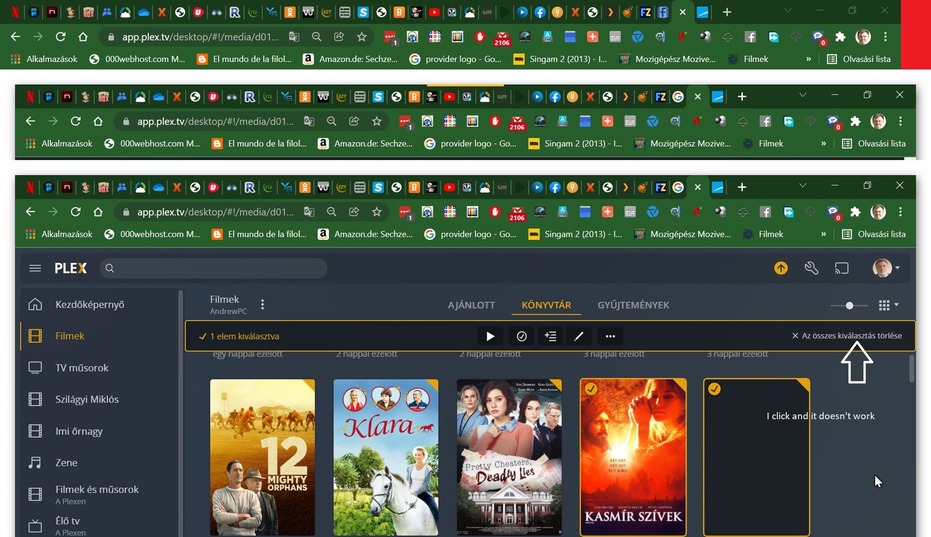
and if I select a movie (movie cover) from the top left in the movies menu,a menu bar with the Delete Selected menu item will open at the bottom, but it will not work.
if this is not understood, I will send screen photos step by step
thx
andrew
On one of those movies you didn’t add and have no idea on where, can you Get info on it?
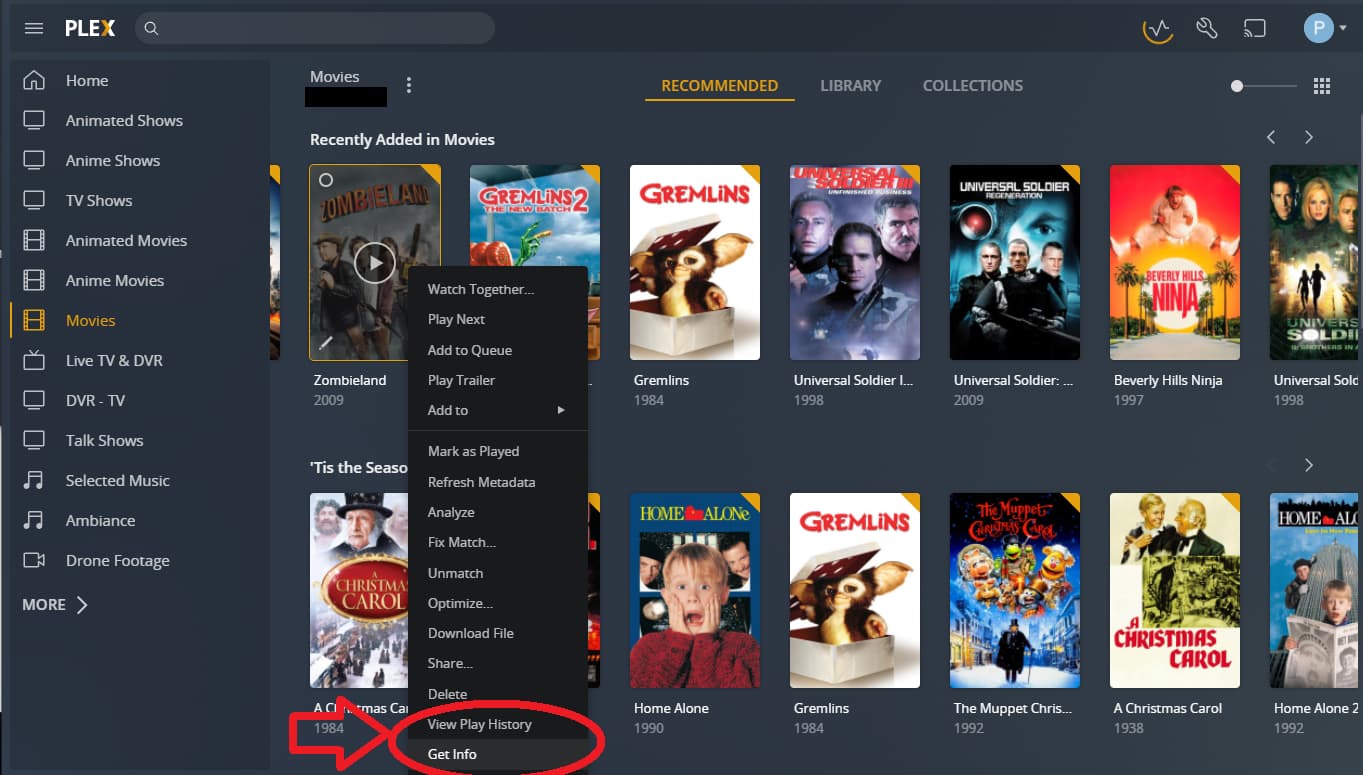
In the info panel, if it’s on your own drive, it will show the file location of the video. If so, then this is your own file. If not, then let’s check something else.
Do you have Movies & TV on Plex enabled?
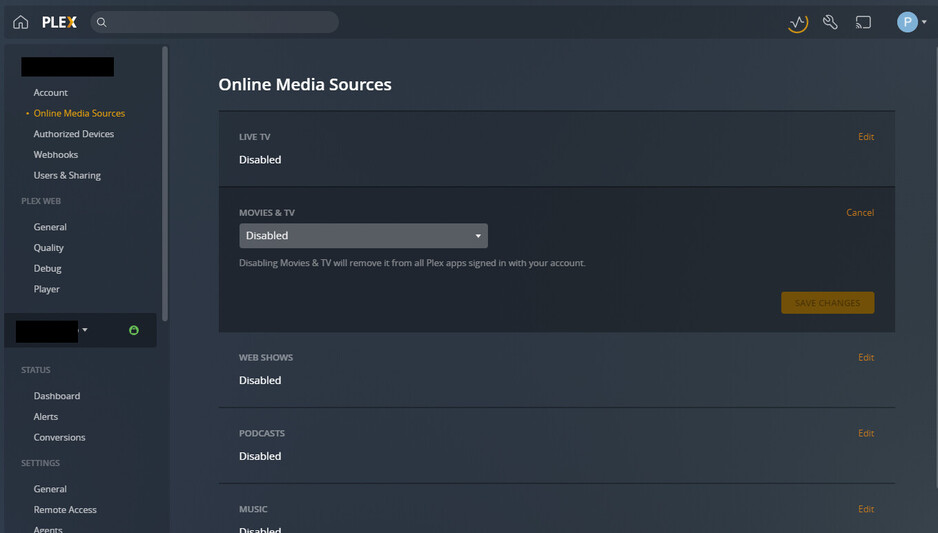
If you have this enabled, and you are browsing Plex’s own collection of free movies, then it might explain the presence of unknown movies.
Plex doesn’t do what you are describing. Period. So the only explanation for what you are seeing are mismatches.
Please show a screenshot of the item and the Plex media info of one such item.

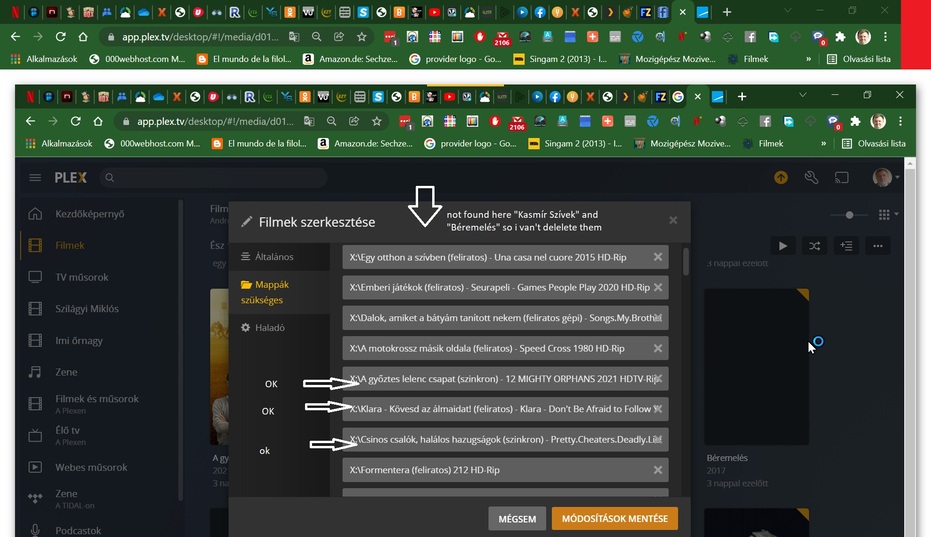

You shouldn’t add individual movies to your library. The Add folder tab is supposed to link a movie library folder.
Example:
If your movies are in X:\Movies\, point your library to that folder.
Don’t point the library to X:\Movies\Movie Name (year)\…
Also… make sure this is an actual folder, not a plain drive letter (e.g. don’t simply point the library to X:\). This can produce some funny side effects.
I suppose fixing your library setup that way should start sorting some of the problems you’re seeing.
Ooooof. Ok, let’s take a look. Firstly, I’d highly recommend you do what @tom80H says and reorganize your media. It’s VERY rare you need to make a library with more than one movie source. (I have multiple libraries, but it’s because I’m a stickler for separating my animated movies). Here is my movie library source:

I have a media drive with videos, music, comedian libraries, and audiobooks. Under Videos, I have a few more folders, such as Animated Movies, Movies, TV Shows, etc. I COULD make a single movies library that points to both my Movies and Animated Movies folders and combines them, but I don’t care to. So for most of my libraries the source is a single folder. Plex is very good at drilling down in sub-folders within that source and within folders within those folders. So there is no need to keep everything in folders on the root of X:/. I would have said to remove all sources and point to the root of X/:, but Tom says that makes things weird. So make a X:/Movies/ folder and dump everything you had in X into that, then change the source for your movie library to X:/Movies/. This may very well fix every issue you have.
In case it doesn’t, let’s take a look at the info for those mystery entries. Point at ONE of them, and look for a triple dot button in the lower right of the poster. Click that, then click Get Info:
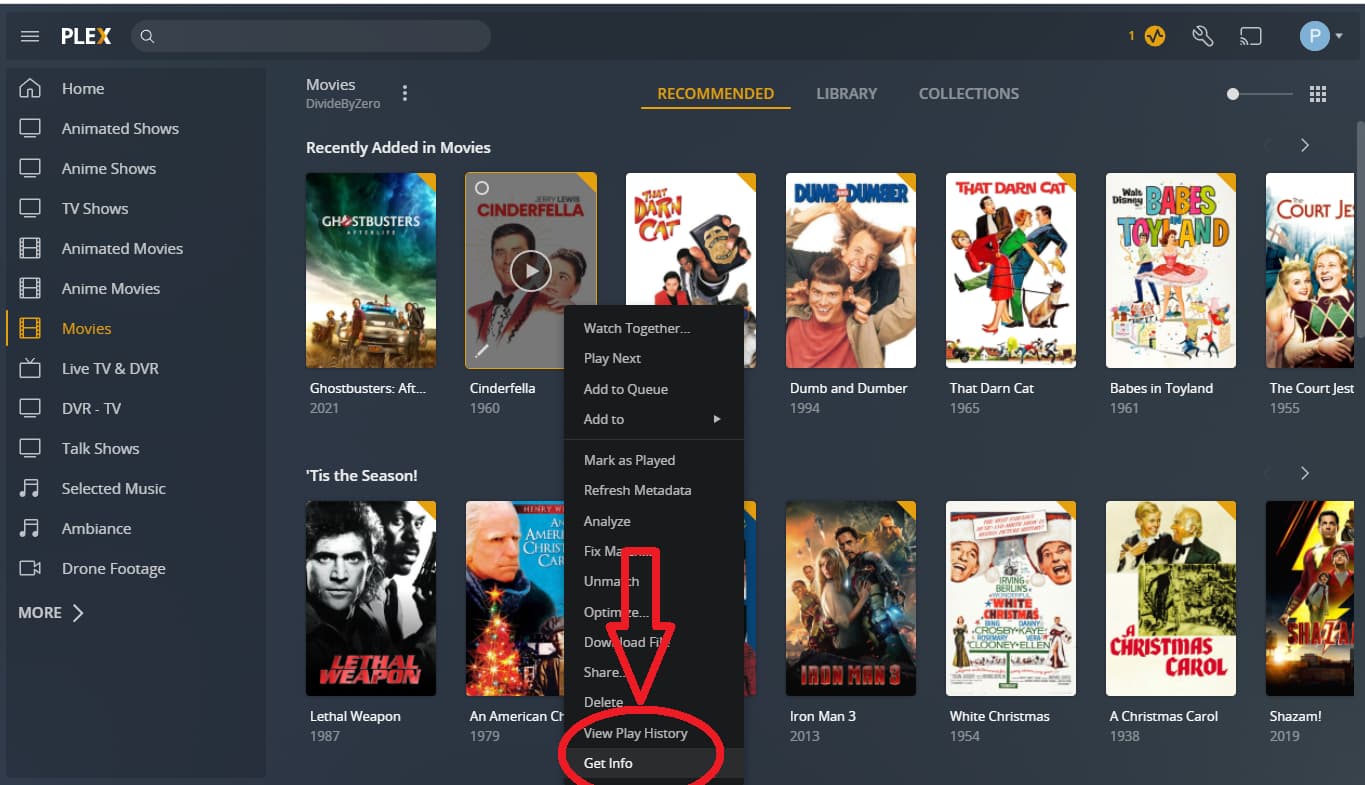
Then you should look at where Plex found the file:
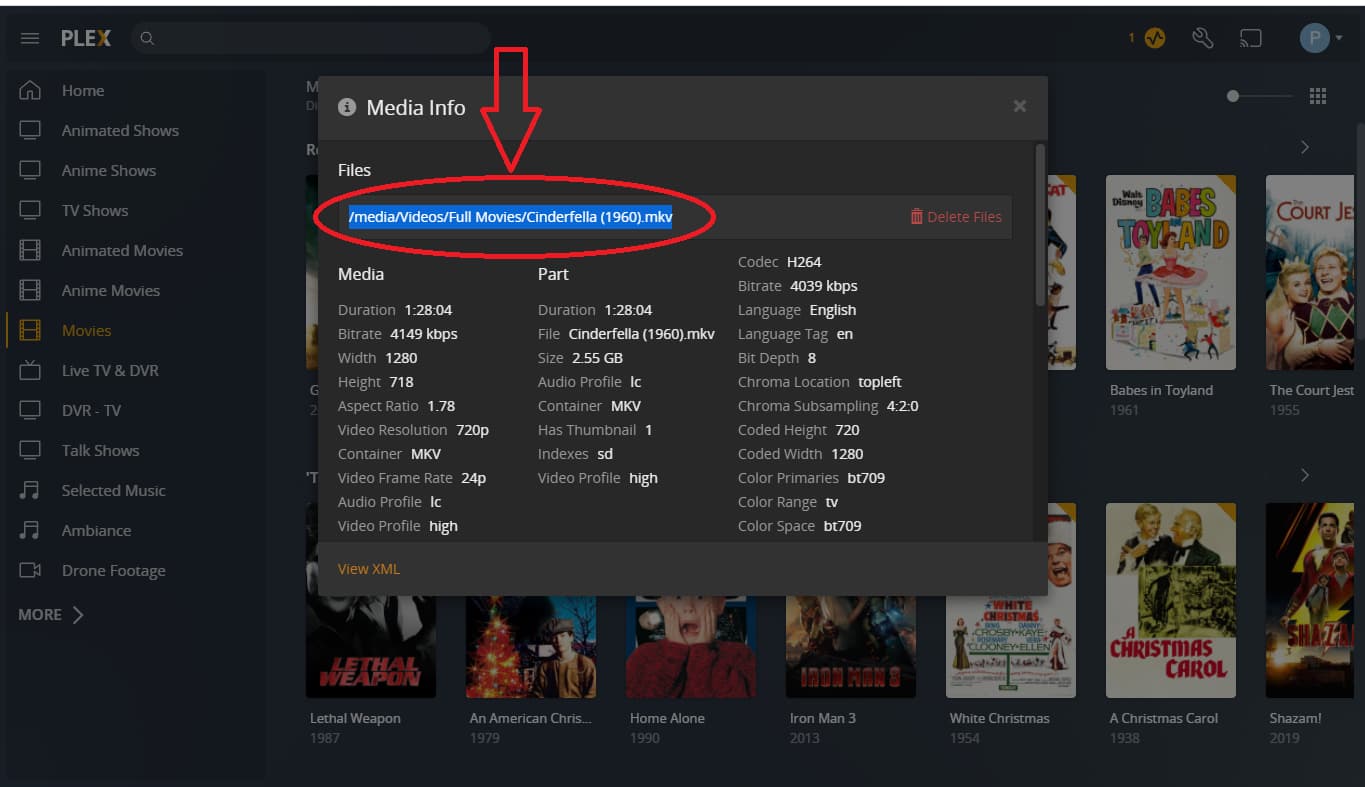
This should tell you exactly where the file is. It’s quite possible that Plex mistook the movie for another one, so you may have what SEEMS to be an unknown movie, but Plex likely just mistook it for another movie. If the poster does NOT match the file, you can fix that by going back to that triple dot menu, and this time picking Fix Match.
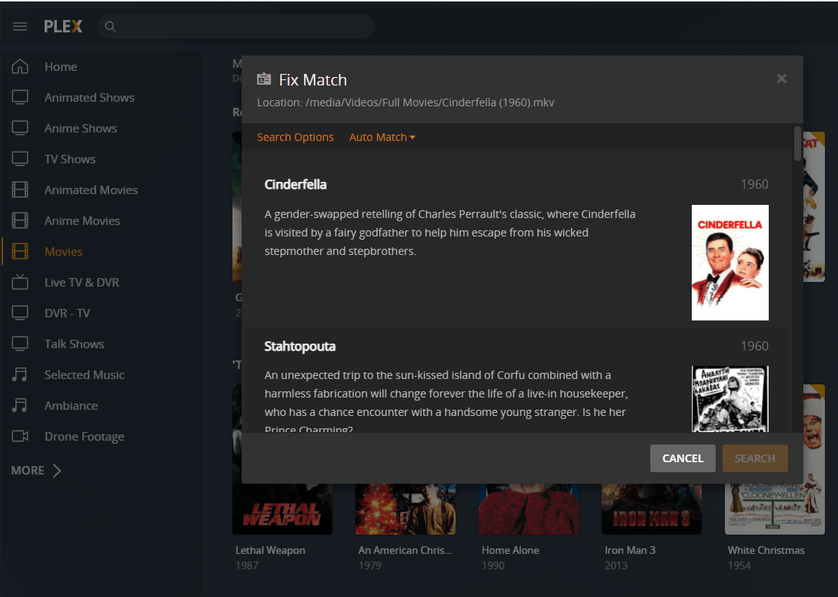
Here, Plex will give a list of possible movies it found on TheMovieDB, and allow you to select the proper one. If you use the name of the movie based on TheMovieDB in the first place, it should automatically have worked, but I do not know how well the service works with non-english titles (I have no non-english films).
EDIT: Oh, btw, the X you were clicking on, claiming it didn’t work in that third image? I don’t know what it says in your language, but here it says X Deselect All. That appears when you select more than one movie at a time, and all it does is let you quickly unselect everything at once. It does not delete a file. To do that, you must click the triple dot menu on an item, and somewhere in that menu is a Delete option. That will delete the ACTUAL FILE ON YOUR DISK though, so I’d recommend against doing this. Instead, find the file itself (using Get Info up above as I mentioned to find the location) and delete it from your folder.
This topic was automatically closed 90 days after the last reply. New replies are no longer allowed.
