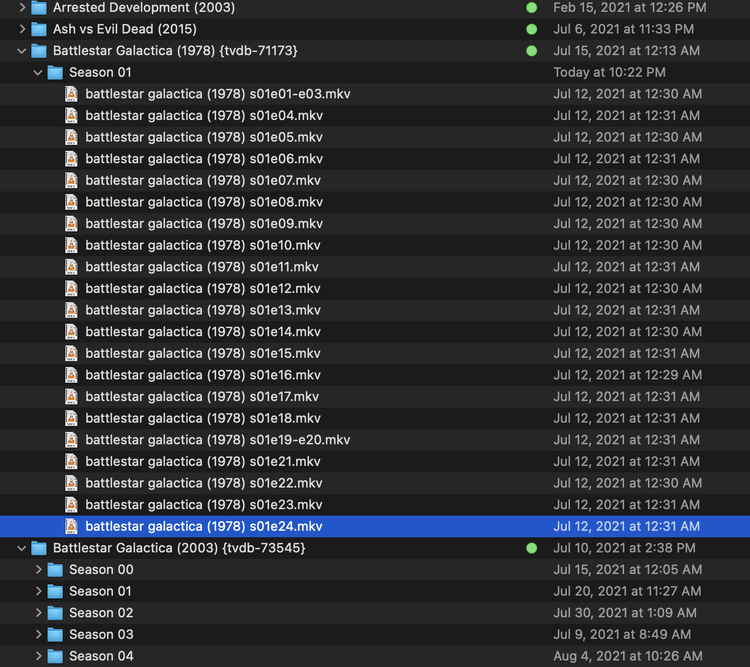
Server Version#:1.24.2.4973-7000
Player Version#: 1.33.0.2444-a220eae4
Hello,
I’ve been a Plex user on my Mac for many years, but recently got a NAS (Synology DS920+) and having a few issues with Plex recognizing certain folders.
I follow the approved naming conventions, have a Plex pass, and my agent/scanner is Plex Tv Series.
I decided to start my new server from scratch because it seemed fairly cumbersome to migrate from MacOS to the Synology server but having some issues where things which used to be recognized no problem are matching in correctly (no big deal) or not showing up at all.
For example I have both Battlestar Galactica (1973) and Battlestar Galactica (2003). Although on my old server I never had to use the TVDB IDs in my folder names for them to be recognized, I added them to see if that would fix the issue. It still has not. I cannot get the 1973 folder to be recognized and imported into my server no matter what I’ve tried.
Can anyone please give me some pointers on how to fix this? I think I’ve tried all the recommended fixes on the Plex site. I’ve attached a picture to show my file structure and naming conventions.
Thank you so much
On Synology, when you know you have good naming, the typical problem is one of permissions.
System Internal User PlexMediaServer (DSM 7) / Plex (DSM 6) minimally needs READ permission to where the files are stored (the shared folder, the directories, and files themselves).
Shared folder permissions are handled in Control Panel - Shared Folders.
Other permissions are handled in FileStation.
I’ve already given Plex full permissions on my media folder, that was something I had to change pretty much right off the bat to even allow it to scan the directories. Now it’s just certain folders for some reason that just won’t scan into Plex.
Thanks for the reply, my permissions were set properly…Turns out the issue was that Plex saw this show as a duplicate of the reboot and matched all the season one files as duplicates despite the TVDB ID.
I split them apart, unmatched, and rematched to the original show.
Oh man, I would have suggested a duplicate show issue if I saw this post a few hours earlier. I had a similar problem with a “Whose Line is it Anyway?” when I added the UK version. It’s frustrating that both UK and US shows appear to have the same year. When I added the US version months ago, despite the right name, it showed up as the UK version, and I had to rematch.
The trouble seems to be that if it failed to match a folder correctly when first added, it will not fix the match if you edit the folder name. Once a show has been matched (correctly or not), it keeps track of the files within it, and even the folder if it got renamed, and associates it with the same show.
This means that since you added in the older Battlestar and it got matched to the new one, Plex would never correctly auto-match the old folder. It just thinks it is a duplicate. In this case, you must check to see if a missing show had been incorrectly matched and separate out the shows in the interface.