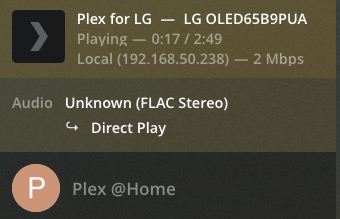
With the new updated version 5.11 I have noticed that starting screen displaying PLEX is flushing 3 times and it takes longer to get the Main screen. Configuring PMS manually for my local network did not improve the speed. Also, when playing FLAC locally on my LG WebOS 4.80 and checking the PMS console it displays as playing Local - 2Mbps. See attached.
Wondering what it means since PMS is local.
I tried early access out tonight, all HDR videos are showing in the interface as UHD and play with washed out colors. I disabled early access and things went back to normal. This is with an LG C8.
The shuffle button is missing inside a collection
Hi guys,
I find this app pretty stable, but I need to test more.
This might be a dumb question, but I dont see a way to use the “skip intro” button/function. I see it appearing on my LG TV, but I dont see a way to activate the button.
If I press UP or DOWN on my remote (it is not Magic Remote), it forwards or rewinds the show, and the same with LEFT and RIGHT keys… I’m sure I’m not doing it right…
Thanks
If it’s a non Magic remote it still has a Ok button, so when the Skip appear hit OK
Programme restarts after adverts. For example, I’ve been watching the Creedence Clearwater Revival documentary and it goes to the beginning after each set of 3 adverts.
What’s the point of showing US adverts in the UK?
An issue I’ve encountered with the preview app is that I was trying to watch a recording from the Plex DVR (~8Mbps 1080i). With “direct play” and “direct stream” enabled, the video was going way too fast and losing sync with the audio. It worked fine after I disabled “direct play” but kept “direct stream” enabled. Works file with other devices though. I haven’t tested it much with other recordings yet, maybe it’s specific to the channel I recorded?
Had to reinstall app to get it to save settings. Only issue I have now is the server shows as remote and not nearby like all my other clients.
Can anyone check “server status” in settings and see what it says?
How the hell did you re install a Opt in app.
Do you mean re installed the old app?
You may need to add a Manual Server LAN IP addressees via the app, called manual server settings
I have the exact same problem. 4K HDR content buffering like hell, both video and audio direct plays. With and without subs. Old app didn’t do this and neither do XPlay.
But I like very much the new “Skip Intro” when watching series.
My TV is LG B6. WebOS 3.3
ATMOS & 7.1 audio files are transcoding, the same files in XPlay play direct and don’t transcode. The difference between the transcoded playback and the direct play/direct stream is huge. So much better when atmos plays as it’s meant to.
The LG can play the atmos files using its native client too. The same files it’s getting from my plex server; so this remains an issue with the plex on LG app.
Why does the new Plex App on LG insist on transcoding?
Native client plays HDR and Atmos perfectly well from my plex server with no transcoding.
XPlay plays HDR and Atmos without transcoding from my plex server.
But the actual Plex App for LG insists on transcoding atmos?
Can’t plex for LG just please use the exact same settings that XPlay for LG is using?
Or even the default DLNA client in the LG? How come both of them can play and HDR and Atmos without transcoding but the new plex app can’t?
Edit: I’m using the freely available Dolby atmos demo files. Only the Plex for LG app is transcoding the atmos audio.
And you point is it does not play Formats a LG (What) can play. Please
Server version:
LG model:
Model: UJ750V
WebOS: 05.80.55
Server Version: 1.19.4.2935
Client version: 5.0.11
Platform version: 3.8.0
Is there a way to arrange the Recently Added Videos and others Recently added manuel on the home screen? I have not found an option.
TrueHD (Atmos) is played as Dolby Digital through Xplay, so it Direct Plays, but you don’t keep the Atmos. The official PLEX app should use the same method, till FFMPEG finally supports transcoding to DD+Atmos. The native LG video player says “unsupported codec” on the TrueHD stream and falls back to a second Dolby Digital audio track if present, if your file only has 1 track, it won’t play any audio, Xplay does.
The TV can decode TrueHD from a HDMI source and even convert it to Dolby Digital.
Have a 65C9 and 55C8 both react the same.
Transcoding audio should be a completely separate thing of video, without subs on just the audio is transcoded and you keep the original HDR stream.
I had to exit early access and go back to the old app, cause my Sony HT-X8500 Soundbar is going off and on the whole time as I stream a movie from my plex media server.
At first I thought it was the soundbar cause I have it since few days, but when I switched to the old Plex app, everything was working fine.
The soundbar is connected to my LG TV (65SM9010LP) via HDMI 2.1 cable (eARC).
So, no early access for me. I hope this will be fixed when the actual app is released.
I’m having HDR problems too. As with others, if I use True HD the image isn’t being displaced as HDR - presumably because it’s being transcoded along with the audio track. I’m also seeing the same issue on a small percentage of HDR videos when using an AC3 track too, but the same video and audio combo is playing fine on the old version.
Related, the info button that appears during video playback has gone. I found this super helpful to diagnose what was going on, so please find a way to add it back in!
Generally, it seems snappy but I agree with the complains that it’s “too big”. Due to the larger icon size the whole thing feels a bit cheaper, like it’s set up in grandma mode or something - I have a large TV, so let me see more on it at once. Perhaps add a level of customisation here?
FWIW I’ve reverted back to the old version until at least the HDR issues are fixed.
TV: LGOLED55CX
OS: 03.00.70
The Filter “unplayed” isnt correctly working for me. It shows 4 already watched series and only 1 unwatched (instead of 3).
I’m seeing the same issue. Sometimes selecting the show from “what’s on” shows a menu, but then tapping “play” doesn’t do anything. They’re broken from the guide too. I opted out from the preview version and can confirm that these channels do work in the old version of the app. They also work in the web UI, and in the Android app.
TV model and Server version Please
Out of curiosity is the HDR file in question h.264 or h.265? Just wondering as the default h.264 level was lowered well below the threshold for direct playing 4k HDR. It was lowered to 4.1 which limits the apps direct play capability to 2k 30fps.
Also - I like your idea of a custom slider or setting for the UI size, just as in the web player. As I have a 55 inch screen as well, and it does feel a little big.
