Have you tried 5.1 Level, I have so far, with no issue.

No I hadn’t, I had only just installed shortly before making my comment. I also assumed there was a reason they did that but it couldn’t hurt to try.
And I set it to 5.2 but I quickly realized that I don’t have anything 4k in x264. And my highest bitrate’d (?) 1080 file is like 17-30mbps, no wheres near the needed data rate to stress test it out, unfortunately.
Problem
lg oled 65c
Preview would only connect to server remotely, not locally, although the server is on the same local network. Had to revert to the released version to correct.
65C tells everyone nothing, is it 6,7,8,9,X. C
Have you manually added the server LAN IP and port.
I’m using 65B8 without isue
I have been using this new LG webOS app. There were three issues I encountered:
- Buffering, when playing a movie there was short buffering about every 5 minutes
- The description with the tv-series and episodes is sometimes in English and sometimes in Dutch. The language I use is set to English in Settings,
-In tv-series the “Unplayed” filter doens’t work.
A personal wish: maybe you can add a feature to change the background color.
LG WebOS UM 7270PSA
Software: 04.80.03
This looks like it will be good but far too many bugs at the present time.
Any suggestions on how to get back to the current stable version?
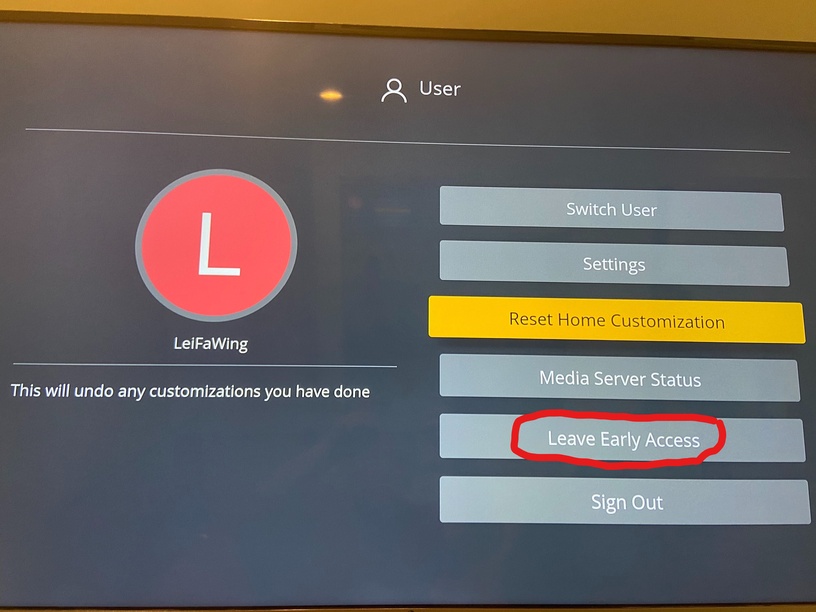
I’m having trouble opting back (LG Smart TV). There is no option under the left menu avatar to Opt Out, or anywhere that I can find. I’ve even tried deleting the app and reinstalling the earlier (current) version, but it still defaults to this beta.
Other issues:
- Can’t save any settings - eg - Change screen saver time (or set to OFF). If you go out of Settings, then straight back in, it has defaulted to 5 mins
- Every time I start the app I have to go through the Customise
Home configuration and reorder my pinned libraries. Every. Single. Time - Watching a movie in 1080p, H264, with subtitles turned on (some foreign speaking parts, so Forced subtitles only), part way through the movie it starts buffering, then plays the movie in a ‘stuttering’ fashion (approx 1 sec play, 1 sec still, repeatedly). Only way out it to turn of subtitles, of set playback to 720p.
- Missing movie/epsiode finish time (an extremely handy feature)
- Missing movie/episode detailed playback information (also very handy)
- Can not turn off the background/screensaver that stats up when app is in idle
- If watching a TV series, the amount of episodes in the season information is gone (another handy feature)
- TV episode theme music gone
- Start up screens are very slow. With the previous (current) version of Plex, I was from TV on to viewing a program within 30 secs max. Now it’s more like three minutes, and often I have to turn the TV off and restart for it to find the server.
However, as I mentioned above, I would really appreciate some help getting back to the previous (current) version.
Client Version 5.0.11
Platform Version 3.8.0
LG webOS TV SJ995T
Software Version 05.80.55
It probably has to do with my server settings but I’m pointing out a clear regression here: worked with old version -> does not work after upgrade with exactly the same server settings (ipv4 only, enable relay on).
LG webOS TV OLED55C8PLA.
APP freezes when deleting file.
Working well here, 4k playback etc is smoother and doesn’t buffer as much. The biggest issue is that live tv doesn’t stream at all. I don’t even get to the playback screen. If I select a TV show in the guide that is currently on, the app doesn’t do anything at all, however if I select a future or previous show, it will show a screen where I can select record, but that doesn’t do anything either.
Also when trying to use the search functionality, the same happens, the DVR functionality is broken.
Originally when I tried, I had issues with the ordering of channels however this appears to have been fixed now.
OLED65C9AUA (65 inch C9)
Plex Server 1.19.5.3035
I have noticed a behaviour change in live TV.
If you join a show that is recording and then the recording finishes you can no longer jump forwarded anymore. Also if you join a show that has finished but is still recording due to end padding you can’t go back past the start of the show you joined. Old client, you could go back to the start of the original recording.
Client Version 5.0.11
Platform Version 3.8.0
OLED65C7
Plex Server Version 1.19.4.2935

ugh, I’m having this issue too. However I did have the option to click “Leave Early Access”. I clicked it, nothing happened and now the option is gone and I’m forever stuck in Early Access. I’m assuming this is a bug. I’m on the LG C8
So in my latest attempt to exit the Early Access version, I did the following:
- Signed out of the app.
- Deleted the app from the TV.
- Turned off the TV (for around ten minutes)
- Reinstalled the app (which the version is apparently 2.2.0, Updated 17/3/2020)
- Opened the app on the TV
- Logged into the newly installed app using the usual ‘log-in via another media’ method when prompted.
This resulted in me landing straight into the Early Access version still, being Client Version 5.0.11, Platform Version 3.8.0. (This information taken from Setting/About.
I can’t see what I’m doing wrong and would appreciate any help 
All my 4k files are H265 - I double checked and the offending ones here were too.
All my 4K HDR movies are direct playing in the old app. In the new app, they always transcode which renders the app unusable for 4K HDR content (HDR doesn’t work, colors are washed out and there’s constant buffering because the server cannot keep up with transcoding).
If magic remote is not yet supported do you have a go around because in this state the application is unusabled.
@murrayb5 and @socarson_gmail_com You can perform a factory reset on the TV. This will reset all the settings you’ve changed as well as remove all the apps that you’ve downloaded, but this will get you back to previous build.
