New Plex Agent: Release dates are now all Year-January-01 (Known issue)

I tried these two on our API endpoint and they match to the correct items based on the IMDB ID. I’ll ask our metadata dev team if there is something else going on.

also, the space between imdb and the guid is optional. You can simply use the - like you have.

@rg9400 Would you mind putting those two movies into another library and trying the match again to see if it matches based on the GUID as expected?

Also, do you have a .nfo file in the folder next to the movie with the wrong IMDB ID in it? If you do, then the GUID in the .nfo will take preference over the one in the filename.

Do you have logs that cover your library upgrade? It would help our devs understand what might have happened.

@chrisallen, unfortunately, I restarted Plex and reverted to an old DB, so a lot of my logs were lost (don’t have Plex Scanner, Plex Scan Matcher, etc. from that time). The only one that remains is the Plex Media Server.log. To clarify, here are the steps I took.

  1. I had already upgraded my library and refreshed metadata a few days back when the agent was released. All my items seemed to be matched properly and had correct custom metadata (with the exception of collection summaries which were all deleted and cannot be edited)
  2. I decided to name my movies as per the convention you mentioned. I turned off the Empty Trash after scan option, shut off Plex, and ran a mass rename using Radarr.
  3. I restarted Plex, and forced a scan of my movie library.

I can definitely see it working on the mass rename, but the log is only filled with items like the below. I don’t see any other types of lines, just this for 2000 movies. In Plex, the alerts UI (which is not logged anywhere AFAIK) seemed to indicate that the item was first deleted, then a new item was created and metadata loaded for that. I stopped the scan in middle when I realized what was happening, but it was still running 40 minutes after I started it.

Jul 26, 2020 22:38:08.647 [41480] INFO - Part rename detected [G:\Movies\The Photograph (2020)\The Photograph (2020) [tt7798646] [8bit] [AVC] [DTS-HD MA 7.1].mkv] was renamed [G:\Movies\The Photograph (2020)\The Photograph (2020) {imdb-tt7798646} [8bit] [AVC] [DTS-HD MA 7.1].mkv]
Jul 26, 2020 22:38:08.834 [34868] ERROR - Unknown metadata type: folder

I don’t have .nfos, only the movie files. I tried copying those files to a new directory and creating a test library with the new naming scheme. They matched incorrectly to the movies I listed before.

For specifics, here is the full movie name and which movie it matched to. The matched movie is not even on IMDb (as far as I can see), so no clue what’s happening here

G:\Test\The Photograph (2020)\The Photograph (2020) {imdb-tt7798646} [8bit] [AVC] [DTS-HD MA 7.1].mkv

EDIT: It is worth noting that even with the old agent, whenever I swapped files out or did renaming, the Plex scanner seemed to always do a delete + create rather than just updating the existing item. It only did that with movies, not TV shows where the items were updated in place. This often led to annoying behavior like switching back posters, though as noted, other locked fields remained static. This behavior seems to not have been changed with the new scanner/agent (unfortunately), the only thing changed seems to be matching accuracy for some movies.
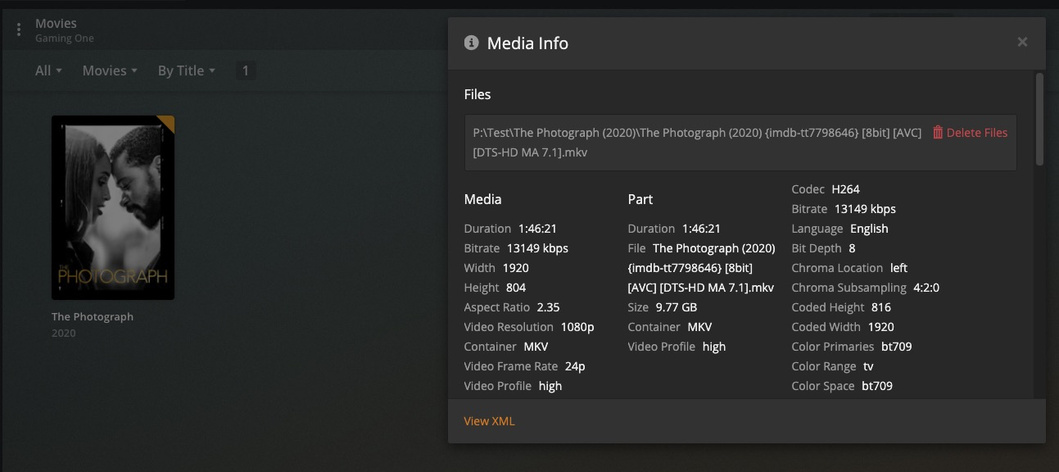
I am going to make a test library and try and reproduce just in case PMS is doing something funky before hitting our new metadata servers

EDIT:

I created a test library and it matched here;

Jul 28, 2020 11:34:19.022 [2844] DEBUG - Native Scanner: Executed Local Metadata stage in 0.53 sec.
Jul 28, 2020 11:34:19.022 [2844] DEBUG - Looking for path match for [P:\Test\The Photograph (2020)\The Photograph (2020) {imdb-tt7798646} [8bit] [AVC] [DTS-HD MA 7.1].mkv]
Jul 28, 2020 11:34:19.355 [2844] DEBUG - MetadataAgent [tv.plex.agents.movie]: Found 1 provider matches for 'The Photograph (2020)'.
Jul 28, 2020 11:34:19.355 [2844] DEBUG - Scanner [Plex Movie]: found cloud match for file '"P:\Test\The Photograph (2020)\The Photograph (2020) {imdb-tt7798646} [8bit] [AVC] [DTS-HD MA 7.1].mkv"': 'The Photograph'
Jul 28, 2020 11:34:19.355 [2844] DEBUG - Native Scanner: Executed Cloud Match stage in 0.33 sec.

@rg9400 Can you nuke your test library and setup another one pointing to this file and grab your logs that cover the scan/match?

@chrisallen I don’t want to post the full log file from the scan on this thread as it is public and the logs contain a bit of sensitive info. I can message them to you if needed though. I did extract the relevant lines though below. Worth noting I could not find any log lines related to requesting that URL that you have in your logs

Jul 27, 2020 23:33:28.840 [32776] DEBUG - Native Scanner: Executed Local Metadata stage in 0.23 sec.
Jul 27, 2020 23:33:28.841 [32776] DEBUG - Looking for path match for [G:\Test\The Photograph (2020)\The Photograph (2020) {imdb-tt7798646} [8bit] [AVC] [DTS-HD MA 7.1].mkv]
Jul 27, 2020 23:33:29.037 [32776] DEBUG - MetadataAgent [tv.plex.agents.movie]: Found 10 provider matches for 'The Photograph (2020)'.
Jul 27, 2020 23:33:29.037 [32776] DEBUG - Scanner [Plex Movie]: found cloud match for file '"G:\Test\The Photograph (2020)\The Photograph (2020) {imdb-tt7798646} [8bit] [AVC] [DTS-HD MA 7.1].mkv"': 'Photograph'
Jul 27, 2020 23:33:29.037 [32776] DEBUG - Native Scanner: Executed Cloud Match stage in 0.20 sec.
Jul 27, 2020 23:33:29.038 [3684] DEBUG - Looking for path match for [G:\Test\The Photograph (2020)\The Photograph (2020) {imdb-tt7798646} [8bit] [AVC] [DTS-HD MA 7.1].mkv]
Jul 27, 2020 23:33:29.041 [3684] DEBUG - Skipping hash check, no size match for 100947 bytes.
Jul 27, 2020 23:33:29.041 [3684] DEBUG - No match for hash.
Jul 27, 2020 23:33:29.047 [3684] DEBUG - Added new metadata item (Photograph) with ID 95951

@chrisallen any idea on why the match failed for me based on the logs? It seems to have found 10 matches when it searched in my logs vs the single match in your log. The search itself is super fast and seems to be leveraging the new agent/scanner, right?

I did have someone else test, and they got an accurate match. However, I’ve tried nuking the library a few times as well as using a different file with that name, and it always results in that incorrect match. Not sure what’s going on that can lead to that different behavior.

@rg9400 I am asking one of our metadata developers to take a look and provide some insight into what might be happening.

Appreciate it! I had a few more questions. In addition to the few mismatches, the other issue I had with my mass rename was the fact that the movies were deleted then re-added. This meant the process took a long time because I think it did analysis and a metadata refresh for each movie. It also meant that any custom artwork was lost. So

  1. Is there a way to rename all my files without having it delete and recreate the items? I tried by turning off the empty trash feature, shutting down Plex during the rename, starting it back up, and rescanning.

  2. If a movie does end up being deleted, then later re-added, is the custom artwork supposed to be lost? This has happened with the old agent as well, but I noticed that locked fields carry over except for the custom artwork. I can still sometimes see my uploaded poster, it’s just not selected. In a few cases though, I could not find the poster I uploaded earlier in the list at all.

Chuck, do you have a template in Filebot you’re using to create that file name? I was trying this earlier, and I’m having a heck of a time getting the curly brackets to display properly on the outside, while still having the variable work properly inside.

@Cafe_Diem

With the FileBot GUI, you currently need to do it this way.

/nas/movies/{n} ({y}) [imdb: {imdbid}]/{n} ({y})

Notice the use of [ ]. It should still find the embedded ID.

FileBot allows us to use {tmdbid}, {imdbid} or just {id}
Depending on the syntax you use (I would check using the GUI tool first, {id} might be the easiest. {id} is either IMDBID or TMDBID - whichever it matches.

Let me or chrisallen know please if any difficulties?

1 Like

Thank you! I’ll run through some tests the next few days, since I’ve run into a few files that had matching problems.

I wasn’t sure if regular brackets were considered an acceptable alternative to curly brackets, since Plex normally ignores anything inside. I’ll replace the colon with a hypen in Windows.

Hello, as per the previous message :

https://forums.plex.tv/t/new-plex-agent-release-dates-are-now-all-year-january-01-known-issue/616134/15, the imdb id is set on the file name without change the folder name but in your last exemple, you leave the file name as Plex naming convention and add the id in the folder.

Which part of the path have to be change to use a hard matching?

Thx

@Haldir

Good question and that gives me the perfect test idea. back shortly.

I know it works on the movie file directly but this confirms the rest. :slight_smile:

Movie_name [imdb tt0057197]
1 Like

Would be great if folders were supported, I could use it for automation with other tool and allow to leave the exact file name intact without clean info or change format.

Haldir,

Please explain “great if folders were supported” ?? I’m not understanding.

I demonstrated the ID number on the containting directory and the file name unchanged.

I mean follow your suggestion by adding the imdb or tmdb id only in the folder name but leave the file for example My.Amazing.Movie.2020.mkv as file and My Amazing Movie (2020) [imdb:tt1212122] as folder name…

New agent has great result if the format is not expected as Plex naming but if we could force the match without change the file name, might be better.

@Haldir

Please look at the directory name and the file name here?

  1. The directory name itself isn’t a hint.
  2. The directory name doesn’t contain the (year) guidance (not proper form)
  3. The File name isn’t in proper naming form.

The only guiding piece of information here is the IMDB ID, which is bracketed

[chuck@lizum matching.20]$ ll
total 16
drwxr-xr-x  3 chuck chuck 4096 Aug 12 17:40 ./
drwxrwxrwx 13 root  root  4096 Aug 12 17:29 ../
drwxrwxr-x  2 chuck chuck 4096 Aug 12 17:40 Movie_name [imdb tt0057197]/
[chuck@lizum matching.21]$ cd Movie_name\ \[imdb\ tt0057197]/
[chuck@lizum Movie_name [imdb tt0057197].22]$ ls -la
total 12
drwxrwxr-x 2 chuck chuck 4096 Aug 12 17:40 ./
drwxr-xr-x 3 chuck chuck 4096 Aug 12 17:40 ../
-rw-r--r-- 1 chuck chuck  292 Aug 12 17:30 Movie Name.mkv
[chuck@lizum Movie_name [imdb tt0057197].23]$ 


1 Like

That’s excellent. (IMDB ID in folder name)

So what is the ideal format for plex? imdb id in the movie folder or filename?
