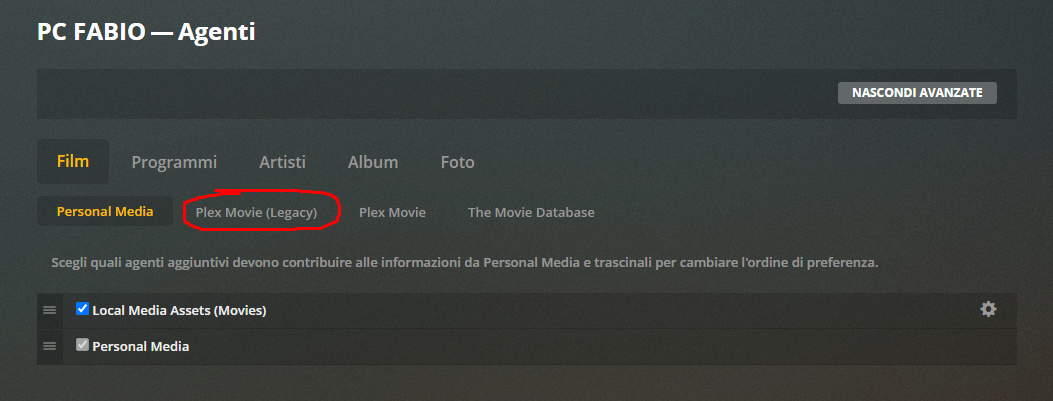
as an fyi… I can report that changing your library back to using the legacy agent and doing a full scan and refresh of all metadata has fixed the various problems I experienced (phew).
Won’t be using this agent for a while – its more alpha (dev test ready) than beta ready IMO.
Chiming in to report my experience with the new Movie scanner
Set collection threshold to 2 accidentally and got 200 2 movie collections. Was hoping setting the threshold to 3 would remove the 2 movie collections but it didn’t. I had to manually remove them.
Also had a handful of 1 movie collections even though threshold was set to 2 / 3. Seems that other movies that should have been in the collection were already part of a collection I had set up manually previously (ex - Godfather auto collection had Godfather 3 only, but GF 1 and 2 were part of a collection I had set up previously)
10 person cast limit is way too limited
Director field is being populated with many other non-director people (mentioned above).
Descriptions on previously manually created collections were wiped out (mentioned above)
I’ll stay with the “legacy” Plex agent for a while…
Localization is not implemented fully (collection posters, f.e.) and I would hate the number of actors being limited - big time.
But for the moment, I do have a question not related to this - but about the “collection” feature expansion.
The original request was HIDE collections with only x (1 for most use cases) elements.
Did I understand correctly that you decided to NOT create those collection items until the minimum number of collection items is met for any collection?
While I am all-in for the feature of “usually” hiding one-item collections, I would love to see if there would be any collections that would “exist” if the minimum of item would be lowered.
The “collection” feature as it was until now made me discover that I was actually missing a couple of interesting movies. I just never realized that there was a sequel available for a certain movie…
I did find the original request very good to just change the view of collections with less than a given number of movies, but still have them.
Am I correct that lowering the minimum number would not do anything until you refresh all movies (suggesting that you know which movies to refresh) and that raising the “bar” would not get rid of any exisiting collections not hitting the new lower limit?
If I am correct (am I ?), then such a collection extension would somehow be only partly implemented. Of course, I can live with that, but this somehow feels like the developing team did not communicate thier plans with the user base before implementing. I would have raised my concerns earlier if they would have done.
How can you find the legacy agent? I only have “Plex Movie” (I’ve just updated Plex to the latest version).
I don’t have the directors and extra issues, but cast list is limited to 10 and I have no pictures for the actors.
Thank you.
Hi! I couldn’t find "Plex Movie (Legacy) in Options->Agents.
I had to do a clean install of PMS to make it appear. Man, this new update gave me all sort of issues.
Anyway,. I have only 10 actors and all thumbnails disappeared (and I’m using the legacy agent).
Thanks for the feedback on the directors and missing actor images, definitely going to discuss ways to improve this going forward.
As for using the “New” collections on an upgraded library it is a bit of a pain because we don’t know if any existing ones were created by the user or not so we don’t want to change those.
To get all new collections you have to delete the old ones, but doing so also locks the collection field so you have to unlock those (so we don’t end up adding collections back that you didn’t want).
Once your collections are deleted you need to:
Select all movies (or batches if your library is very big)
Click the edit button
“Lock” the collection field under “Tags” and hit save
Click the edit button again
“Unlock” the collection field and hit save
Refresh all metadata or you can do this selectively (just refreshing one item in a collection will populate all the others that are also part of that collection).
As I said, updating “normally” PMS (using the internal updater when I got notified of the new version), “Plex Movie (legacy)” didn’t show. I had to delete PMS, download the installer and run a clean install to have it shown.
Basically, this didn’t show until the clean install.
It’s something that came up a few times during the forum preview but currently we only extract the IMDB id from the nfo file if one exists. This matches what the previous agent did too.
There aren’t any plans right now to expand the .nfo parsing in the new agent but if enough people make noise about this then it would help that cause.
Please consider this as noise because I use NFO files to customize the info rather then just pass on the matching info. Mostly for custom collections but also for personalized summaries and such. It is also much easier should I have to rebuild my library.
Most other media manager read and write them,
I’m just asking Plex to read and load the information from them.
Makes it so much easier to rebuild a Server
Also you edit the information in it, it doesn’t change.
@drzoidberg33 I had a couple questions about the new agent.
I always had issues with stale IMDb Ratings. It certainly seems that when I upgraded, the ratings became more accurate, but there’s always a concern that they can become stale. A good example is when a new movie is released, the ratings can swing dramatically (Palm Springs went from a 6.9 to a 7.7 to 7.5). I was curious if this new agent handles this in any sophisticated way, or would I be forced to refresh metadata to keep the ratings up to date?
Based on 1, I was using this tool - https://github.com/mynttt/UpdateTool. It would keep the ratings up to date every 12 hours. It no longer works with the new agent, similar to many other third party tools and integrations (like the Trakt plugin). The main reason is that the guid of any movie no longer contains an ID from a metadata provider like IMDB/TMDB/Trakt. That means that these tools have no way of knowing how to match the movie. Is there any workaround or way to pull this info using the new agent? This would create a major hurdle on developing any sort of script or software to interact with Plex.
Also noticed the below movie is coming with a title of Dry Run even though it is called Dark Waters. Actual match seems correct
@rg9400 You may want to look here. New Plex Movie agent
Apparently we’re not supposed to use the API to do things anymore. Personally found this to be an ignorant approach but what do I know.