May I first offer this?
The Engineer found something he didn’t like.
Please let me know if this solves it for you.
May I first offer this?
The Engineer found something he didn’t like.
Please let me know if this solves it for you.
Synology DS414
DSM 7.1.1-42962 Update 6
CPU: MARVELL Armada XP MV78230
Folks, Might anyone have feedback for me?
I have all the platform binaries for this build. Please let me know what’s desired/needed
I have the exact same issue, no settings were changed just routine update. I am running it on a Drobo5N2
Here, give this a shot. Please report back as it’s an engineering build with proposed change for the abrupt termination.
https://artifacts.plex.tv/plex-media-server-experimental/1.40.5.8887-344747f5b/drobo/plex.tgz
That seems to have fixed it on my end. I will comment again tomorrow to reconfirm that there was no abrupt termination.
I am reverting to build 1.40.4.8679
I removed the error message regarding the IP addresses by deleting the spaces 
But I can’t get rid of the error message regarding insufficient access rights. The user PlexMediaServer really does have all access rights. To test it, I even revoked all rights and then gave him read and write rights even though he doesn’t actually need write rights.
Here is the relevant excerpt from the Synology permissions report for the folder
What also surprises me is that it doesn’t affect all series in the series folder. There are some more in there (with the same permissions and folder settings) that aren’t mentioned in the error log. And as I said before, despite the alleged lack of access rights, I can still play all of these series without any problems.
Update after some hours:
I’ve now tried a few things again and started to create new folders (in the series folder) for all the series that appeared as errors in the log file and then moved the media files there. The newly created folders no longer have the access problem. It’s a bit time-consuming but at least they no longer appear as “errors” in the log.
These folders that were shown as supposedly not having access rights were all copied from my other NAS, maybe it has something to do with that.
But I did all this with the old PMS version 1.40.4.8679
You posted some revised versions of the new update above. Do you perhaps also have a revised version for “PlexMediaServer-1.40.5.8854-f36c552fd-armv7neon_DSM7”, i.e. for the DS215j with Marvell Armada 375 CPU and DSM 7?
Then I could test it later because I have full access to the NAS again today.
Might be off topic but I experience the same behaviour on my Drobo 5n.
Update: Since last version installed hours ago.
By creating new subfolders in “Series” I solved the problem with the allegedly missing access rights and by deleting the spaces I also solved the problem with the IP addresses.
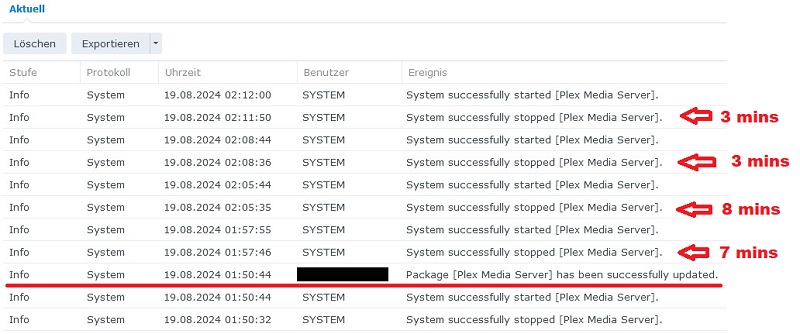
Then I installed the update 1.40.5.8854 again but as I expected nothing changed in the behavior of the PMS. Quite the opposite, it just shuts down sooner, namely after 5-10 minutes.
After the last manual start, I quickly extracted the PMS log files and attached them here and hope they will help you troubleshoot.
(Logs Deleted)
I have now (again) done a rollback to 1.40.4.8679 and the PMS is running (as expected) without any problems for over 30 minutes.
At some point you have disabled debug logging which makes finding the actual issue a lot harder. Can you re-enable debug logging and post new server logs?
As @dbirch mentions, please re-enable debug logging for Plex Media Server in Settings → Server_Name → General + Show Advanced.
Then install and run PMS 1.40.5.8854.
If/when PMS crashes, pull and post the log files.
You can then roll back to PMS 1.40.4 so the system will be stable.
FYI, there is no reason to disable debug logging in PMS. Doing so saves neither CPU cycles nor disk space. Do not enable verbose logging unless specifically requested. That adds too much information to the log files. They can wrap in a matter of minutes, with valuable information getting rolled off into the bit bucket.
@dbirch @FordGuy61
Ok, I activated “debug logging” under the old (working) PMS version and then updated it to the new “buggy” version 1.40.5.8854. Then I waited until PMS had terminated itself 5 times (of course I restarted it manually in between) and here are the logs:
(Logs Deleted)
What is striking is that everyone who has reported the same problems has installed ARMv7 processors in their NAS. Is there perhaps a problem specifically with the processor type?
Not going there yet, [820278128] WARN - [ViewStateSync] Crash: Crash reporting disabled is what has caught my attention.
My first thought is corrupt database. Can you use GitHub - ChuckPa/PlexDBRepair: Database repair utility for Plex Media Server databases and do a full repair?
Also looking at your logs it looks like you are using the old agents and plugins. I am seeing errors related to the IMDB plugin
There is a known problem with ViewStateSync.
As best I know, it will be resolved in 1.41.0 (next release)
For now, to confirm this, Settings - Account - ViewState Sync - OFF
If that resolves it then it’s confirmed.
If not then I have another small fix engineer’s build which addresses another problem we found
You mean “Sync my watch state and ratings”? Ok, I will test it tomorrow because I am away today and will not have direct access to the server until tomorrow. Then then I give feedback
Yes. In your Account Settings.
I’ve a DS414, which is also ARMv7. When running 1.40.5.8854, if Sync Watch State is enabled, PMS crashes during startup (same error messages as @dbirch mentions). If Sync Watch State is disabled, PMS does not crash.
As you suspect, the problem appears limited to ARMv7 based systems. My DS918+, with an Intel Celeron J3455, does not exhibit the problem.
@dbirch Thank you for your answer and your attempt to help. I’ve had a quick look at the PlexDBRepair and it looks very complicated to a Linux idiot like me. I’m also surprised why this problem(?) hasn’t caused any problems with any other PMS version. So please excuse me for not testing it (for now), partly out of fear of having even bigger problems afterwards than now 
And as for the agents and plugins, I’ll take a look tomorrow to see what I’ve set up in Plex. But I can’t remember ever setting anything other than what is selected by default.
I will test @ChuckPa suggestion with ViewstateSync tomorrow, maybe that is the solution 
Also confirmed here that disabling “Sync Your Watch State and Ratings” keeps the server from crashing.
Yeah try that first, wasnt aware of a possible known issue
SPK format please