My server just doesn’t work at all. Says server is unavailable then I go into “More”. When I left the early access preview, it was all working again. No idea why.

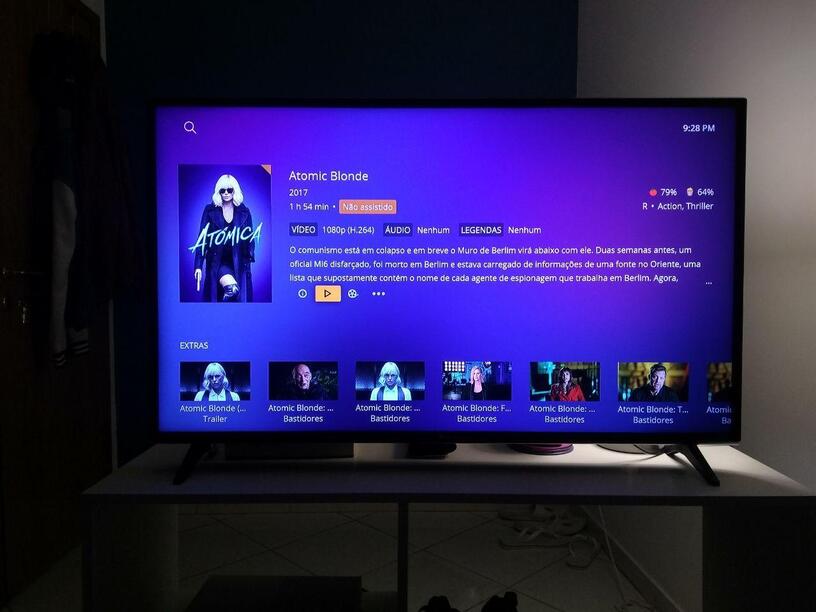
I tried it but only access I get is to the Plex provided media. My server is unavailable. I’ve Deinstalled and reinstalled, same. If I revert to normal Xbox Plex I can access my media again. Which is available to my TVs app and everyones phones.
Bigger clock would be nice for those of us that are blind, double the size or an option for various sizes…
Image of next video is a must and skip chapters.
Plex for Xbox One v2.57.0 is now rolling out to users
This update contains some changes around buffered segment behaviour, that may show some improvements for users who are experiencing buffering issues. The changes are only available in the preview app for the moment. Please give it a go and see if there are any improvements. Please keep in mind however, that this isn’t a magic bullet and some buffering may still occur while we work on a longer term solution to the issue.
NEW:
- Show initials for cast items without an image
- Add back ability to exit app by pressing back on home page
- Added ‘Go to Artist’ and ‘Go to Album’ to Album/Track item options
- Added gray subtitle color
- Replaced Audio Boost settings with Normalize Multi-channel Audio, enabled by default and only applied when transcoding audio
- Added Reset App action in Advanced Settings
FIXED:
- Fixed subtitles sometimes disappearing briefly while playing.
- Fixed subtitles not displaying for other parts of multi-part media.
- Sometimes with Live TV playback, metadata and player progress was not showing.
- Fixed incorrect filters showing for albums in the libarary screen.
- Fixed progress bars extending off the edge of recorded TV items.
- Fixed wrong style for Movies & TV Continue Watching.
- Default screensaver type setting to plex logo.
- Fixed regression crash when editing subtitle offset.
- Live TV guide was not showing up for managed users.
- Fixed platform max bitrate not being respected when set via player settings.
- Break target duration segments on non-key frames
- Fixed subtitle sizes to be more consistent with the previous app
- Fixed infinite spinner when attempting to play an unavailable file
I have same issue as jf352, It cant find my server at all, I have the latest version of the server and app, and Im part of the Xbox Insider Program (Alpha-Skip ahead). hope this gives enough information.
I really like the new layout on Xbox, however will this new design also be available for Shield TV and if so, any timeline?
looks great but I miss the rounded corners of the covers like on Android TV / FireTV. Why is this not in here.
Why is the blurry background missing now? This always looked great.
I also had the same experience as jf352. I use the Plex package on a Synology DS718+ (DSM 6.2.3-25426 Update 2) to run my plex server (Version 1.19.5.3112). I also restarted the Plex package on my Synology and tried to connect to it again with no improvement. When I left the early access preview, there was no problem connecting to my Synology’s Plex server.
I actually found the solution. I think the original app allows “insecure connections” (or we had set that somewhere, not sure) whereas the new app you need to explicitly set that you allow it in settings. After I did that, the app worked fine.
Looks and works great. Only thing I noticed right away that I’m missing is having media information during playback by pressing menu. Now I think the only way is by going through the settings menu instead of a quick on/off by pressing menu.
I may be blind here, but I can’t seem to find Automatically Sign In on my Home Users? You have to manually enter a Pin every time.
Edit-
Also the screensaver isn’t respecting the setting chosen - Entertainment still shows the Plex Logo, and then asks for a pin again on resume.
Overall pretty good, but performance loading in posters is even worse than normal, I do miss the blurred background, and title text needs to be adjusted (like in my TV shows library, not nearly enough of the title is visible).
Have switched to Early Access on the XBOX One S using the PLEX App. Seems to be okay so far with playing Movies and TV shows, noting of course the few outstanding issues as already mentioned. The huge difference for me is that the GREY tint and borders that have plagued XBOX users for years has gone. I have true black borders (on video with that normally has borders, i.e. the older 4:3 format) and the colour quality of the video has improved with true blacks instead of the black being grey. Are others seeing this change I wonder. Vast improvement for me 
@Moussa You need to make sure that everyone who opts in knows this. I spent far too long trying to work out why I could no longer connect to the QNAP server on my network. Searching I have found lots of people who have already given up because they could not solve it.
For others that are having issues with it saying, “Unable to connect to {name_of_your_server}”. In the Xbox app, go to Settings (at the bottom of the menu on the left), then go to Advanced. It will have “Allow Insecure Connections” and “Prefer Insecure Connections” set to “Never” by default. I changed both to “Only on my network” and the Xbox app worked fine after that.
Yes agreed @Moussa if the preview changes settings the user needs to be aware of this.
I’ve noticed that when playing content, movies / TV from ‘Movies & TV on Plex’ that once a show has played it’s first lot of ads it then ends the stream, marks the episode as complete and then starts to play the next one.
Thank you Mousa. I’m still struggling with this. Do I need to uninstall and reinstall the app on the Xbox. I should note I can miss things my wife is pointing out that are right in front of me so I assume this is on me.
I’m finding that I’m really not a fan of the new Xbox App for a few reasons. I’m hoping they can be improved.
- Dpad Up/Down which previously skipped forward/backward a chapter or 10 minutes does not seem to function any more.
- Further moves with chapters no longer SHOW the chapters and allow for quick navigation to scenes based on thumbnails.
- The overlay is too opaque and takes up too much real estate. Stylistically, it’s fine, but anything with subttitles ends up looking not great.
- Sure, the single place to go for Subtitle and Audio Language is nice, there are now more steps to get there and the process just isn’t as simple and clean.
- Speaking of navigation, I’ve been very fond of the Shuffle feature, however navigating to shuffle requires a lot more navigation to reach.
- Fast Forward / Rewind seems to have gone away too. Now we just skip.
There are some nice features. the longer scroll for recently added is a nice touch. Overall the UI is prettier. But it’s gone way backwards in terms of functionality and ease of use. I’m so disappointed with it that this is my first post, despite being a Plex User for 5+ years.
I’ve been using the new Xbox One Plex preview app for a few days. Feedback below:
- I use the shuffle function to play my library of music videos, and it used to be that when you went ‘up’ from the library of videos to the header buttons, it would go to the closest button in the header, now it goes to the leftmost button, causing additional navigation clicks to get to the shuffle button.
- I understand that the missing Chapter Skip/10 minute skip button is coming. This is essential.
- Can we use the top bumpers on the Xbox controller for ‘Previous video’/‘Next video’?
Thanks for the work on this!
