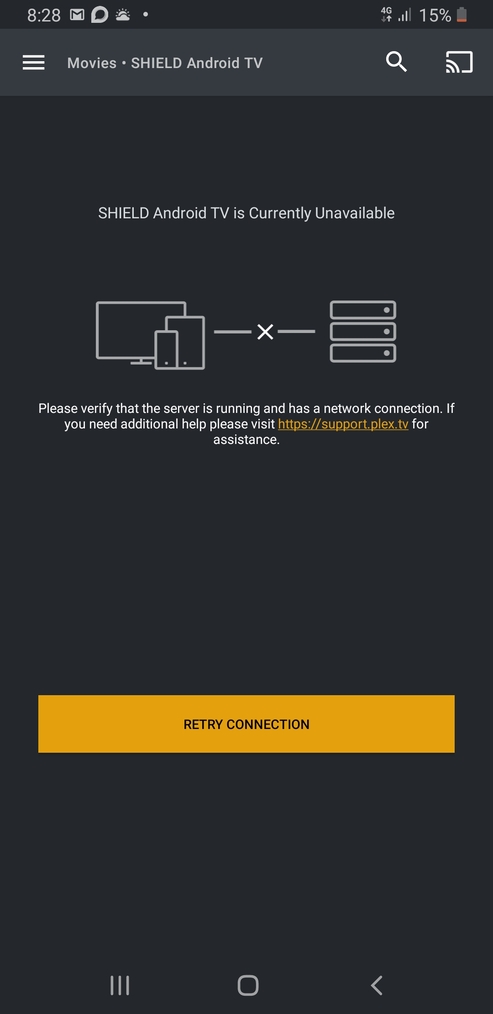
, I cannot access the recommended tab within TV Shows or Movies section due to error. “No internet connection”
I can access home which shows my on deck and recently added and I can play these with no issues as well as the Library tab within TV show s and Movies. However I cannot get to TV shows or Movies recommended section.
I should also mention that I can access YouTube, Netflix etc from the nvidia with no issues.
The same thing also occurs via my mobile on the plex app if I’m connecting via wifi. If I connect via 4G, then, the error is different and its saying its unavailable.
Exact same for me, did anyone figure it out? If I turn off my plex server the messages changes to “Media server offiline” (or something similar) so it obviously can connect to the internet to figure that out. No amount of reboots of shield or plex helps
Since this has happened before with the Plex app I had another app - KODI - which can also play from the Plex server, it works fine. So same workaround as last time the Plex app broke, use KODI instead
I have the same issue… noticed this a few days ago… maybe a week now. The recommended section of most (if not all) of each library shows “no internet”. No updates are installed. Running plex in unraid at 1.16.6.1592 for a different plex issue
My content will display if i go to the “library” part of each library
Something must of changed in the backend?
Mi Box, nvidia sheild and even android mobile plex app is affected. However the unoffical plex APPimage on Linux does not have this issue.
In the same boat, app says no internet connection, yet if I go to the library I have no issue streaming, using Nvidia Shield as server. The annoying thing is it doesn’t keep in sync with the server.
Same here! This started a couple of months ago. I have reinstalled the server ( worked for a few days). I also purchased new server hardware, reinstalled a new server and right off the bat, same issue. I dont get it… Please tell me there is an answer out there…
Thanks
It is the App. I rolled mine back to the old version of plex and all work fine but a painful procedure. I have just told the server and app to update to see what happened… It created the same problem.
So back to uninstall update and run with the original version on my Nvidia and I am working again…
So uninstall the update in Play store, then Go to setting in Play Store, click on gear cog and disable auto update…
At least it gets you going again with a old version
I had this same issue this week on my Shield TV 2017, even with the latest versions of the Plex frontend and Server apps from the Play Store.
The only way to fix was to perform a “Clear Data” on the Plex app frontend (not the Server initially because the frontend takes a LOT less time to set up afterwards). This fixed most of my connection issues, but even after resetting the Plex frontend app I discovered some strange behaviour such as the frontend not being able to load my libraries, and TV channels refusing to tune because the server couldn’t find my Hauppauge USB tuner that’s plugged right into the back!
In the end I had to “Clear Data” on Plex Media Server as well and now I’m not experiencing any more issues, but it did take a whole day to set the server up again to let it scan and analyse my libraries and overnight to re-download and setup my EPG. Such a pain!