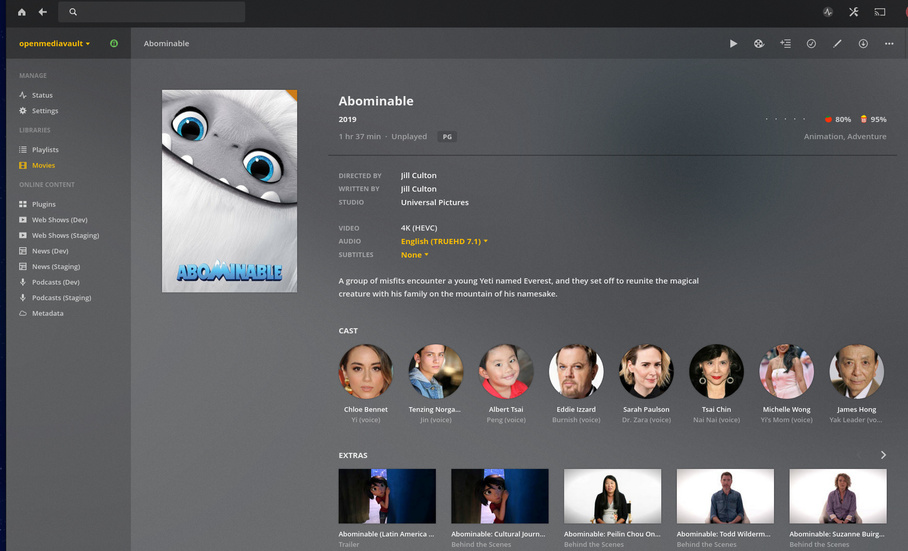
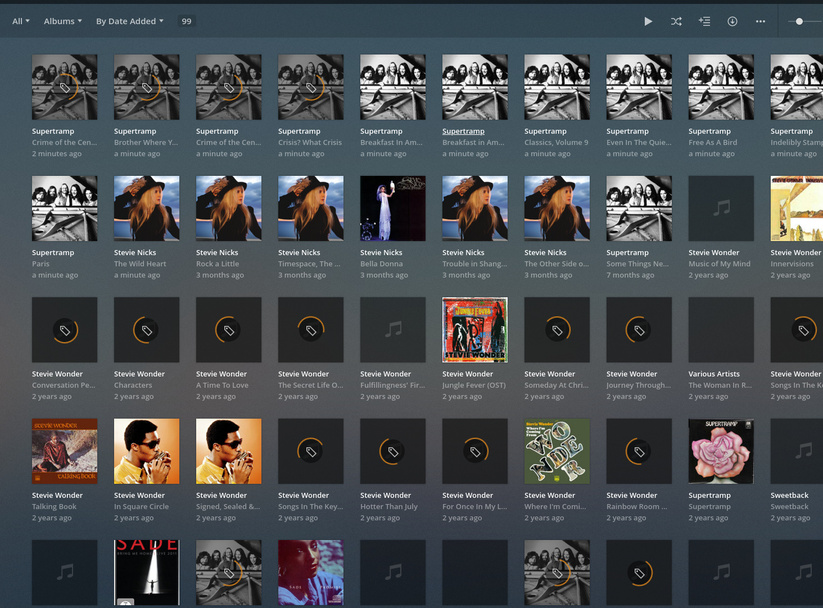
I have no idea with NAT, how to do it or what it is, and google has not helped.
So… I completely reset everything. Reinstalled raspbian buster lite, OMV 5 and then plex.
Same issues.
However, I do notice that if you hover the mouse over the recommended or news links in the home page the whole page disappears and reloads. So I think there is possibly an issue with the network settings where two different processes are resetting the network every few minutes, which knocks out the connection.
I think my next try is to static the IP on the Pi, bypassing or disabling the other processes.
EDIT - Although now all the TV shows are back with metadata.
That would be the easy way. I am not sure how to have OMV running with Plex on board too on the Pi4, without enabling it as a plug-in which is no longer being updated by the OMV developers.
Plex runs fine in the docker, I can stream and see all my files. Just the metadata is pain.
I have the TV shows showing up again, so the network is working, the internet is available, permissions on the /config location are fine, the static IP is doing its thing. Unless there’s a different method used for each metadata file type/server I cannot think of a reason it shouldn’t work. I think I just wait and see if an update fixes it or some kind internet elf kicks it.
Thanks for the assist and help on the ‘unsupported’ Frankenstein monster I am using. It actually works really well as my NAS/plex server, apart from those darn pesky movie metadatas.
@ChuckPa
The machine is not only running plex but is also the NAS/one of the backups for the family. I have not found the instructions on how to install plex on the Pi with OMV without a docker/container, and as I am dumb (also short of time to devote researching this) I followed the simplest breadcrumbs.
As we are not a large family with everyone streaming at the same time I don’t need super-computer level processing. But do need the NAS for some work stuff too. (Also a budget to consider)
OMV on the Pi was the easy solution and adding Plex seemed simple enough as all kinds of people are doing it and there were simple YouTube instructions on how to do it. So simple even I managed to fudge it together. Then the small issue of the metadata. Not a world -ending problem, but one that has taken far too much of my time in the last few days for what I would think was a simple fix as TV shows and music gets all the metadata leaving poor old movies out in the cold.
For giggles…
I have deleted the docker Plex entry.
I have installed the stand-alone Plex Armv7 server (checked architecture in use before doing this) through SSH, updated repository so it can find updates per plex support site (Plex Support Page)
Plex is working. Now scanning files.
Still not getting metadata.
Edit: Not getting movie metadata. Getting TV show metadata no issues, waiting for music to update then will know how that’s working.
Yup, taking a long old time… doesn’t help when you realise you have to change the default location of the plex Application Support folder half-way through as the SD card used for the OS is smaller than the potential of the folder. (3.1Gb on last fully operational server)
Restarted the scan and seeing what happens, still looks like the movie metadata is not showing.
The scan of the library was still ongoing, music specifically. It is getting the information, but seems to only use minimal resources and is slow going. I stopped everything, optimized the database, started the movies scan again. Still not getting the metadata.
I don’t know if it’s a core thing or just the fact the drives are SMB shares limiting the throughput?
The PMS is using 0.6% of the CPU and memory is 2.7%, so it’s barely breathing. Network usage is stagnant at about 10Kbps.
When I used the OMV plugin (no longer viable) it raced through everything.
Without being on site, there is no way of knowing what’s happening.
I tried to setup OMV. Forgive me; I tried to set it up but never got past the first login after installation. Where’s the GUI or is OMV for the purely evil ?
You also need remember, music processing has been completely overhauled.
Basic music is nomore
Premium music is no more
A new mechanism, with new provider is now how it works.
I followed this to install OMV on my Pi: Youtube Video
Once installed open a browser and go to the IP of the machine you installed it on and log in with “admin” and pw “openmediavault”
Then I set up my RAID and shares to SMB in OMV.
Then I followed the basic steps to ssh install the PMS onto the Pi. (After giving up on docker/portainer)
Then I followed your instructions (Plex Support) on how to change the location of the meta data folder in PMS.
Once I realized it’s a “Headless” appliance, the rest was trivial.
OMV 5.0.5-1 is installed & updated.
PMS is installed as the native package.
Media is being copied to the shared folder (to demonstrate)
It took longer to figure out how to open the box than to do the rest.
It’s a regular Linux box
Treat it as such
Use the Native debian package (if on an X86_64 machine).
If it’s ARMv7 then it’s 32 bit.
If it’s ARMv8 that’s what makes it 64 bit. ARMv8 is the first 64 bit processor.
X86_64 will be the same procedure. Only the binary package changes.
systemctl enable plexmediaserver
systemctl start plexmediaserver            # (this is harmless as it's already started)
Check its status with:
root@openmediavault:/# systemctl status plexmediaserver
● plexmediaserver.service - Plex Media Server
   Loaded: loaded (/lib/systemd/system/plexmediaserver.service; enabled; vendor preset: enabled)
   Active: active (running) since Mon 2020-01-13 13:04:35 EST; 1h 54min ago
 Main PID: 767 (sh)
    Tasks: 75 (limit: 4654)
   Memory: 1.3G
   CGroup: /system.slice/plexmediaserver.service
           ├─ 767 /bin/sh -c  PLEX_MEDIA_SERVER_INFO_VENDOR="$(grep ^NAME= /etc/os-release | awk -F= "{print \$2}
           ├─ 787 /usr/lib/plexmediaserver/Plex Media Server
           ├─ 917 /usr/lib/plexmediaserver/Plex DLNA Server
           ├─ 922 /usr/lib/plexmediaserver/Plex Tuner Service /usr/lib/plexmediaserver/Resources/Tuner/Private /u
           ├─1552 Plex Plug-in [com.plexapp.system] /usr/lib/plexmediaserver/Resources/Plug-ins-ad17d5f9e/Framewo
           └─4365 Plex EAE Service

Jan 13 13:39:43 openmediavault sh[767]: GUI: Matching 'The Royal Scam [2008 SHM-CD Remaster]'
Jan 13 13:39:46 openmediavault sh[767]: GUI: Score for 'The Royal Scam (2008 SHM-CD Remaster)' (-1) is 92
Jan 13 13:39:46 openmediavault sh[767]: GUI: Requesting metadata for 'The Royal Scam (2008 SHM-CD Remaster)'
Jan 13 13:39:46 openmediavault sh[767]: GUI: Matching 'Two Against Nature'
Jan 13 13:39:48 openmediavault sh[767]: GUI: Score for 'Two Against Nature' (-1) is 106
Jan 13 13:39:48 openmediavault sh[767]: GUI: Requesting metadata for 'Two Against Nature'
Jan 13 14:17:24 openmediavault sh[767]: GUI: Matching 'Somewhere In Time [MCA]'
Jan 13 14:17:25 openmediavault sh[767]: GUI: Requesting metadata for 'Somewhere In Time [MCA]'
Jan 13 14:17:31 openmediavault sh[767]: GUI: Matching 'Rarities, B-Sides, And Other Stuff, Volume 2;Rarities, B-S
Jan 13 14:17:31 openmediavault sh[767]: GUI: Requesting metadata for 'Rarities, B-Sides, And Other Stuff, Volume
lines 1-24
Now you can open the IP of the OMV NAS just as you would any other Plex server and setup. You’ll notice the paths are the real (NAS relative) paths.
Flashed new Debian lite image to SD card. (128Gb card, no issues with App Support data)
SSH’d into the system and installed Plex per yours above (32bit version as raspbian debian doesn’t support 64 bit yet) Rebooted.
Started plex, logged in. No apparent issues. But as NAS volumes not mounted didn’t test adding media.
SSH’d into the system again and installed OMV v5. Once that completed checked PMS and OMV were running without issues. This was the case. Rebooted.
Mounted the raid drives, added the SMB shares. Rebooted.
Checked the mounting and availability of the drives and data. All OK. Checked PMS, working.
Added movie library to PMS… No metadata, apart from HP and the goblet of fire which gets the actor details etc, but no images.