should be Patience is a virtue 
New log…
Plex Media Server Logs_2020-01-13_19-12-54.zip (5.5 MB)
Would you have the ability, and would you mind, conducting an experiment which will allow you and I to have identical configurations?
I am attempting to eliminate external environment from the equation.
The experiment entails:
- Create an OMV x86_64 Virtual Machine using 5.0.4 configured with Bridge networking so it has its own IP address on the LAN. (don’t forget to get updates)
- enable the file sharing and mount (via the shell) one movie storage share.
- Install PMS on it in the same manner I showed above - give it a “TEST” server name.
- Without making any changes to any defaults, create a library section.
- Add ONE media share (preferrably the one containing these movie issues)
- Let PMS add them – using FULL defaults.
- Observe the results.
There are many variables in flight here.
a. The Raspberry itself
b. The OMV on Raspberry versus OMV full binary packaging
c. networking.
I wouldn’t mind, but I don’t think I have the ability or knowledge to do the test as you have it written.
Wouldn’t it be easier to start with the Pi with just PMS installed and see if that works OK. Then, if that works as a ‘fresh’ install then the problem is OMV?
That could be pretty simple to setup, although I would have to move some movie files to another hard drive.
What do you have for main computational resources?
Do you have access to Virtual Box (64 bit)?
I have a home PC (Dell, old, i3, win10 pro 64bit) and the pi.
I am looking into it… It might take me some time to get it all together… hopefully tomorrow if I have time. Currently looking at VirtualBox 6.1 and how that works, then identify how to install a linux distro (and which one), then where the heck the OMV 5.0.4 is and how to shoe-horn that in before plunking a PMS on top.
Talk about a steep learning curve!
VirtualBox is a type 2 hypervisor.
It installs as a program on top of Windows. (much like HyperV)
With VirtualBox open, you create a Virtual Machine.
For what I seek to do is compare the real OMV binaries on X86_64 versus the Raspbian/OMV hybrid.
If you have Windows HyperV and are comfortable with it, it will work.
OMV does not appear to offer 32 bit binaries so 64 bit windows is a requirement.
Supplemental:
Do not install a Linux distro into the VirtualBox VM.
You want what I have:
https://svwh.dl.sourceforge.net/project/openmediavault/5.0.5/openmediavault_5.0.5-amd64.iso
This is the “CDROM” image to use to start it.
It’s “HD” is a 64 GB sparse allocated VHD (it will only use a couple gig) ,
4GB ram.
Bridge addressing (so your router gives it a DHCP address which you can override once at the command line)
What this creates is a Virtual OMV NAS. We’re only interested in the OS drive so we can install PMS and mounted storage (from the real NAS)
Once you’ve signed into this at the command line, you can more closely follow my instructions above for the wget to download PMS.
OK, I have the virtualbox running with OMV amd64 PMS installed.
Unable to get to the 10.0.2.15 ip address in my browser.
Edit… never mind… forgot to bridge. Sorted it.
OK. So how do I get the NAS to show up on the new VM?
Give the NAS an IP address on your LAN which isn’t used by anything else.
Once it has that new IP, you can open it in the browser just as you would any other
I have access to the VM.
I am not seeing the drives from the original NAS.
Are the original drives exported as shares? (NFS or CIFS is enabled)
If exported as NFS,
mkdir /movies-other
chmod 755 /movies-other
mount ip.addr.of.other:/movies /movies-other         (I assume here "movies" is the name of the shared folder on the original OMV)
In the VM, you will now find the movies available to PMS in the directory /movies-other (browse when creating the movie section)
The VM times out trying to connect to the original OMV/Pi
Where is the media stored? attached to the Pi ?
yes. with NFS enabled and the movie folder shared.
Ping between the VM and the Pi runs fine. Ran ping from the vm and the Pi and they both work fine, so they can communicate.
after creating the directory and chmod’ing it, Typed mount 192.168.0.21:/Movies /video-other on the VM and it just sits until it times-out.
Checklist:
- Original Pi - NFS service is running
- Original Pi - Firewall not blocking NFS service ports
Port 111 (TCP and UDP) and 2049 (TCP and UDP) for the NFS server.
Ports are open. Telnet checked.
From the command line in the new VM, you should be able to do this as well:
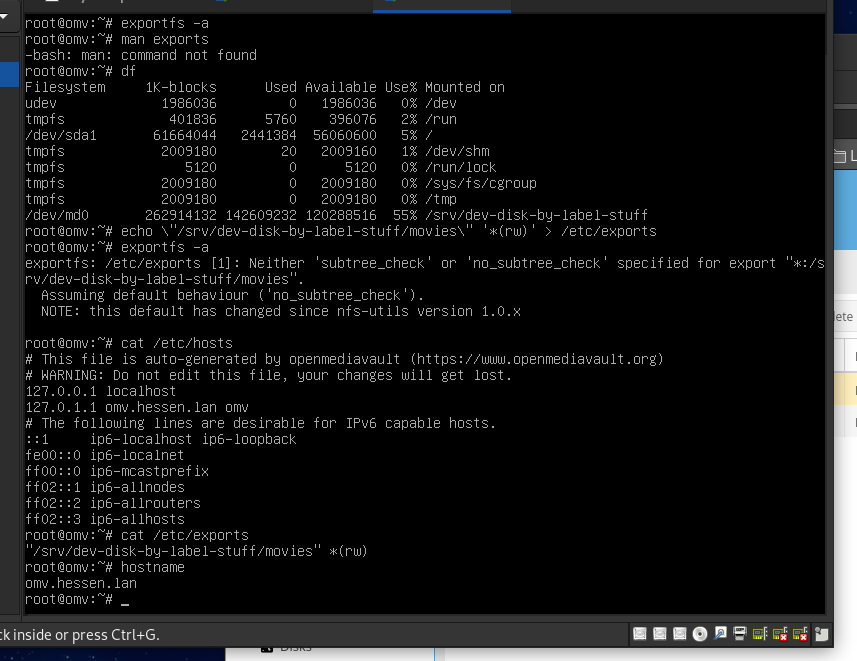
sh-5.0# mount 192.168.0.204:/srv/dev-disk-by-label-stuff/movies /mnt
sh-5.0# ls /mnt
'Abominable (2019)'				'Alvin and the Chipmunks The Squeakquel (2009)'
'Aladdin (1992)'				'Atlantis The Lost Empire (2001)'
'Alvin and the Chipmunks (2007)'		'Fantasia (1940)'
'Alvin and the Chipmunks Chipwrecked (2011)'	 FixExtrasMove
'Alvin and the Chipmunks The Road Chip (2015)'
sh-5.0#
I created ‘stuff’ as my dummy name and put a “movies” share on it.
Reference in the VM, how it looks.
Nothing happening. Still just timing out.
