Server Version#: 1.25.7.5604
Player Version#: 4.76.1
I’m probably doing something wrong that should be obvious, but I’m not able to rename a smart collection in any library (Movies, TV, or Music) I am able to rename smart collections though.
I’ve made sure that there isn’t a conflicting smart or dumb collection (or playlist) with the same name, the only problem I could think of, but nothing seems to work.
I don’t how else to put it.
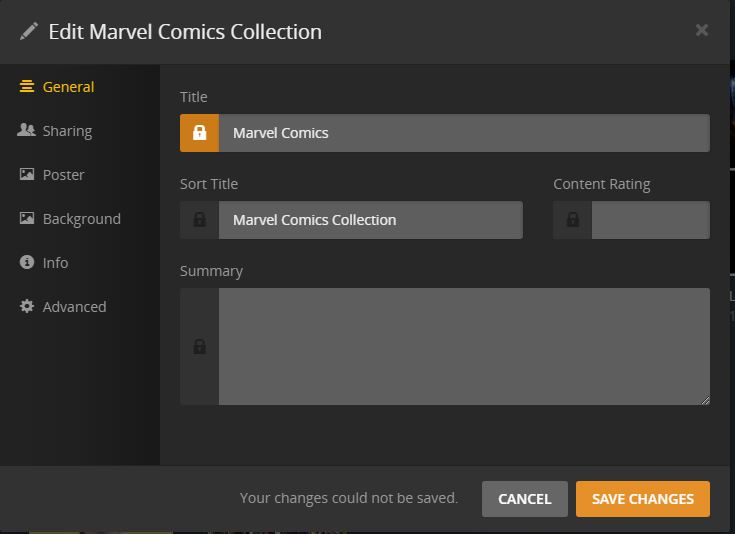
Edit Smart Collection → Title → Save Button and I get a message that my changes could not be saved. May be an image will help.
In this case, I’m trying to rename the collection from “Marvel Comics Collection” to “Marvel Comics” It doens.t matter if I change both the title and sort tile fields so they are equivalent, if I have locked or unlocked fields, or every combination I can try… The field becomes locked as soon as I begin editing. Just realized that I get the same message for all fields on this page, so I can’t even add a summary.
Edit: It’s not a recent problem, been around for quite a while (months). I just decided that It’s time to ask for assistance, since I can’t figure it out myself.
Reboots doesn’t fix it, cleaning bundles and clearing caches have no effect. I get the same results from the local or hosted app, on two different computers. As I said, the problems been around for months, so there has been multiple reboots, and manual and scheduled bundle cleaning during that time. I’m not sure how to clear the cache, but I’m willing to try that if you provide a quick “how-to”.
I’ve actually had a similar problem last September.
Back then I was told there’s been some changes to how collections were saved which could cause existing ones not to be able to be updated. I recreated my smart collections and was subsequently able to edit them again.
Not sure if that’s what you’re experiencing (given it’s been around for some time).
I will try that. Most of the smart collections are only a few weeks old, so I’m hoping a “last September” bug has been addressed. I’ll delete and re-create… Do you suppose I’ll have to delete all of them, regardless of age, before I start? Thanks
That seems to work. I started with one of the most recent smart collections (definitely only a month or so old, and not edit-able) I’m guessing they’ll all have to be deleted and recreated, some have been there for quite awhile. Thanks again.
Nah… It worked the first time. I deliberately gave the new collection a name I wanted to change, and the new, edited title was accepted. Unfortunately, I misspelled the new title, and it’s once again “Your changes could not be saved” Grrrr!
I’m kinda baffled as to why renaming the smart collection only worked once (after it was deleted and re-created).
Before I delete all of the smart collections and start over, is there any other reason besides the change to how they are created in September? It seems odd that a collection can only be renamed one time (in my case anyway) Is there anything I can look for in the logs that can be causing my unique problem?
I didn’t bother with any of the of the repair options mentioned in the support article, but if you think it’s worth trying I will do so. There doesn’t seem to be any sort of problem with the way the server works except this quirk, so I’m assuming there’s nothing wrong with the database
The only other thing coming to mind is checking the other db files in the respective folder.
Attempting to repair the database if it’s considered ok shouldn’t be necessary (or even counter-productive).