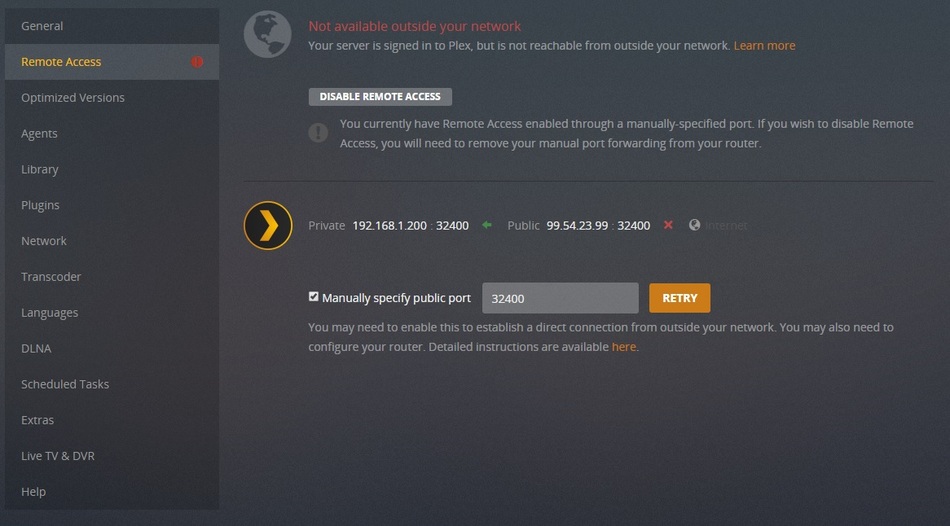
Server Version#: Version 1.13.5.5291
Player Version#:
Hello, I have Synology server working fine since day one, I went on vacation and I noticed it was not working so I see I can only access the library under my own network but not from web or other devices away from home (Firetv moms house) I never changed anything so I have no clue, not sure if the server did an update and that’s when everything went bad. I have attached the logs for any one to help me please. This is driving me crazy!!!
Some modem/routers require you enable UPnP. If you previously enabled it, and got a firmware update from your ISP, it easily could be turned off again. (this happens with mine).
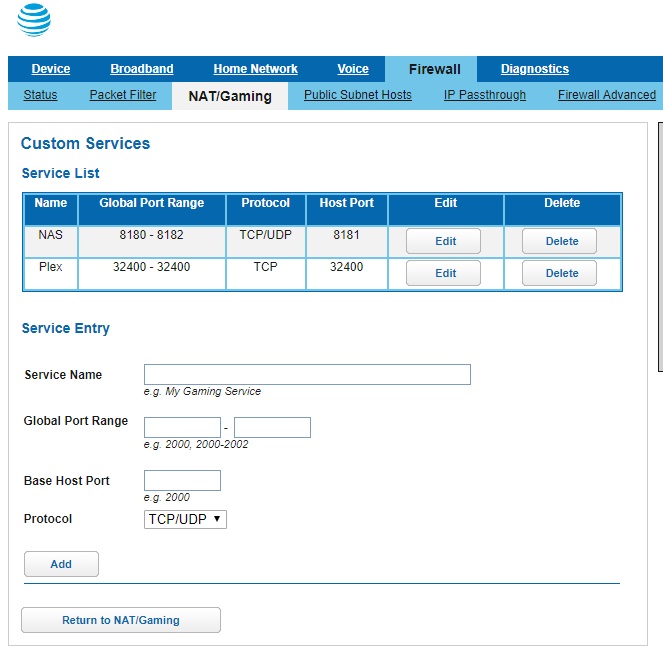
I had to expressly grant permission in the router for my Synology to open ports (UPnP) as well as manually create the port forwarding there.
Then, once created, I had to run the sequence:
Disable remote in PMS
Restart the Syno (closes ALL sockets)
Go to remote access, with the router all ready,
Enable.
You might encounter it flipping green and jumping back or staying red. It’ll get there if everything is forwarded correctly (static IP on the syno too)
Additionally, you can turn off IPv6, you don’t use it on your LAN. it will cause you grief if you have no IPv6 support elsewhere in the LAN / on the host
There are some users who see a race condition when establishing a remote access session. It is known to engineering and a fix for it is about to be released.
I don’t know if it will resolve this for you or not. In our testing, it’s shown in situations we’d never suspect.
Please make sure eth3 is set as your “Default Gateway” in the Synology configuration. (since that’s what’s plugged in)