Server Version#: 1.23.1.4528
Player Version#: Plex for Mac: 1.31.1 Plex Web(hosted): 4.55.1
Server Log after recent add and refresh:
Plex Media Server Logs_2021-05-17_18-40-01.zip (3.8 MB)
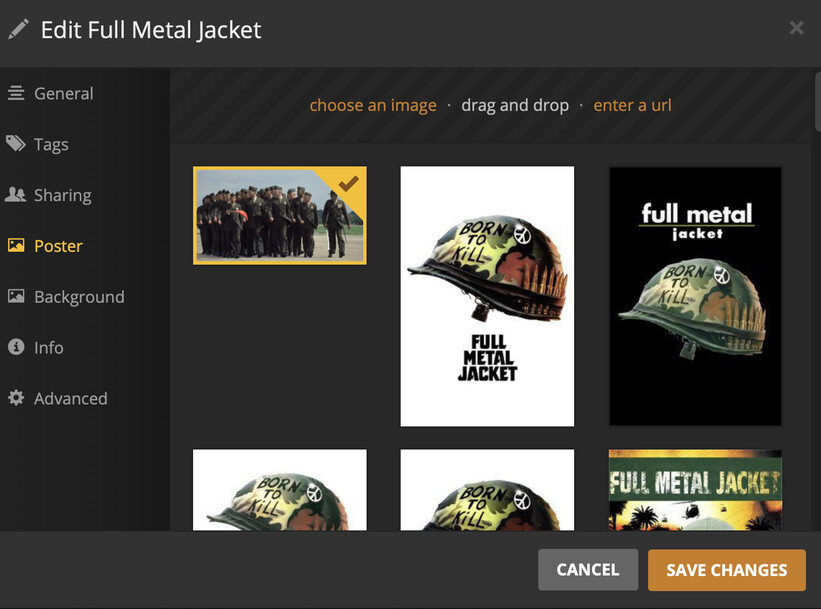
Last 3 movies I’ve added pulled metadata incorrectly with Plex Agent. I had 2 previous movies not match correctly or not match anything but as soon as I hit “fix match” it found the correct one and updated as expected - thought it could’ve been something on me so just moved on. The most recent one, Full Metal Jacket - it matched correctly but didn’t use the poster art and refresh isn’t doing anything (I can manually select of course).
I recently updated so thought since this acted up a for a 3rd time - and it had been rock solid for months - I thought I’d check in and see if this is occurring to other folks or just me. I’m still not used to digging in the Plex logs myself so was looking for help in figuring this one out.
Edit: Also noticed it didn’t set the background.
I did reboot router after recent update and this problem has been occurring for a couple weeks but I’ll double check.
I am confused though where the network issue is the cause if it pulled the data into Plex for the movie (see screenshot), applied info such as cast, description, rating but didn’t apply the poster. Where that’s a networking issue? The poster and background are there, I can pick it, so it pulled it from sources as well but didn’t apply it? Just want to understand so I’m making appropriate checks. You know what those line of code mean in regard to pulling and applying metadata to objects in Plex, but I don’t, so any help understanding would be appreciated.
Fair point on the Video folder… it hasn’t caused me an issue yet and I have Video Station disabled (and synology DLNA disabled) so I’ve been letting it ride until I do hit a problem or for my next server update. It’s “not best” I’m aware, and will fix eventually.
The special characters… that’s decades of film to video files spanning hundreds of videos my father converted as a retirement project … that’s likely my retirement project at some point. I’m not expecting Plex to get all those right - is there particular harm in letting them sit in Plex? I hooked them into Plex for easy access (though not sorted). I can dump them outside Plex if it might be causing other issues for the server. EDIT: Saw the “cause crash” after re-read … I’ll move them out until I can get them sorted.
I rebooted modem, router (which does have local cache but reboot clears it) and cleared caches in Plex on Synology per instructions. No change …
But … in trying to help another person in the forums about file names and resolving to agents I had a thought about a setting I know isn’t turned on and… “prefer local metadata” was enabled for my Library. I do not know if a recent update flipped that or I somehow triggered a change myself, but… that was the problem. I turned that off, did Plex dance, and it pulled the movie data correctly and applied the poster\background. I honestly have NO idea how that setting got swapped but there it is… 
I’m familiar with DNS but not clear why that URL (ocsp.digitcert.com) is resolving to my public IP address (24.207.223.209 is my Public IP) in NextDNS logs when TraceRT\Hostname lookup show [72.21.91.29] … but NextDNS does know my public IP so maybe something there is triggering a funny lookup result or is that actually right for that particular function happening there?
I don’t know if the failed resolve of ocsp.digicert and failed connect to server via my public IP are related but if DNS is resolving those together and If that’s not right I’d like to get it resolved … so any insight on those particular errors would be appreciated.
Special Characters - I may try a search/replace on those characters but I’ll probably just put it in a dedicated spot outside of Plex for now to avoid weird scans on it and preserve the data dump (originally part of an iPhoto library - which doesn’t play well with anything but AppleTV which I don’t have).
Thanks for your help! Sorry it was just a setting on my end but I appreciate the advice you gave based on what you saw in my logs.
Yeah… I’m with you on the setting change thing after an update being a culprit. Roku update recently reset my remote volume controls so happens everywhere. 
I’ll mark this one solved for the metadata but if anybody knows why the DNS for digicert is resolving to my public facing home IP I’d be grateful. That just seems… odd… but I don’t know what it’s doing to know for sure.