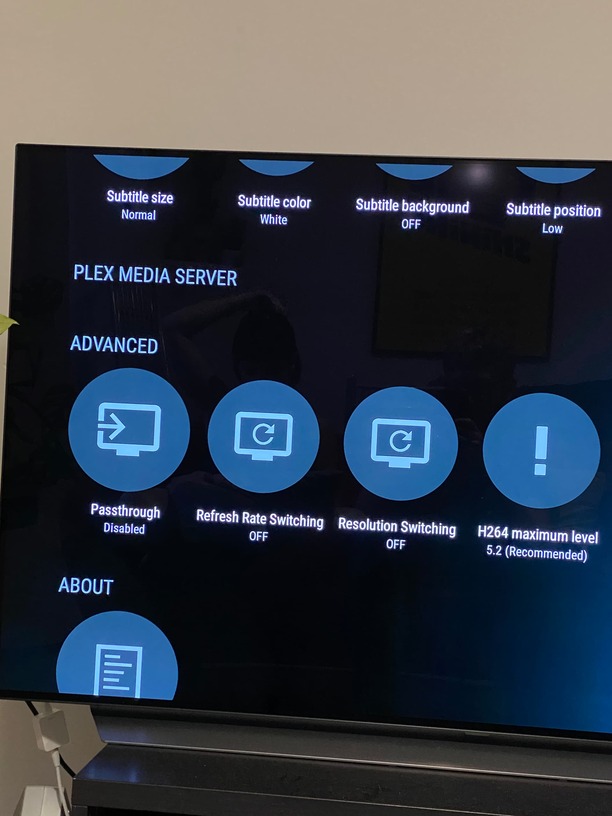
I had to force restart my shield last week as it froze. Since then my PMS has disappeared from the app.
Also, Under settings, the PMS section is empty (as per the photo)
Also, prior to this, when I logged out and then back in, the shield usually asked if I wanted to set up a new server. However now, it only shows this screen for less than a second and it disappears before I can select anything.
Any ideas how I can fix this? Please and thanks.
Did you have the PMS data folder moved from it’s default location?
I have the similar problem since updating PMS on my Shield on Monday night. I’ve tried rebooting the device and unplugging it, no luck. I’ve tried logging out and re-entering Plex, still no joy. It’s almost the same as when we moved to Android 11 and the subsequent issue. Plex says my server is not available and in the Options screen, PMS is not showing. This seems to happen almost every time there is an update and the system becomes unstable.
I’ll check when I get home.
I have also tried various permutations of:
- clearing the cache in shield options
- uninstalling and reinstalling the plex app
- signing in and out of Plex
- clearing the approved devices in the Plex web settings
Everything looks to be ok on the default data location. No change there.
Same here. It was working then suddenly stopped today 5th August. Restart and power down hasn’t helped. Clearing data/cache hasn’t helped. The PLEX client is ok but no server! Very similar to what happened after the android 11 update but AFAIK there has been no shield update.
I’ve given up and reinstalled PMS and will rebuild my library, which is going to take some time. Cheers Plex for releasing another unstable update.
Same issue for me, reinstalled plex and it worked for a while but the same problem came back. No Server as in the picture above.
Does the server show as running in the system app settings? usually when server will not start correctly is it a corrupt DB
Same has happened to me, but I’m struggling to reinstall PMS, can you tell me how you managed to reinstall the app on your shield please?
It cannot be unintalled completely because a very early version was installed into firmware. In the device settings under system apps go to Plex Media Server and Uninstall Updates. You probably need to clear data as well. After that update from the store
I factory reset my Shield and that did the job. Plex server is back and seems to be working now.
I hit uninstall for PMS in the Play Store, as well as Plex. When you re-enter Plex it comes up with really old version, updated both and now working again. Have spent at least 10 hours so far reloading libraries and ensuring artwork is correct. Still a way to go. After dodging a bullet on the Android update saga earlier this year, it’s really frustrating that users are facing a similar problem again.
It’s very strange that it has hit a number of users at exactly the same time Plex released an “update”. Maybe do some more testing before releasing it on the public. I’ve spent at least 10 hours rebuilding my library and I’m not finished.
I don’t disagree. if it happens again and you can get the logs from the server we can have a look to see why it might not start.
I’m a little late to the party, but the same thing has happened to me.
My Shield froze and I had to unplug it and plug it back in. My media server stopped working at that point and does not appear in Plex options. I tried installing the available Plex Media Server update, but that did not fix.
I looked at the logs as suggested earlier in the thread. It appears that the Sqlite DB has been corrupted.
Sep 26, 2022 19:07:09.221 [13394] ERROR - SQLITE3:0x1, 11, database corruption at line 66843 of [1b256d97b5]
Sep 26, 2022 19:07:09.221 [13394] ERROR - SQLITE3:0x1, 11, database corruption at line 66993 of [1b256d97b5]
Sep 26, 2022 19:07:09.221 [13394] ERROR - SQLITE3:0x1, 11, statement aborts at 21: [update activities set finished_at=started_at where finished_at is null] database disk image is malformed
Sep 26, 2022 19:07:09.224 [13394] ERROR - Database corruption: sqlite3_statement_backend::loadOne: database disk image is malformed
Sep 26, 2022 19:07:09.224 [13394] ERROR - Error: Unable to set up server: sqlite3_statement_backend::loadOne: database disk image is malformed (N4soci10soci_errorE)
I see that there is a DB backup folder next to the logs folder. How does one go about restoring a back up on the Shield?
I found this article and followed the directions to restore a DB backup. My server is back up and running.
https://support.plex.tv/articles/202485658-restore-a-database-backed-up-via-scheduled-tasks/