Server Version#: 1.19.1.2645
Player Version#: 7.31 beta but same issue on 7.30
Tuner Make/Model: HDHomeRun CONNECT Quatro
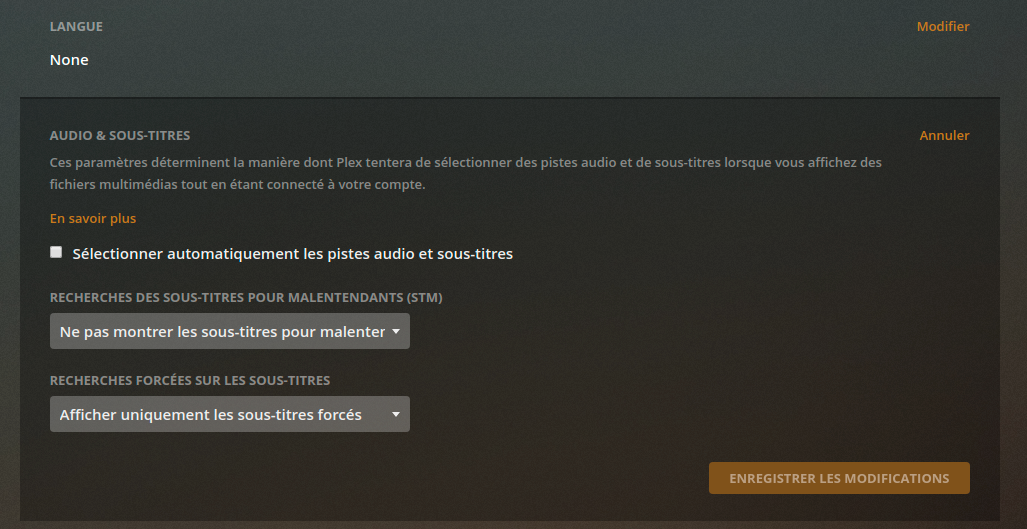
I disabled all subtitles in menu (see capture) but subtitles are always on live TV for all channels. I use old player because new player doesn’t work on android TV for Android TV.
have you by chance manually enabled the subtitle for that live tv stream?
check if you have one selected by swiping up/down (it’s been some time since I last used Plex on my Android TV… don’t remember which one it is). In both the old and new player that should give you access to a menu where you can select from available audio and subtitle tracks.
As you configured Plex to not automatically select any audio/subtitle tracks… that’s pretty much the only place left to look.
That is unless the subtitle is already coming burned into the video. From the log you provided that doesn’t seem to be the case.
Hi @Tony_21 no solution for the moment. If I use HDHomeRun application or TV google application , I don’t have this issue. Subtitles disabled but with Plex subtitles are always on even if I disabled automatic selection. I tried with another profile and it is the same thing.
now the new player works and I have a menu to select subtitles but it is the same problem
In the subtitle menu, no subtitle selected and I see subtitles ans if I select one of subtitle available, there is no change and If I comeback to the subtitle menu, I see that no subtitles selected as if selection doesn’t work.
You can see my test in the new log log live tv - newplayer.txt (77.1 KB)
Maybe a clue, when I watch the recorded shows, the subtitles are actived by default but when I desactivate this option, they disappear well…
This issue is present just on live and on Android TV, works fine on my android phone…