Server Version#: 1.20.2.3343
Player Version#: Version 4.43.1 (hosted) and Version 4.34.4 (local)
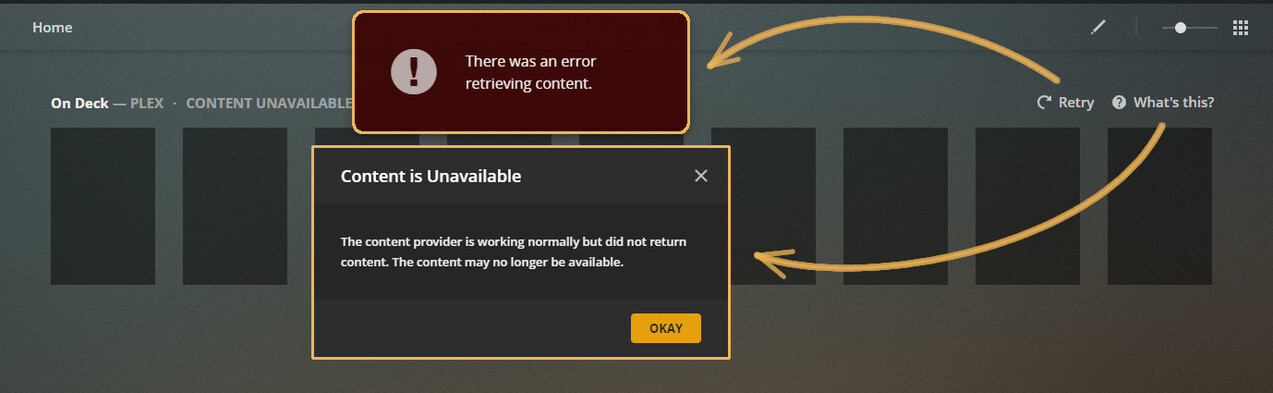
Since upgrading to the latest server version, On Deck in the PlexWeb app shows “Content Unavailable” Clicking “Retry” gives the message shown in the attached image, and clicking “What’s This” gives me the other message in the image.
To be honest, I seldom watch TV content stored on the server during the summer, so I’m not sure there should be anything showing as “On Deck,” but there is one TV show in “Continue Watching” (which shows properly)
I have “Weeks to consider for On Deck and Continue Watching” set to 16 weeks, and “Maximum number of On Deck items which will appear”. at 40.
The Roku App shows both “On Deck” and “Continue Watching” properly. The web app does show the single “On Deck” item properly when you navigate to the Recommended Tab for TV shows.
There’s a chance there may have been something I watched on the “Live Streaming TV” service, but I’m not sure if that type of content shows up in On Deck, and it might explain the error messages. If that’s the problem, I would guess this is a bug that needs some attention.
I will attach server logs later, but since I upgraded the server the “Plex Media Scanner” has kicked into high gear, so I imagine the logs will be full of whatever it is doing since the upgrade. (New content was not added)
Yeah this happened to me as well when I updated last night. Web app seems to resolve whatever issue was when I tried this morning but Android TV with custom home hubs still an issue for me. Doesn’t seem to be an issue for everyone so trying to figure out what is different about my install.
So the cure might be to wait and see, 'cause it may resolve itself. I can wait for that option, but in the meantime, I might disable “On Deck” from the home screen, just because it’s so damn distracting.
When I upload some logs. maybe you can figure out what is “special” about our installation…
The local app doesn’t have the ability to add “Live TV” to the home screen, only the hosted app.
I did unpin the “Live TV” from the hosted app, in case of some conflict, but On Deck still has the blank posters. I never had any of the online hubs on the home screen, though.
I probably just don’t understand what you’re trying to tell me. .
HUBS are what is shown in the main section, like continue watching, on deck, recently added, etc
If you disable the ‘automatically manage home screen’ “feature”, and remove the plex online content HUBS, this will cause the CW/Ondeck/Recently added HUBS to disappear/fail.
At least on android, I have not attempted to modify or change my plex web home page, and it has been working fine.
The issue symptoms are different on Web and Android TV. I haven’t seen the issue on other clients yet but the day is young.
@TeknoJunky I left my online content hubs alone on android tv and my library hubs still don’t show up. but it surely could be related if happening to you.
Hmm… since I never had any of the online hubs (or if I did, I removed them - I don’t recall doing that) and the PlexWeb app is set to automatically manage the home screen (based on what you have pinned) and all that I have pinned is local media, I would think I have everything set up correctly.
I haven’t checked the android app, but there is something not quite right with the new server. AS I mentioned before, the Roku app seems to work properly. so far…
disabling the auto management may not be required, but removal of the plex online hubs (web/news/podcasts/livetv/movies&tvs/etc) cause the removal (or prevent of) on deck etc from showing up and/or from working.
The Android issue should be fixed with 1.20.2.3370
The web app issue is still being looked into. For me it only happens when there is only one thing in On Deck. I think that is why i thought it resolved itself when i had more thing in On Deck.
I also wanted to confirm with folks that for the Web app everyone here with issue is using custom home screen hubs.
I don’t think I’m using custom hubs. As I mentioned previously I have the PlexWeb app set to automatically manage the home screen (Based on what you have pinned)
I had also tried partly watching a TV show, so there would be more than one on deck item. There is still not even an “On Deck” hub in the hosted app, and the local app still has the row of blank rectangles for on deck.


 .
.