Try restarting your server
I too Have it Split this Exact same way But, a tad different, for example, Arnold, Chuck Norris, Clint Eastwood, JCVD, you get where I’m going but it’s just main stars with multi movies for instance my Stallone folder doesn’t have the Rocky’s in it that has it’s own I just don’t want to have them all in one Movie file and have to go scanning through it all and yes I know clicking a letter or a search and I kinda have over 25k 300TB Movies so it’s a lot easier to have folders (that doesn’t really work well with plex) and bare in mind this was all done way before you started your collection update, and before I was able to rearrange my side menu Pane folders the way I wanted on the left by adding a ° to keep that folder on top so my users can access that specific folder quickly, now it’s impossible. having all the Recently added shows on main screen doesn’t effect me nor bother my users at all, I like it, it completely wastes all my folder efforts but I’m not going to do away with them but, I still want the option to remove them, I’ve looked for an easy remove and I’ve not yet come to the end of this thread yet to see if someone has put one up, here’s hoping. thanks for your efforts and keep up the good work… Beef
I appear to have found an oddity with 1.22.3, might even be a bug!
So after the roast beef for my belly, followed by a snooze, I decided to open that 1.22.3 can of worms, and after a subsequent restart of PMS, indeed I saw the option Merge Recently Added Items which is something I have personally been waiting for since the split of RA’s.
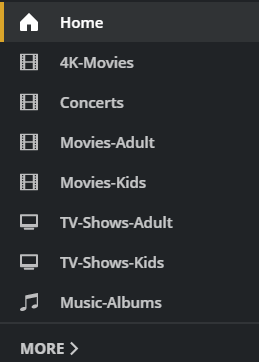
I can see that the home screen has indeed merged the RA hubs for the 2x TV Shows libraries that I have pinned to the sidebar, however I appear to no longer have any RA hubs at all for my 4x Movies libraries.
Here is my sidebar…
And yet on the home screen, I only see the following hubs…
Continue Watching
Recently Added TV
Recently Added Music
Recently Played Music
So after some messing around, resetting the customization, restarting the server etc, I realized that I have Exclude from home screen and global search set on the 4K Movies library.
I then unpinned that library, and the combined RA hub for the remaining 3x movie libraries then appeared! … And indeed it showed items from all 3 libraries!
I then re-pinned the 4K Movies library to the sidebar, and initially it appeared at the bottom of the sidebar list, at which point I still had the RA hub for the 4x Movie libraries… GREAT!
I then reordered the sidebar, moving the 4K Movies library to the top, and the RA hub for the movies libraries disappeared!
So to summarize …
If you have a library which has
Exclude from home screen and global searchpinned to the top of your sidebar, the RA hub for that media type will not appear on the Home screen. But if you reorder the sidebar and move that library anywhere below, the RA hub then appears.
Plex Web version 4.54.5…
PMS version 1.22.3.4392…
EDIT: This behavior is also pushed / carried through to Plex for Android TV 8.16 (on my Shield 2019 Pro) and the new Plex HTPC 1.2, but not on Plex for Android 8.15 (on my Sony XH95)
Ok thanks for fixing RA! Now please please please tell us that you’ll do the same for Recently Released Episodes. There can’t be any reason why this option shouldn’t exist next to combine RA?
Edit: Also, since we can’t change this ourselves anymore  , when I have 3 TV libraries the order on the Home Screen becomes like this when combining RA:
CW Movies/TV
RRE TV Library 1 (according to pinned order)
RA TV combined
RRE TV Library 2 (according to pinned order)
RRE TV Library 3 (according to pinned order)
RRM Movies
RA Movies
Latest Playlists
(My pinned order is:
Home
TV Library 1
TV Library 2
TV Library 3
Movies
Playlists)
Makes no sense that RA TV combined is below RRE TV Library 1?
Do you get the same problem if your using the hosted Plex Web App instead of the local one I assume your on now? The hosted web app is on version 4.56.3
Yes, same behaviour on the hosted Plex web.
sigh
Why is it, just when I start to learn to TOLERATE Plex’s latest GUI decisions from years previous on device of our choice, you decide we don’t need it the way we’ve grown used to and change it.
My spouse and I had just grown used to adjusting the GUI change of 3-4 years ago to meet our habits.
We start Plex tonight and are unable to find content we were watching, have more content in home than we really want, but don’t wish to remove it from sidebar pins.
And, honestly, I’m not looking forward to the 3-4 hours I now have to spend to relearn how to make settings in my sidebar items to even try to get close to what I had previously.
I have 5 servers/14 libraries shared with me from friends I made here before I stopped posting regularly after Plex’s last changes and ‘fu to the original users, we have to make our vulture capitalists happy’ change. Arrow pad on my remote will be worn out, if/when I figure out the new way to do things.
Dynamic home screen?
Really?
What…the…h.
Ok, I just noticed that it wasn’t the newest version in your screen shots so I thought it was worth a try. 
Hi @DaveBinM and everyone. I joined to add my perspective to this thread. I am disappointed with the change and the loss of On Deck. It was the only feature I really used on the home page, and the new Continue Watching doesn’t cut it.
I watch mostly TV shows, and I don’t binge. When I finish an episode of one show, I want to next watch an episode of the least recently watched show (i.e., the one I haven’t seen for the longest time). On Deck allowed me to do that by scrolling all the way to the right (which wasn’t ideal, but worked). Continue Watching doesn’t seem to retain enough history, it seems. Since the “improvement”, now I skip Home entirely, go to the Library, sort by date viewed, then scroll down to find the show I want to watch. It still works, but is even less ideal. Any chance I have a full list back of what shows I’ve watched, ideally also with an option to sort by least recently watched?
I think you are an update or two behind bretcb. Version 1.22.3.4392 came out today and as I understand it, the amount of items you had chosen for your on deck should be the same for the new continue watching
This change was originally rolled out not working properly and people only had 6 shows in the new continue watching. It sounds like that’s the version you still have running
Try updating to the latest version.
I just noticed myself that I got the 1.22.3.4392 version for the server I have on Windows but I have another server on a NAS that shows an update for 1.22.2.4282
I didn’t think to ask you that. Is your server on a NAS by chance? We might have to update manually or wait a few days to get it
How do we get rid of the Recent Channels and Shows on Now hubs that the Live TV & DVR library inserts? It seems pointless to me and wasn’t visible until recently. I assume I had them turned off or sorted all the way down to the end.
I like having the Live TV & DVR first in my library list for easy access to the guide. I don’t want the extra junk on the home page.
I think that’s the catch.
If you don’t want to see the hubs you’re talking about you have to unpin the whole category from your sidebar and keep it hidden
That’s my remaining issue. I like having Live Tv&Dvr at the top of the list on the menu as aside from On Deck (sorry, CW) the TV guide is what we goto. After that we look at Recently added TV
I don’t like the recent channels as I don’t look for a particular channel to watch, I look for a programme.
The order of the shows on now is terrible. The guide shows in grid format in order, BBC 1, Bbc2 etc, but shows on now is a random format, and usually shows some weird shopping channel.
So after all these recent changes, Ive had to push the live TV down past the TV programmes library. Its not a massive issue, but I would like it an option at the server to choose what to show like you can with the libraries.
(and off topic; but can the order of the shows on now be changed to channel order?)
And perhaps for example if obeyed the favorite sorting from this feature request.
It’s been so long ago, I forgot I’d already voted for that feature
Begs the question of how Plex prioritise features - I’m interested to know if OD/CW merging was a feature requested and how many votes it got. (I say as someone who doesn’t really care either way on the merge, it was the fall out of the changes/6 episode bug that got me to this thread).
I really don’t understand removing the “On Deck” section and the Recommendations addition; most, if not all of us, manage our servers and libraries; we know what is there so I can’t see any use for Recommendations. Even less so if the decision to add Recommendations is the reason for On Deck being removed.
Please, I would love to hear Plex’s take on this?
That seems to have stopped working, if you remove/delete all but one, then only that RA row is shown and that is for the specific folder it is tied to, be it tv, movies, etc. And if you have something from another folder/row in CW and that RA row was removed then the show/movie from CW is removed as well.
Indeed, while CW limit is fixed and RA can be combined, the hubs pinning and ordering in general feel pretty limited now in the automatically managed home screen. I wrote my thoughts on it in another thread, please comment if you agree No More Manual Home Screen After April 22nd?!?!? - #61 by enchained
I do not have too much hope on us getting the customization back, but I’m thinking to create a feature request, just to see how many people were affected by the change.
Isn’t the ordering of the rows on the home hub tied to the ordering of pined items ? So if you set the order of your pined items as movies, tv shows for example then the rows on the home hub page would match that order.
Not sure if that is what you mean but the order does seem to have some customisation but maybe not as much as you want.
You could read the message I linked for the details. But to cut it short: if you choose a few recommended hubs for some library, you have it as N-hubs-block which can’t be divided or mixed with other hubs in any way. You can’t have Recently Added row for TV libraries next to the Recently Added for Movie libraries if you enabled more hubs for them for the Home screen.
Also, as far as I understand, due to it’s nature, combined RA row may glitch cause it doesn’t belong to one specific library, so it’s hard to order others around it via the sidebar pinning.
