Server Version#: 1.31.1.6733 on DSM 7.1.1
Player Version#: multiple clients
Hi folks,
not sure how “places” should work in Plex. I have a lot of photos with geotagged metadata, but I don’t see it in Plex, regardless of the client (Android, iOS, Mac osx, …)
any clue?
thanks
Andrea
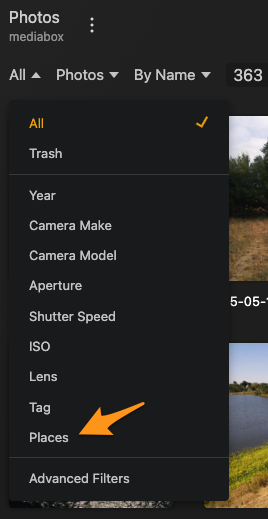
places is a filter
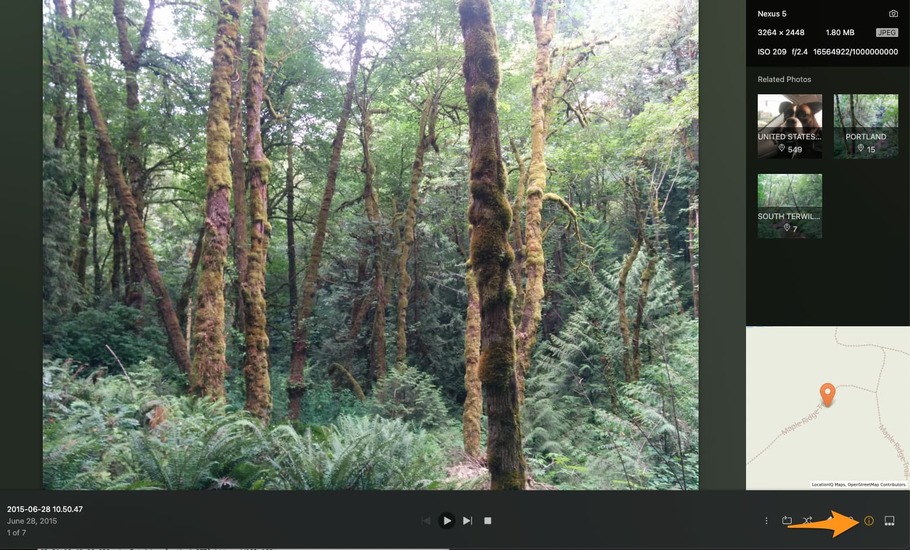
info for individual photos it is only avail in desktop ( web interface) and the mobile apps to show a map and blocks to find other photos from that same place.
In web click the info icon to bring up tags and map
in mobile click what looks like a luggage tag next to the heart
this is quite strange. I don’t have that map view on web client, nor these info in my iOS client.
Mmm …
filter “places” … “no options”
question: is Plex able to see metadata in a CR2 file? or this is working only with TIFF/JPEG files?
Only the server admin account can see location stuff by default unless changed in the servers library settings.
also in the library itself in its advanced settings need to have it set to save location names.
afaik it is only GPS exif in a jpeg. It was originally introduced when cell cameras for the most part only did jpegs. I’ll ask others when back from the weekend
perhaps this is the reason I don’t see any data (I have all configured as above).
My files now are CR2 … let me check with TIFFs
I’m guessing this is the same issue I reported several years ago. In my case, my photos are geotagged .dng files. .tif files also don’t work:
[Bug] No maps appearing for geotagged photos
any update by Plex on this? Did you try with the latest?
Andrea
The problem is unchanged with the latest.