Server Version#: 1.41.0.8992
Player Version#: 4.138.0
<If providing server logs please do NOT turn on verbose logging, only debug logging should be enabled>
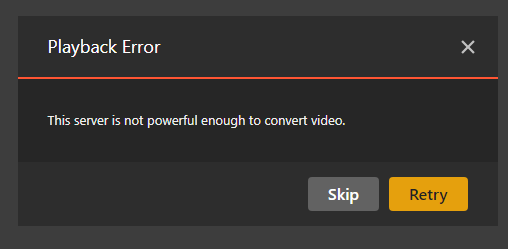
when i play some videos it says "this server is not powerful enough to convert
video ". in my home network (through lan) it can’t play.
i tested chrome,edge, firefox all those can’t play.
but when i play it in my office with chrome.
it can play smoothly. i can’t understant. i don’t know what problem is.
i deleted all the cache , temperaty files and cookies. but not working.
there were no issues when i play it before. but it could not been playing around for some time.


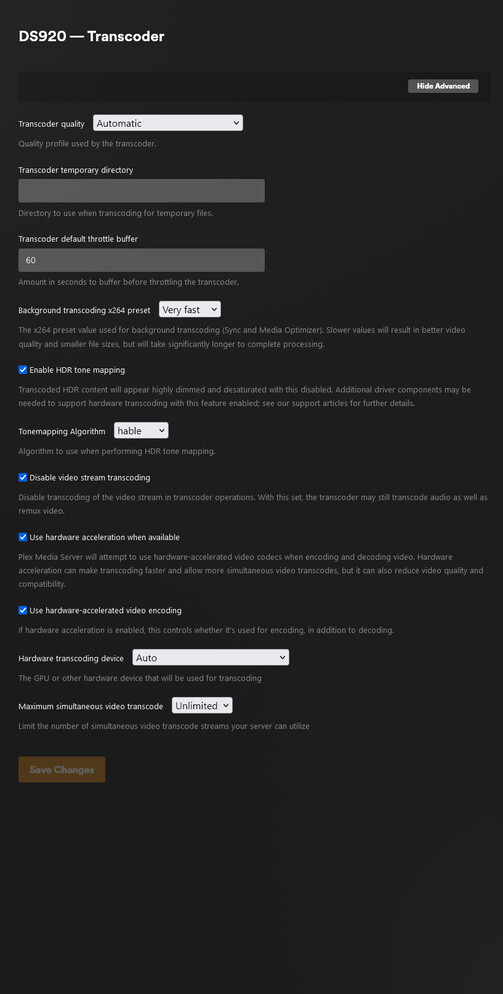
here is my debug logs
Plex Web Logs
[
  {
    "type": "info",
    "host": "100.95.150.54:32400",
    "userAgent": "Mozilla/5.0 (Windows NT 10.0; Win64; x64; rv:130.0) Gecko/20100101 Firefox/130.0",
    "browser": {
      "platformVersion": "10",
      "id": "firefox",
      "name": "Firefox",
      "version": "130.0",
      "gecko": true,
      "platform": "Windows",
      "platformID": "windows",
      "platformModifierKey": "ctrl"
    },
    "version": "4.136.1",
    "primaryServerUrl": "https://192-168-0-20.8f68f357bf5e4a4b86fe7fdb21a3b897.plex.direct:32400/",
    "primaryServerAuthToken": true,
    "username": "leeeunchang",
    "cloudUrl": [
      {
        "scheme": "https",
        "address": "clients.plex.tv",
        "uri": "https://clients.plex.tv",
        "testState": "connected",
        "isBundled": false,
        "isFallback": false,
        "relay": false,
        "isUntested": false,
        "isPending": false,
        "isConnected": true,
        "isUnauthorized": false,
        "isUnavailable": false,
        "isFailed": false,
        "isAborted": false,
        "isLoopback": false,
        "isPrivate": false,
        "isHttps": true,
        "isSecure": true,
        "isPlexDirect": false,
        "currentTest": null,
        "sources": [
          {
            "id": "internal"
          }
        ]
      }
    ]
  },
  {
    "type": "log:message",
    "level": 4,
    "message": "[Connections] Testing all 1 connection(s) for [Loopback]",
    "time": "2024-09-24T12:39:53.690Z"
  },
  {
    "type": "log:message",
    "level": 4,
    "message": "[Servers] Waiting for initial servers = [Loopback]",
    "time": "2024-09-24T12:39:53.690Z"
  },
  {
    "type": "log:message",
    "level": 4,
    "message": "[Commands] Executing testServerConnection",
    "time": "2024-09-24T12:39:53.691Z"
  },
  {
    "type": "log:message",
    "level": 4,
    "message": "[Connections] Retrying connection tests for [Loopback] in 30 seconds",
    "time": "2024-09-24T12:39:53.691Z"
  },
  {
    "type": "log:message",
    "level": 4,
    "message": "[Connections] Testing connection for [Loopback] at http://127.0.0.1:32400/media/providers",
    "time": "2024-09-24T12:39:53.751Z"
  },
  {
    "type": "log:message",
    "level": 4,
    "message": "[Connections] Testing legacy connection for [Loopback] at http://127.0.0.1:32400",
    "time": "2024-09-24T12:39:53.751Z"
  },
  {
    "type": "ajax",
    "url": "http://127.0.0.1:32400/media/providers?X-Plex-Product=Plex%20Web&X-Plex-Version=4.136.1&X-Plex-Client-Identifier=73lrpis7vh4rpmesi9c3uobu&X-Plex-Platform=Firefox&X-Plex-Platform-Version=130.0&X-Plex-Features=external-media%2Cindirect-media%2Chub-style-list&X-Plex-Model=bundled&X-Plex-Device=Windows&X-Plex-Device-Name=Firefox&X-Plex-Device-Screen-Resolution=1078x872%2C1920x1080&X-Plex-Language=en&X-Plex-Session-Id=cf79b290-9abf-4d62-8635-7647f5983c32&X-Plex-Playback-Session-Id=&X-Plex-Playback-Id=",
    "status": 0,
    "headers": {
      "Accept-Language": "en",
      "Accept": "application/json"
    },
    "statusText": "error",
    "time": "2024-09-24T12:39:53.757Z"
  },
  {
    "type": "log:message",
    "level": 1,
    "message": "[Connections] [Loopback] is unavailable at http://127.0.0.1:32400/media/providers (Status 0)",
    "time": "2024-09-24T12:39:53.757Z"
  },
  {
    "type": "log:message",
    "level": 1,
    "message": "[Connections] [Loopback] is unavailable at http://127.0.0.1:32400/media/providers (Status 0)",
    "time": "2024-09-24T12:39:53.757Z"
  },
  {
    "type": "log:message",
    "level": 1,
    "message": "[Connections] All connections to [Loopback] failed",
    "time": "2024-09-24T12:39:53.758Z"
  },
  {
    "type": "log:message",
    "level": 4,
    "message": "[Servers] Found all servers = DS920, legion5, plex.tv",
    "time": "2024-09-24T12:39:53.759Z"
  },
  {
    "type": "ajax",
    "url": "http://127.0.0.1:32400?X-Plex-Product=Plex%20Web&X-Plex-Version=4.136.1&X-Plex-Client-Identifier=73lrpis7vh4rpmesi9c3uobu&X-Plex-Platform=Firefox&X-Plex-Platform-Version=130.0&X-Plex-Features=external-media%2Cindirect-media%2Chub-style-list&X-Plex-Model=bundled&X-Plex-Device=Windows&X-Plex-Device-Name=Firefox&X-Plex-Device-Screen-Resolution=1078x872%2C1920x1080&X-Plex-Language=en&X-Plex-Session-Id=cf79b290-9abf-4d62-8635-7647f5983c32&X-Plex-Playback-Session-Id=&X-Plex-Playback-Id=",
    "status": 0,
    "headers": {
      "Accept-Language": "en",
      "Accept": "application/json"
    },
    "statusText": "error",
    "time": "2024-09-24T12:39:53.760Z"
  }
]
Mod Edit: Formatting log file. @FordGuy61

