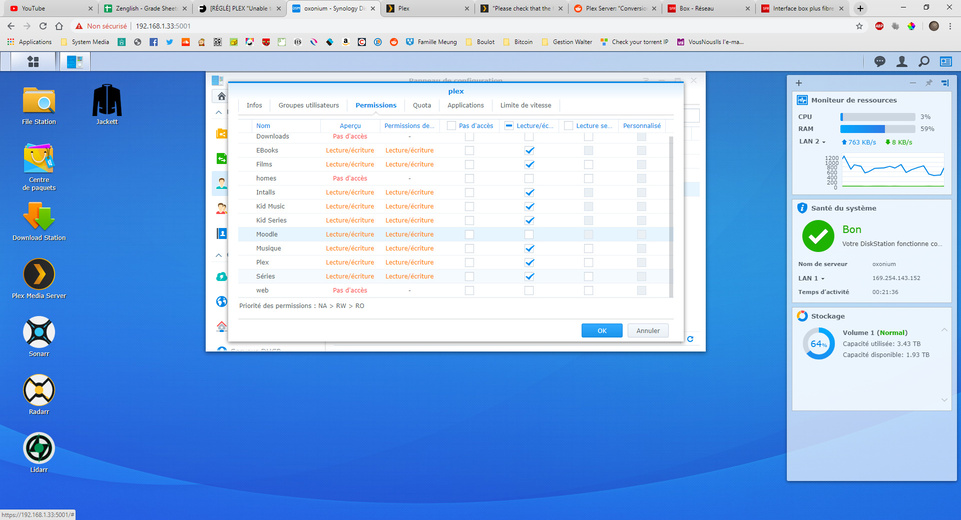
To followup:
This is a one-time action as folks update from pre-1.15.4.994 to anything above this.
Here is the forum announcement which I posted:
To followup:
This is a one-time action as folks update from pre-1.15.4.994 to anything above this.
Here is the forum announcement which I posted:
I have the exact same problem as of Aug 2019. I am using a QNAP system. Any help is really appreciated.
Are you using the Multimedia share and Codex Pack?
I’m running PlexMediaServer-1.16.3.1402-22929c8a2-x86_64 (updated to this version today) and now my “video” folder is no longer available.
To be clear, I had already done the updates post-1.15.4.994 and everything was working fine. Now, after this update, I’ve verified all of my folders have the same permissions, restarted, etc. When I browse folders when adding a new library, all of my folders populate just fine except “video” is empty and any libraries built off of sub-folders within are unavailable. Music can still be played in Plex, just nothing that resides in “video”.
Is there a way to get an earlier PMS version to downgrade and check if that’s the issue? Plex Media Server Logs_2019-08-09_23-21-38.zip (3.1 MB)
Your logs show that user plex does not have permission to the video share.
Please recheck it.
I will also ask if you rebooted DSM as the PMS 1.15.4.994 notice stated.
Your logs show:
Aug 09, 2019 11:06:07.804 [0x7f78997fa700] ERROR - Unable to find title for item of type 5
Aug 09, 2019 11:06:07.804 [0x7f78997fa700] DEBUG - MDE: analyzing media item -1
Aug 09, 2019 11:06:07.804 [0x7f78997fa700] DEBUG - MDE: : no direct play video profile exists for http/mpegts/
Aug 09, 2019 11:06:07.804 [0x7f78997fa700] DEBUG - MDE: : no direct play video profile exists for http/mpegts//
Aug 09, 2019 11:06:07.805 [0x7f78997fa700] DEBUG - MDE: : codec is unavailable for analysis
Aug 09, 2019 11:06:07.805 [0x7f78997fa700] DEBUG - MDE: : codec is unavailable for analysis
Aug 09, 2019 11:06:07.805 [0x7f78997fa700] ERROR - Unable to find title for item of type 5
Aug 09, 2019 11:06:07.805 [0x7f78997fa700] DEBUG - MDE: : selected media 0 / -1
Aug 09, 2019 11:06:07.805 [0x7f78997fa700] DEBUG - Cleaning directory for session 25a5fbdb-a4a6-49a8-92c6-a0fd14893249 ()
Aug 09, 2019 11:06:07.805 [0x7f78997fa700] DEBUG - Starting a transcode session 25a5fbdb-a4a6-49a8-92c6-a0fd14893249 at offset -1.0 (state=3)
Aug 09, 2019 11:06:07.805 [0x7f78997fa700] DEBUG - Streaming Resource: Added session 0x7f7864615320:25a5fbdb-a4a6-49a8-92c6-a0fd14893249
Aug 09, 2019 11:06:07.806 [0x7f78997fa700] DEBUG - TPU: hardware transcoding: enabled, but no hardware decode accelerator found
Aug 09, 2019 11:06:07.806 [0x7f78997fa700] DEBUG - TPU: hardware transcoding: final decoder: , final encoder:
The video share is also owned by Video Station. It is highly recommended you create your own shares and move the media to them (out of the Synology pre-defined share).
Any DSM or Synology app updates can and often do impact the video share.
If you need assistance in moving your media without losing metadata or watch history, please let me know.
Perfect, creating a new shared folder did the trick. FYI, the permissions were correct (set the same on the new shared), it must have been the conflict in using the existing “video” folder.
Thank you!
Plex user lost permission to the media folder for some reason randomly. Thanks to the hints here, I. I back up and running.
@ChuckPa I posted on here in June with the same issue everyone is describing. In order to solve the problem, I rolled-back to a previous version.
Synology finally updated their Plex version, and when I upgraded, I’m back to experiencing the problem. The user settings are correct - I’m sure it’s indeed the permissions issue. And yes, I’ve rebooted 
Just for giggles, I created a test shared folder and gave Plex RO perms and dropped a file in it. Plex sees it, and the movie plays.
Any other ideas you might have before I move my entire library to a new shared folder? I’ve verified permissions many, MANY times.
Thank you all for your help, reset permissions on synology rebooted, now Plex works as it should.
Prior to this I was going crazy, mucking around with router, apple tv you name it I played with it!! should have came here first, would have saved me a lot of grief and anxiety.
Greg
I had the same problem for 4 days, was resetting everything router plex users pc,
and it was Synology read /write, 1 click and it worked, you guys should beta test before rolling out updates,not everyone as technical as your staff .
I’m having this exact same issue as well, since the last update. I am on a Synology DS216J
Have you followed the above listed procedure?
Hi,
I’m having the same error on my Syno 418j.
I’ve followed the steps to give the permissions to plex on the shared folders.
I’ve restarted (multiple times) my NAS.
I’m still getting this error.
Oh, and I checked and did just as @joeylutes did :
So, please tell me there’s a fix that wil avoid a 2Tb transfer + Re-Config of third party apps…
It worked!!! Thanks a lot!
And thanks @ChuckPa for providing the solution.
This topic was automatically closed 90 days after the last reply. New replies are no longer allowed.