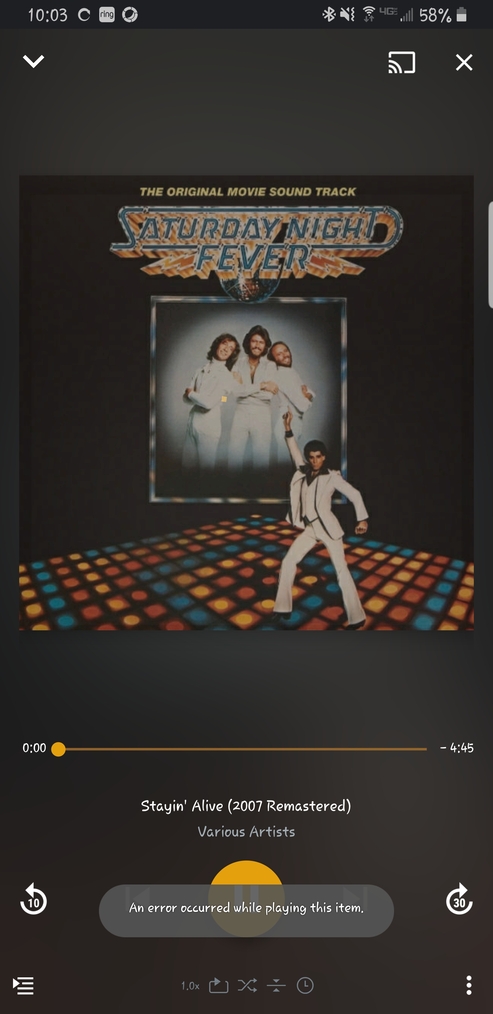
Just a quick update, I deauth-ed the device, re-signed in / re-authed, and I could sync…
But only for short period of time (or amount of files?), then it’s back to converting the mp3s into mkv again.
It’s happening on
Plex Android: 8.5.1.19778
Plex Server : 1.20.1.3232
The files are synced as mp3, and I could play it if I go to Downloads >> Music, and play it from there.
But if I were go to my usual Music library and play it (with Advanced >> Player >> Prefer Synced Content set to on), then it would encounter an error, until I toggle that option to off, then it’d finally play the song, but from the network of course.
I did this as well, and THOUGHT it was working, but the synced files were no longer synced after the device was deauthed… (So when I played them it was actually streaming them, blowing through my cellular data… ) Once I resynced them to the device, the exact same issue as described above occurs. Does pulling in the big dogs help: @elan?
Welp, sorry if I misled you: Before deauthing I had emptied all the synced content in the devices. Didn’t mention it because having anything synced would constantly crash the app, so it was empty like that for weeks.
I just tested again and I’m positive it’s working offline. My main use of music in Plex main app is in an old tablet with only wifi, so disconnecting wifi and playing any track I haven’t played before (so it isn’t cached by any chance) works fine. Just the usual gremlins of the Plex app and sync.
Yeah, I think this has to do with the Android client as opposed to the server… I hope the engineers hear/read about this (and fix it) soon, there are a TON of folks who would love to hop on Plex once Google Play Music is retired…
Yes, I am also trying to migrate to plex from google. I love the video side of things. Plex, please here our cry!
It says it syncs my playlists but will not play. At least let me play the native songs on my android phone. I could live with that until you get it working correctly.
While 8.6 on my Samsung Galaxy S10+ no longer gets the error. I still believe that it is not working as intended.
Any music that I’ve sync’d still plays from the server not from the sync’d copy (unless I navigate to the Downloads & Sync section). The app does not seem to honor the “Prefer synced content” setting for music when played from outside of Downloads & Sync. Video does honor the prefer synced content setting and will always play the synced content whether or not I’m connected but that is not the case for music.
For those of you who responded that it is now working for you, can you see where it is playing the music from under “Playback Info”/Source?
@abitoutside70 That has been an issue for quite some time now. Unless I navigate to Downloads & Sync it will always play from the server.
I think the issue here where playing synced files didn’t work at all.
There is another issue here though too. There are times when you select Downloads & Sync and even though you have music synced successfully nothing shows. If you’re not connected to the network where the server is, you can’t get the synced music to show. It’s inconsistent but happens often.
lol I just purchase the life time plex pass for this reason… Now I find out that the Plex Sync is broken… One of the main selling points… lol WTF I’m running the latest server and latest Plex for Android on my Note 8. “an error ocurred while playing this item”
Plex Server version: 1.20.3.3421 Oct 9, 2020
Plex Android Client version: 8.7.2.20952
Samsung Note 8 - OS version 9 with latest security patch Sept 1, 2020
Sync says successful, but when going to mobile client and trying to play files , get “an error occurred while playing this item” popup, for every song…Interestingly when doing the download from the Windows Plex Player, the files play fine on my local PC…seems to be just the mobile sync workflow that has an issue…
Still having this issue while playing new synced albums since August. No issues with old synced stuff.
Issue said to be identified and fixed but it wasn’t for me.
Updated Plex Adnroid app today to 8.8.0.21200 and still the same.
Plex server v1.20.3.3437
Plex tries to convert the songs to something where is set to keep original quality.
Then I get when trying to play a song “An error occurred while playing this item”
I am also having this same issue. Samsung S9 (Android), plex app version 8.7.2.20952. Music files sync, but aren’t able to be played after syncing. They are also being converted from MP3 to MKV.
This seems to have worked for me as well…Did you get this from Support, or just happened across this process…seems to be radio silence from support this issue…
But it’s amazing to see how little attention was given to this issue considering the number of posts created to deal with that. I’ve been having this issue for months.
 ) Once I resynced them to the device, the exact same issue as described above occurs. Does pulling in the big dogs help: