Hi
Thanks for your detailed response.
I have removed all of the old sync files that I had, about 10 of them.
I did notice the [Notify] Failed to add watch errors. I have added the s2s_watches_max = 98304 to the synoinfo.conf file using shh as the scheduled task was not working due to root permissions. I have checked and it is there but I am still getting lots and lots of those watch errors. Permission denied.
Plex is able to scan some media folders but not others because of permissions? Well I just click the scan library files in libraries under settings and it goes through all of the libraries.
I have had a big clear out of all my files and these are what I now have.
TV Folders
.mkv 19325 – .avi 11334 – .mp4 8726 – .m4v 226 – .wmv 15 – .divx 1
.mov 1 – .mpeg 1 – .rmvb 5 – .flv 1 – .jpg 345 (TV Covers)
Movie Folders
.mp4 1935 – .avi 879 – .mkv 234 – .wmv 502 – .mov 71 – .mpg 69
.flv 21 – .mpeg 4 – .mvb 1 – .asf 1
Music Folders
.flac 5513 – .mp3 8075
Photo Folders
.jpg 10347 – ,png 227 – .gif 79 – .jpeg 247
Home Movies Folders
.mp4 225 – .mpg 152 – .avi 186 – .vob 5 – .mov 53 – .3pg 1
Stand up Comedy Folders (Done as home videos)
.avi 431 – .divx 12 – .mp4 60 – .mpg 15 --.flv 75
.mkv 1 – .wmv 6 – .asf 1
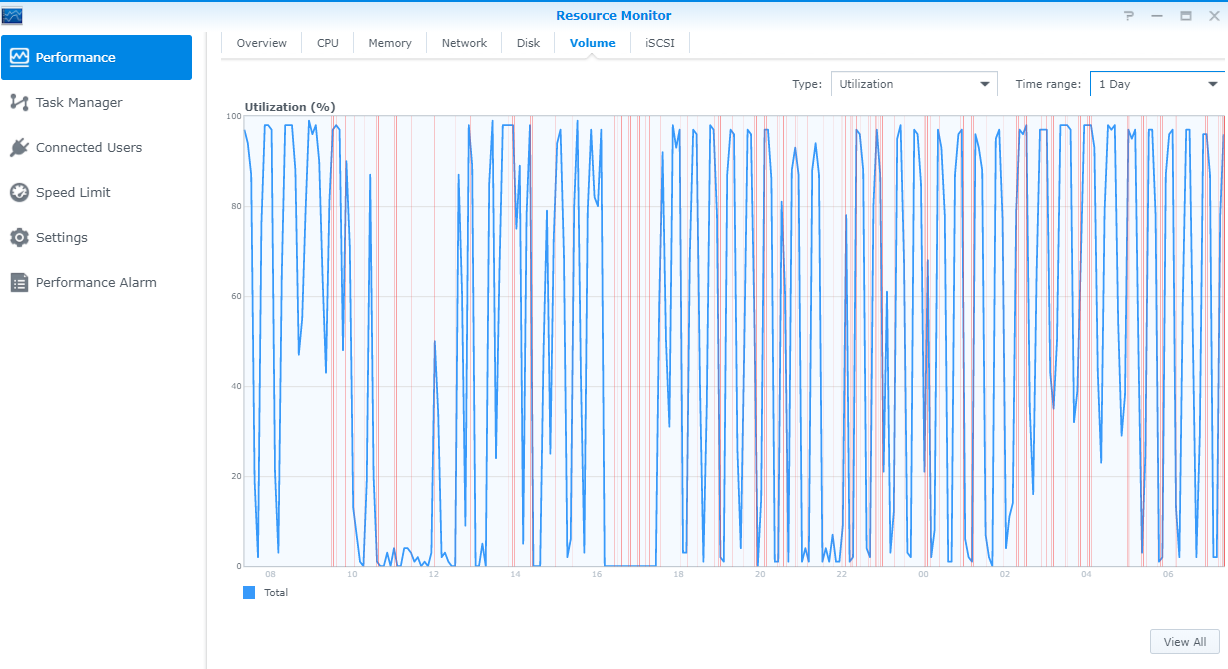
The high disk activity is still going, below are all the times that there was high disk activity. When this happens the whole system slows down and sometimes I can even access the system and have to reboot. At the times mentioned below the only thing I had running on the server apart form the operating system was Plex. Whenever I stop plex running the disk activity stops.
17:47 -> 18:01
18:13 -> 18:28
18:40 -> 18:55
19:07 -> 19:22
19:34 -> 19:49
20:00 -> 20:16
It looks to me like it is on some sort of loop stops for about 12 minuses then very high disk activity for 15. Also when I looked into the console every time I had high disk activity I saw things keep repeating. I have attached a picture of the volume activity for the last 24 hours and as you can see it is up and down all the time at those intervals. In the chart you can see 3 times it stopped for a while. The first time is when I had Plex shut down. The second time is when I installed the RAM and the third time is when I rebooted Plex again.
If I change the name of the Video folder that my complete Plex library is in then will that not affect my whole library in Plex and have to re-scan and update every file in the DB with the new location? How important is this?
I downloaded and had a look at ffmpeg seems though you have to go through each file one by one. This is very difficult when you have 40000+ video files. I saw you mentioned that Plex has an ffmpeg, can I use that to check which files are corrupted and how?
I do use Filebot and all my files for TV shows and Movies have been named by Filebot.
TV Shows
Show Name (date)
Season 1
Showname - S01E01 - Episode Name
Movies
Movie Name (year) (Folder)
Movie Name (year).avi
I think the server crashed because I ran out of electricity on the metre. I have been rebooting the server as it gets so slow when I get the high disk activity.
Finally I threw 8gb of Ram under the hood from 2gb hoping that would help.
Logs are attached
Thank you for your help.
Steven
Plex Media Server Logs_2020-08-14_07-30-16.zip (4.4 MB)