Hi, I have a issue i’m hoping that someone can help me with. I have created 5 tv shows in the plex library, most current being the show Charmed. I have named the folders and subfolders correctly so plex can recognize them ex Season 01 folder, then s01e09. When I use windows explorer to move the episodes from a temp folder to the Season 01 folder, i will drag and drop about 3 to 4 episodes at a time, then when that is done do another 3 or 4. When I have done this, or more episodes at a time and plex recognizes the new media, it has created another tv show named dragonballz and put those episodes in both the dragonballz and the charmed tv show directory. When I go into the portable hd where they are all kept, that is where i have directed plex to look for the files, there is nothing named dragonballz. But when I go into plex to delete the dargonballz tv show, it then deletes all the charmed episodes in that charmed season 01 folder also. In order to circumvent this, I have to drag and drop one episode at a time, then tell plex to scan the library files to make sure another tv show is not created. I have created in the past 4 other tv shows and have moved them, sometimes 6 or 7 at a time with this never happening. I can do 1 at a time but is very time consuming to do 1, then wait, scan the library, do another, and so on. Please help.
Disable automatic library updates.
Then copy all your files. Then trigger the library update manually.
I did exactly as you suggested and I moved 10 episodes over and triggered scan library files manually. Now it created a Ellen Degeneres Tv show with 2 of the 10 charmed episodes under this show. What is going on? I also went into the charmed season 01 folder and deleted the two specific episodes that created the ellen tv show directory and scanned files again and under ellen no episodes appear so I try to delete the tv show and now its saying an error occurred when trying to delete.
Please show me examples of your actual file names and the folder structure where they are residing in.
Here are the pictures
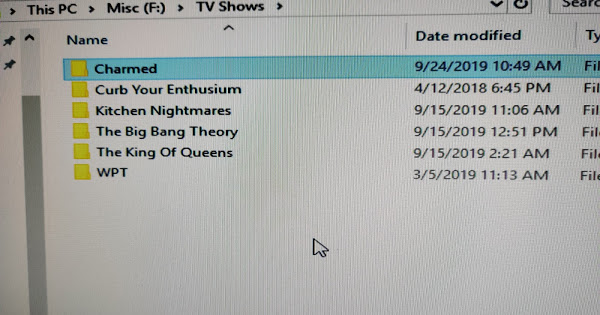
I’m pretty sure it’s not “Enthusium”.
But apart from that it looks quite regular.
Please verify in the properties of your tv show library that it’s pointing exactly to F:\TV Shows and not one folder level above nor below it.
If that is the case, perform the Plex Dance.
Ok, in Plex I go to TV Shows/manage library/edit, choose add folders and under add folders to your library, there are 2:
F:\TV Shows
F:\TV Shows\Charmed
I think this is what your talking about, right?
So, do I delete the one that shows charmed then? If so, that won’t delete my episodes i already have then, will it?
Yes.
Depends. It won’t remove any video files, if you mean that.
You might have to perform the Plex Dance with “Charmed” afterwards, to remove the mismatches from the Plex database.
Ok, I removed the directory with charmed in the name. It didnt appear to delete any video files, which is good. I then drag and dropped 3 new video files/episodes at the same time into the season folder. It copied the files to the correct folder and after doing a manual Plex library scan, it did not creat a new tv show directory so, so far so good. I did not do the plex dance at this time. Thanks for your help. If I run into it doing it again, I will let you know and do the plex dance.
