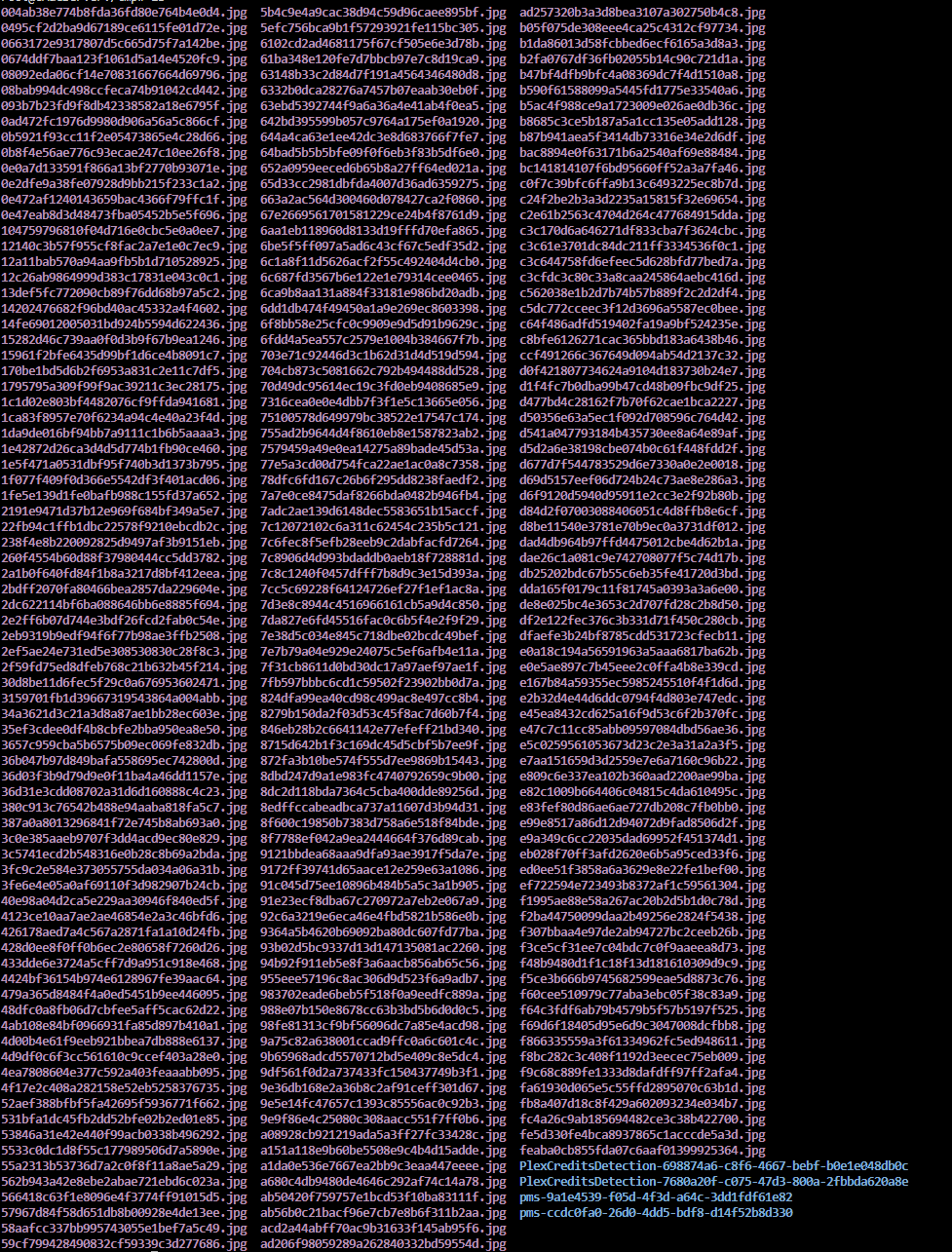
Plex Credit Detection filling docke.img within /tmp

Yes, Re-enabling DEBUG logging would at minimum give us an area (series / movie) where the bad media files are.

While this is your system, an encapsulated HDD emulation is a layer of overhead which is taking away much of the performance you gained by using the SSD in addition to putting extra write overhead on that SSD. Long term it will wear the SSD harder/faster than not using it. A regular partition is the more efficient way to control these things. If it were a separate HDD, even better. (you don’t need SSD for this. This isn’t high-speed database / metadata work )

Thanks for the additional information really appreciate it! Something for me to consider/maybe a project for the holiday season.

I’ve noticed today the docker img usage beginning to creep up in size and see Credit Detection in the container sitting at 22GB. I’ve re-enabled the DEBUG logging as well. I’ve have a bit of trouble finding the issue as it was seen in the previous logs as maybe everything shows with the Debug tag instead of the ERROR for these message? Thanks again for the assistance in nailing this down!

22GB

Attached are the most recent DEBUG log enabled set of logs since I’ve noticed the 22GB.
Plex Media Server Logs_2023-12-23_17-32-32.zip (6.7 MB)

Fully filled docker image this morning
Plex Media Server Logs_2023-12-24_12-14-53.zip (3.3 MB)
I found the following:

Dec 24, 2023 09:28:53.991 [22483779681080] DEBUG - There were 1 top-level paths for A+.
Dec 24, 2023 09:28:53.997 [22483779681080] DEBUG - We're going to try to auto-select an audio stream for account 1.
Dec 24, 2023 09:28:53.997 [22483779681080] DEBUG - Selecting best audio stream for part ID 165556 (language: en)
Dec 24, 2023 09:28:53.997 [22483779681080] DEBUG - We're going to try to auto-select a subtitle.
Dec 24, 2023 09:28:53.997 [22483779681080] DEBUG - Audio Stream: 467533, Subtitle Stream: -1
Dec 24, 2023 09:28:53.997 [22483779681080] DEBUG - We're going to try to auto-select an audio stream for account 1.
Dec 24, 2023 09:28:53.997 [22483779681080] DEBUG - Selecting best audio stream for part ID 165557 (language: en)
Dec 24, 2023 09:28:53.997 [22483779681080] DEBUG - We're going to try to auto-select a subtitle.
Dec 24, 2023 09:28:53.997 [22483779681080] DEBUG - Audio Stream: 467535, Subtitle Stream: -1

Which I believe may be the DEBUG version of the ERROR seen above which seems to indicate A+ is the culprit. I also see it mentioned by it’s metadata/# in other location just before these DEBUG messages. These belong in another library for educational videos, something I’ve now disabled credit detection on. Fingers cross that was the root of all my issues!
Happy Holidays!

I have also been having the exact same problem for a couple of weeks now. My docker disk fills up in about 1 day. I converted the docker to a directory and in a couple of days, 1Tb was occupied. Since I disabled credit detection, it hasn’t happened again.

I’m going to fire a machine or two in hope of pinpointing this problem.

Knowing I can be total PEBKAC :see_no_evil: ,
Please tell me:

  1. Type of library being created when this blows up
  2. Library creation options used to cause this
  3. How many media items (files), approximately, in the section being created.

I have my brand new :smiling_imp: JasperLake NUC which should crank this out pretty quickly. If need be, I’ll spin up something bigger.

Shucks, issue persists even with Credit Detection disabled for the library containing the thought to be culprit above.

I’ve found my plex docker space increasing again this morning so figured I’d attach additional logs just in case they can be of any help.

Plex Media Server Logs_2023-12-26_16-54-13.zip (5.1 MB)

  1. Type of library being created when this blows up
  2. Library creation options used to cause this
  3. How many media items (files), approximately, in the section being created.
  1. TBH I’m not exactly sure. I typically leave Credit Detection set to when content is added as well as a scheduled task. I can confirm I have seen credit detection run when content is added and the size of the docker img remains the same. I see the increase overnight so seems to be from the scheduled instance of credit detection/older content.
  2. I have Credit Detection enabled for both my TV, and Movies Library. In my Server Library settings I have Credit Detection as a scheduled task and when media is added.


3. Depending on section 3-5K.

I just completed a full server build –

  1. 15,791 media (movies/tv) files
  2. Default settings on everything
  3. I watched Credit and Intro Detection run.
    – Largest use of /tmp was “Gone With the Wind” at 13 MB. (3hr 53min movie)
  4. This is not a problem with Credit or Intro detection.

The only thing I’ve not done is create a completely encapsulated filesystem for the container to run in.

Your logs are not showing me any “out of space” errors.

I see:

  1. DHCP refresh (Not static / dhcp reservation?)
librarySectionID=9&metadataItemID=144907&metadataType=4&state=-1&parentID=-1&rootID=-1&mediaState=idle (17 live) #6b3ff2 GZIP Signed-in Token (CMacPLEX)
Dec 24, 2023 09:35:56.077 [22484060502840] DEBUG - Completed: [127.0.0.1:55492] 200 GET /:/metadata/notify/changeItemState?librarySectionID=9&metadataItemID=144907&metadataType=4&state=-1&parentID=-1&rootID=-1&mediaState=idle (17 live) #6b3ff2 GZIP 0ms 195 bytes (pipelined: 85)
Dec 24, 2023 09:35:57.284 [22483960412984] DEBUG - NetworkInterface: received Netlink message len=1820, type=RTM_NEWLINK, flags=0x0
Dec 24, 2023 09:35:57.285 [22483960412984] DEBUG - NetworkInterface: Netlink information message family=0, type=1, index=10, flags=0x11043, change=0x100
Dec 24, 2023 09:35:57.285 [22483960412984] DEBUG - Network change.
Dec 24, 2023 09:35:57.286 [22483960412984] DEBUG - NetworkInterface: Notified of network changed (force=0)
Dec 24, 2023 09:35:57.292 [22483960412984] DEBUG - Network change notification but nothing changed.
Dec 24, 2023 09:35:57.292 [22483960412984] DEBUG - NetworkInterface: received Netlink message len=1820, type=RTM_NEWLINK, flags=0x0
Dec 24, 2023 09:35:57.292 [22483960412984] DEBUG - NetworkInterface: Netlink information message family=0, type=1, index=10, flags=0x11043, change=0x100
Dec 24, 2023 09:35:57.292 [22483960412984] DEBUG - Network change.
Dec 24, 2023 09:35:57.292 [22483960412984] DEBUG - NetworkInterface: Notified of network changed (force=0)
Dec 24, 2023 09:35:57.295 [22483960412984] DEBUG - Network change notification but nothing changed.
Dec 24, 2023 09:35:57.890 [22483756309304] DEBUG - [Req#6b3e73/Transcode/bif/3ca3778a-3339-4101-ab5e-1589e1abefc9] Activity: updated activity 3ca3778a-3339-4101-ab5e-1589e1abefc9 - completed 50.6% - Generating video preview thumbnails
Dec 24, 2023 09:35:58.178 [22483756309304] DEBUG - Request: [71.235.134.189:42038 (WAN)] GET /library/sections (17 live) #6b3b3e TLS GZIP Signed-in Token (CMacPLEX) (d21e991f3b11)
Dec 24, 2023 09:35:58.208 [22484058393400] DEBUG - Completed: [71.235.134.189:42038] 200 GET /library/sections (17 live) #6b3b3e TLS GZIP 30ms 1551 bytes (pipelined: 2)
Dec 24, 2023 09:35:58.357 [22483779681080] DEBUG - [Req#6b400c/Transcode/bif/3ca3778a-3339-4101-ab5e-1589e1abefc9] Activity: updated activity 3ca3778a-3339-4101-ab5e-1589e1abefc9 - completed 51.1% - Generating video preview thumbnails
Dec 24, 2023 09:35:58.532 [22483904695096] DEBUG - Request: [127.0.0.1:55492 (Loopback)] GET /library/changestamp (17 live) #6b3ff3 GZIP Signed-in Token (CMacPLEX)
Dec 24, 2023 09:35:58.532 [22484060502840] DEBUG - Completed: [127.0.0.1:55492] 200 GET /library/changestamp (17 live) #6b3ff3 GZIP 0ms 433 bytes (pipelined: 86)
  1. A lot of playback activity

  2. All of a sudden, DB access falls into the sub-basement (Host grossly overloaded)
    This should complete in about 0.1 milliseconds.

Dec 24, 2023 09:37:30.562 [22484060502840] DEBUG - Completed after connection close: [71.235.134.189:40200] -3 GET /:/websockets/notifications (19 live) #f8 TLS 27782651ms 159482050 bytes
Dec 24, 2023 09:37:32.205 [22483986283320] DEBUG - It took 90.000000 ms to retrieve 0 items.
Dec 24, 2023 09:37:34.848 [22483864992568] WARN - SLOW QUERY: It took 3820.000000 ms to retrieve 4 items.
Dec 24, 2023 09:37:36.461 [22483864992568] DEBUG - Grabber: HDHomerun discovered 0 compatible devices.
  1. Shortly after this, It’s as if the network / host resources start collapsing on itself
Dec 24, 2023 09:37:59.433 [22483958303544] DEBUG - [NSB/SSDP] found 3 SSDP devices via http://10.0.1.103:1400/xml/device_description.xml
Dec 24, 2023 09:37:59.444 [22483958303544] DEBUG - [NSB/SSDP] SSDP arrived: 10.0.1.103 (10.0.1.103 - Sonos One)
Dec 24, 2023 09:37:59.444 [22483958303544] DEBUG - [NSB/SSDP] SSDP arrived: 10.0.1.103 (10.0.1.103 - Sonos One Media Server)
Dec 24, 2023 09:37:59.444 [22483958303544] DEBUG - [NSB/SSDP] SSDP arrived: 10.0.1.103 (Kitchen - Sonos One Media Renderer)
Dec 24, 2023 09:37:59.460 [22483986283320] DEBUG - [HCl#3ee9] HTTP requesting GET http://10.0.1.51:80/lineup_status.json
  1. The network/network stack fails.
Dec 24, 2023 09:42:17.172 [22484019972920] DEBUG - [HttpClient/HCl#3f2c] HTTP simulating 408 after curl timeout
Dec 24, 2023 09:42:17.674 [22483867102008] WARN - [EventSourceClient/pubsub/172.104.218.101:443] MyPlex: Updating device connections failed, retrying in 10 seconds.
Dec 24, 2023 09:42:47.756 [22483867102008] DEBUG - NetworkServiceBrowser: SERVER departed after not being seen for 188.552671 seconds: 192.168.0.11 (CMacPLEX)
Dec 24, 2023 09:42:49.959 [22483867102008] DEBUG - Notifying the system bundle an update to server /system/notify/serverUpdated?host=192.168.0.11
Dec 24, 2023 09:42:52.623 [22483867102008] DEBUG - [com.plexapp.system] Sending command over HTTP (GET): /system/notify/serverUpdated?host=192.168.0.11
Dec 24, 2023 09:43:00.457 [22483877444408] WARN - SLOW QUERY: It took 4200.000000 ms to retrieve 9 items.
Dec 24, 2023 09:43:05.540 [22483867102008] DEBUG - [HCl#3f2f] HTTP requesting GET http://127.0.0.1:33313/system/notify/serverUpdated?host=192.168.0.11
Dec 24, 2023 09:43:10.236 [22484060502840] DEBUG - [EventSourceClient/mediaserver/72-74-56-234.4af3b5395a6740088a3ced2e4151d3a4.plex.direct:32400] Failure: 125 - Operation canceled.
Dec 24, 2023 09:43:19.961 [22484060502840] ERROR - [EventSourceClient/mediaserver/72-74-56-234.4af3b5395a6740088a3ced2e4151d3a4.plex.direct:32400] Retrying in 60 seconds.
Dec 24, 2023 09:43:23.335 [22483796065080] DEBUG - [EventSourceClient/pubsub/172.104.218.101:443] MyPlex: Updating device connections (from timer: 1)

From this point on… there’s no recovery. Everything is bad file descriptor or other error.

Bad file descriptors tell me the container’s connection to the host resources are no longer valid.

I have my full library on a GeminiLake on Unraid and cannot recreate this.
What’s the difference beyond my using a /config directory ??

I have a sneaking feeling that the DHCP refresh issue may be due to an ISP outage that occurred during the 24th. I have a failover LTE modem setup so that may be the cause of the address change.

The DB access failing; maybe I am having an issue with my DB? In this case I can certainly run your awesome Repair Script which I haven’t run in some time (Thanks for this!!)

As for the “out of space” error unfortunately that I haven’t seen as an error message just more that my docker image on unraid continues to fill until it reaches it’s limit.
For example right now I see my docker image using 119. Typically I see this at ~71GB.
Docker 119

Checking the Container Size via the unraid docker tab can see my plex container having increased to 13GB vs it’s normal size of ~350MB

If I then go to console of my plex docker container.

cd tmp
ls

can see the following

If I follow that with

du -d 1 -h

du
Within that /PlexCreditsDetection-768xxxx location I find thousands of thumbnail.jpg files.

If possible to find which piece of media is causing the Credit Detection to balloon like this I’d happy to remove that media too.

That latest set of logs I posted today should include what occurred last night as between last evening and today around noon is when I noticed the docker image begin to increase in size.

If there is any other logs information/configs I can provide happy to post as well. Thanks!

WOW… Simply wow.

I do not have that.

My PlexCreditDetection directories disappear as soon as the job for that item finishes.

root@Jemini:~# cd /tmp
root@Jemini:/tmp# ls -la
total 624
drwxrwxrwt 12 root root    340 Dec 26 20:09 ./
drwxr-xr-x 20 root root    420 Dec 26 18:49 ../
drwxrwxrwt  2 root root     40 Dec 26 18:42 .ICE-unix/
drwxrwxrwt  2 root root     40 Dec 26 18:42 .X11-unix/
drwxr-xr-x  2 root root     40 Dec 26 19:40 CA_logs/
-rw-r--r--  1 root root      0 Dec 26 18:42 atlock.tmp
drwxr-xr-x  3 root root     60 Dec 26 18:42 community.applications/
drwxr-xr-x  2 root root     60 Dec 26 18:42 emhttp/
-rw-r--r--  1 root root      2 Dec 26 18:48 modulestoplg.json
drwxr-xr-x  4 root root     80 Dec 26 18:42 notifications/
drwxr-xr-x  5 root root    100 Dec 26 18:42 pkg/
drwxr-xr-x  3 root root    300 Dec 26 18:49 plugins/
-rwxrwx---  1 root root     73 Dec 26 18:42 start_service*
-rw-r--r--  1 root root      1 Dec 26 18:48 sysdrivers.init
-rw-r--r--  1 root root 622840 Dec 26 18:48 sysdrivers.json
drwxr-x---  5 root root    120 Dec 26 18:49 unassigned.devices/
drwxr-xr-x  5 root root    120 Dec 26 18:49 user.scripts/
root@Jemini:/tmp# uname -a
Linux Jemini 6.1.64-Unraid #1 SMP PREEMPT_DYNAMIC Wed Nov 29 12:48:16 PST 2023 x86_64 Intel(R) Celeron(R) J4125 CPU @ 2.00GHz GenuineIntel GNU/Linux
root@Jemini:/tmp# 

on Ubuntu, I do have a few of these. I will work on tracking them down

chuck@papy:~$ ls -la /tmp
total 86652
drwxrwxrwt 15 root  root      4096 Dec 27 01:05 .
drwxr-xr-x 20 root  root       306 Dec 26 21:00 ..
-rw-r--r--  1 plex  plex    789005 Dec 26 22:37 00e8efb92ee536a44f9b7ce8a3281494.jpg
-rw-r--r--  1 plex  plex   1968448 Dec 26 22:37 2a2471670860de9cc50e0bab496a32ff.jpg
-rw-r--r--  1 plex  plex    990855 Dec 26 22:37 3e12a19fd44e1cdb783e353e1e3aff40.jpg
-rw-r--r--  1 plex  plex    400090 Dec 26 22:37 55ea48e7a536ad5ff9e5471cdc32d649.jpg
-rw-r--r--  1 plex  plex   1520953 Dec 26 22:37 5d7da8bd6b2fdd4cf80ea391df652e90.jpg
-rw-r--r--  1 plex  plex    302412 Dec 26 22:37 5f972ee76fcd46c1f5b3ec63d9e916b3.jpg
-rw-r--r--  1 plex  plex    255522 Dec 26 22:37 704d199384408253e6a20174bdedbafb.jpg
-rw-r--r--  1 plex  plex    609909 Dec 26 22:37 84d3a474621162a0b4d4ca92c6fb57bf.jpg
-rw-r--r--  1 plex  plex   1599756 Dec 26 22:37 a4b5a21bf08b7244b378b7905580a01a.jpg
-rw-r--r--  1 plex  plex    307747 Dec 26 22:37 bd0e01c49531a701519286787bef35ee.jpg
-rw-r--r--  1 plex  plex    237890 Dec 26 22:37 c3cf4e6ab33920fad258e1f4cd51520d.jpg
-rw-r--r--  1 plex  plex   1194622 Dec 26 22:39 c4f87c2672a4595c97761f9e13c01cc6.jpg
-rw-r--r--  1 plex  plex    581348 Dec 26 22:37 f3e7c3ae56b0e5ac4a0f8b5d01306416.jpg
-rw-r--r--  1 plex  plex    257672 Dec 26 22:38 f78337613117187552e148233ea0c92f.jpg
-rw-r--r--  1 plex  plex    225187 Dec 26 22:37 fa13513f5fa8566bd49733f6630b837c.jpg
-rw-r--r--  1 plex  plex   1097709 Dec 26 22:37 ff4a0a32450c9820edd69313f9cf189d.jpg
drwxrwxrwt  2 root  root         6 Dec 26 20:56 .font-unix
drwxrwxrwt  2 root  root         6 Dec 26 20:56 .ICE-unix
drwxr-xr-x  2 plex  plex     16384 Dec 27 01:10 PlexCreditsDetection-1b7ebf08-7d15-4a1d-84cd-19990b2ba5fc
-rw-r--r--  1 root  root       773 Dec 26 22:35 plexinstaller.log
-rw-rw-r--  1 chuck chuck 76341142 Dec 26 22:35 plexmediaserver_1.32.8.7639-fb6452ebf_amd64.deb
drwxr-xr-x  3 plex  plex        30 Dec 26 23:06 pms-b357e380-48b7-475c-941d-5dc44fa10435
drwx------  3 root  root        22 Dec 26 20:56 snap-private-tmp
drwx------  3 root  root        17 Dec 26 20:56 systemd-private-7244ce7c4ca24b27b3a0be8155f0bbf2-bolt.service-SS6i87
drwx------  3 root  root        17 Dec 26 20:56 systemd-private-7244ce7c4ca24b27b3a0be8155f0bbf2-ModemManager.service-TH2xBr
drwx------  3 root  root        17 Dec 26 20:56 systemd-private-7244ce7c4ca24b27b3a0be8155f0bbf2-systemd-logind.service-4pbbo6
drwx------  3 root  root        17 Dec 26 20:56 systemd-private-7244ce7c4ca24b27b3a0be8155f0bbf2-systemd-resolved.service-JPJPVz
drwx------  3 root  root        17 Dec 26 20:56 systemd-private-7244ce7c4ca24b27b3a0be8155f0bbf2-systemd-timesyncd.service-0p4Pow
drwxrwxrwt  2 root  root         6 Dec 26 20:56 .Test-unix
drwxrwxrwt  2 root  root         6 Dec 26 20:56 .X11-unix
drwxrwxrwt  2 root  root         6 Dec 26 20:56 .XIM-unix
chuck@papy:~$ 

I always get them. The moment the tmpfs reboots, they’re gone.

Turns out, these are posters. That’s the scanner. It’s forgetting to cleanup something
(2a2471670860de9cc50e0bab496a32ff)

Until I have chance to talk to the engineers, How about a daily cron job to remove all jpeg files from /tmp (rm -f /tmp/*.jpg) a bit of a kludge but will help

Noticed in your first grab with

ls -la /tmp

That based on the results looks like the host /tmp location. If I run that from my unraid terminal I see very similar results.

However we’re I’m actually seeing that massive PlexCreditDetection directory is the /tmp location of the docker container itself.

I’m finding that by going to my plex container and clicking console

From that if I run

ls -la /tmp

Get the results above. Containing more .jpg files and the PlexCreditsDetection files and that’s it.

Currently no where do I have a mapping of /tmp:/tmp in my docker container.
I do have /transcode:/tmp which is using that RamScratch location in the /tmp on host. Towards the top of the post have a few better screen shots high lighting that as well.

That being said maybe the script idea still could work however I wouldn’t be targeting the host /tmp location but the plex docker container /tmp location which make take some digging into on my part :sweat_smile:

if you’re not mapping inside:outside

In crontab, you want a task which goes into the container and does a

root@Jemini:~# docker exec -it CONTAINER find /tmp -name \*.jpg -print -exec rm -f {} \;

Play with that a bit, I’m not 100% certain about the double escaping to get it into the container from crontab. works nicely without double escape :slight_smile:

Just do the -print and confirm it’s what you want… then turn up the :boom:

Awesome, I’ll play around with this!

Just a side not for accuracy sake the thumbnail files I’m seeing in PlexCreditsDetection-xxxx are .jpeg

Thanks again for taking time on this!

That’s what I found too. jpeg vs jpg.

That was my confirmation, in addition to seeing the temp dir vanish. it wasn’t a credit/intro problem.

Just curious worst case scenario:
Movie is added and credit detection runs BUT oh no the script was scheduled to run at the same time.

Is that credit detection ruined for that piece of media or next scheduled run would be all set?

Or maybe in the mean time I just change my Credit Detection settings to as a scheduled task and make sure the script to cleanup .jpeg runs at a totally different time.

i would see about running cleanup before and after scheduled tasks and then on-demand when adding a lot of media…

but how often DO YOU add a lot of media ?

That timing does makes sense!
And most likely less then I think so certainly an edge case.

Thanks again for the script assistance as well!

I was considering would it be potentially better to do a find against PlexCreditsDetection and delete the entire directory rather just the .jpeg?

It’s a band aid so think I’m just splitting hairs… But was thinking that could prevent the container /tmp ending up with a bunch of empty PlexCreditsDetection directories.

Since this is a bandaid…

  1. Run your script to clean up all the variants / junk

  2. AFTER scheduled tasks completes.

How viable?

I think very workable! :smiley:
I can use the unraid User Scripts plugin to schedule the script to run following my plex 2:00-5:00 scheduled task window. 0 6 * * *

In the future? :sunglasses:

Put the container out somewhere it won’t hurt you… and use /config directory style.
-or-
If this is your main/only PMS installation, Give it a crazy size…

  1. Make it 256 or even 512
  2. Thin Provision (sparse) create the file.
    (It will only use space as it needs it)

With all the testing I do, It’s not unusual for me to load up a container with 280,000+ media items in it. That’s lot of metadata and images.