just to know if I understand correctly. I have some movies coded as “Dolby Vision, Version 1.0, dvhe.05.06, BL+RPU”, I try to see on my iPhone 12, and:
if I use the Plex client (v. 8.3), I can’t reproduce any profile 5 movie (color space not supported)
if I use Infuse client (v.7.3.10), I can. It is recognised as DV and not only HDR, and I can appreciated the differences in terms of shadows/lights
this is because the Codec ID is dvhe instead of the expected by Apple dvh1?
And if yes, what should happen for a non-apple device, if it will receive dvh1 instead of dvhe?
just so you know various options, you can keep dolby vision playback with external srt subs too and mp4 (on Android TV at least - I’m assuming Apple TV too because srt is so basic which is why I chose it), how I do mine for profile 5 and profile 7 fel with forced subs not burned into the video stream
profile 8/mel i just burn them into the base layer stream myself
@Volts it’s not just pgs subs some from UHD ,non-UHD releases also contain image based sup subs, but same problem
Yes I cleaned it up I was mistaken myself for a second lol
But pgs/sup are coming from non-uhd ‘originally’, was my main point, and I could have sworn I’ve seen it with dv5 before as well but don’t know where atm
Native source apps probably handle image subs fine if I had to guess, or they could be getting altered by a ‘man in the middle’, either way
Just tested it and unfortunately external SRT subs won’t work with corrected DV5 MP4 files on Apple’s AVPlayer as it has to be muxed into the stream. Also, you can indeed package TrueHD into MP4 but AVPlayer does not support decoding TrueHD. I was able to play dvh1 MP4 files with TrueHD in Quicktime on macOS and through the Files app on iOS (with correct colors) but there will be no sound at all.
I think the issue is that the Plex transcoder cannot produce direct streams with the correct codec ID and so Plex on iOS and tvOS will simply refuse to play anything that is dvhe.05.06 and cannot be direct played. It will show the colorspace error if it has to add SRT subs or transcode audio streams using direct stream.
Here’s a dolby vision p8 HLG base layer file if you guys wanna remux and test on your Apple devices btw - quietvoid provided it over at makemkv forums IIRC
edit: it just says dv8.06 in mediainfo if you look because it’s mkv the rpu is 8.4 IIRC just mux correctly
Tonight was the first time I tried to play a 4K HDR Dolby Vision MKV on the latest generation Apple TV 4K (Grey Remote) using Direct Play/Stream (No Transcoding).
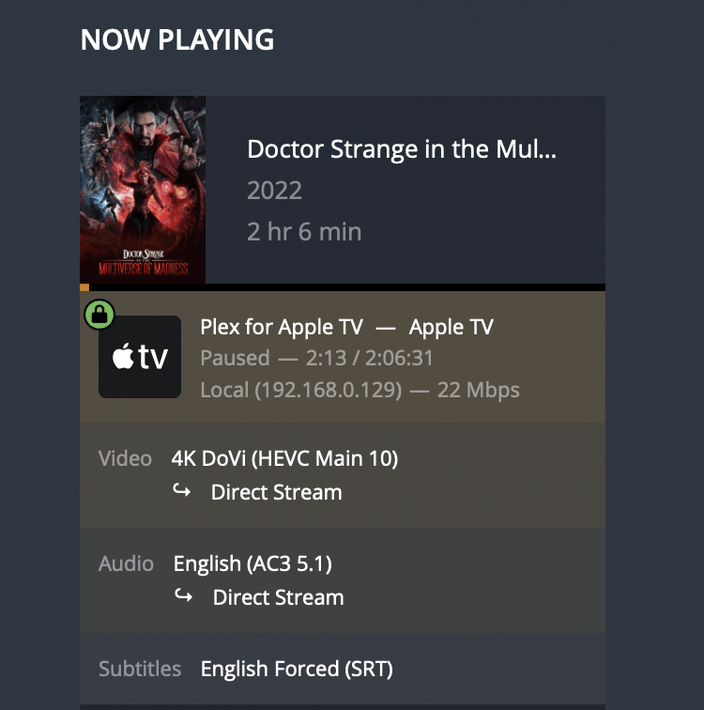
To my SHOCK, the movie triggered the DOLBY VISION icon on my TV and it looked just as good as the same exact 4K DV HDR movie I bought on Apple (iTunes). I have a very distinct eye for HDR10 Vs. true DOLBY VISION. So this looked like DV to me, and I can always tell. So I started doing research on what updates iOS and Plex/PMS did to support this.
I then fired up the Plex Dash app on my iPhone and it reported the following:
You guys see the “4K DoVi” part? Is this recently new? I played other non Dolby Vision files and this tag is NOT there. So there does appear to be a difference with Direct Streaming and how Plex interprets and tags these DV files.
Furthermore, the non “DoVi” files did appear to look like sub-par straight HDR (again I can notice the difference on my 77" LG C1 OLED).
So not do beat a dead horse any further, but IS THIS WORKING like I believe it is? Or like others have said, is this just faking it and forcing the ATV/OLED to display the Dolby Vision icon, and really actually playing just the fallback HDR10 profile?
Either way, it looks really good and I was shocked to see that this “works” on Plex!
I’m hoping this is LEGIT. I usually use KODI and suffer with the HDR10 limitation since I use a Windows 10 PC/KODI/MADVR/MPC-BE Player as my main HTPC to drive my OLED. Using KODI, Dolby Atmos passthrough audio works great with my Pioneer LX-701, but DV just does the “HDR” icon deal on my TV and it is actually playing the HDR10 profile.
Needless to say, I’d drop KODI as my HTPC experience to get native DV on ATV since KODI does not support ATV natively, and since Windows 10 can’t play DV MKVs.
The last update was that it is working on some profile 5 files but not all, Plex is currently investigating. You can take test file from the first post, convert it into mkv with the ffmpeg commands provided in one of the posts and see for yourself.
That looks like a UHD Blu-ray rip - correct? I’m guessing because it’s got an HDR10 base layer and is 77Mbps. We could confirm if you share the Media Info.
If so, those are DV Profile 7, and have worked pretty well (no EL) for a while. The tooling is fairly mature. A while ago Plex added those labels.
This thread started with an example DV P5 video. Those are still a challenge.
Someone with more technical knowledge with me will have to test this out. From what I can see, it is Direct Streaming instead of Direct Play. It doesn’t trigger DV and also seems to have lost Dolby Atmos now.
Infuse with the same file triggers DV and plays in Dolby Atmos.
This DV5 file, which previously wouldn’t play before the latest beta updates, seems to be playing fine. Direct Streaming though. However it looks to be displaying in HDR10 (which is indicated in the top left corner of the screen with Playback HUD enabled - as pictured above, and the HDR logo was displayed in the top right corner instead of Dolby Vision). How is this possible? Isn’t DV5 a Dolby Vision only profile? The aim is to display Dolby Vision content in Dolby Vision… not HDR10. Also, in my testing not all DV5 MKV files will play, and… DV5 MP4 files won’t play at all.
Apple TV 4K (gen 2) on an LG C1
Video
ID : 1
Format : HEVC
Format/Info : High Efficiency Video Coding
Format profile : Main 10@L5@High
HDR format : Dolby Vision, Version 1.0, dvhe.05.06, BL+RPU
Codec ID : V_MPEGH/ISO/HEVC
Duration : 2 h 6 min
Bit rate : 16.7 Mb/s
Width : 3 840 pixels
Height : 2 160 pixels
Display aspect ratio : 16:9
Frame rate mode : Constant
Frame rate : 23.976 (24000/1001) FPS
Color space : YUV
Chroma subsampling : 4:2:0
Bit depth : 10 bits
Bits/(Pixel*Frame) : 0.084
Stream size : 14.7 GiB (62%)
Language : English
Default : Yes
Forced : No
Color range : Full
Audio #1
ID : 2
ID in the original source medium : 4352 (0x1100)
Format : MLP FBA 16-ch
Format/Info : Meridian Lossless Packing FBA with 16-channel presentation
Commercial name : Dolby TrueHD with Dolby Atmos
Codec ID : A_TRUEHD
Duration : 2 h 6 min
Bit rate mode : Variable
Bit rate : 4 419 kb/s
Maximum bit rate : 7 824 kb/s
Channel(s) : 8 channels
Channel layout : L R C LFE Ls Rs Lb Rb
Sampling rate : 48.0 kHz
Frame rate : 1 200.000 FPS (40 SPF)
Bit depth : 24 bits
Compression mode : Lossless
Stream size : 3.91 GiB (16%)
Title : TrueHD 7.1 Atmos
Language : English
Default : Yes
Forced : No
Original source medium : Blu-ray
Number of dynamic objects : 13
Bed channel count : 1 channel
Bed channel configuration : LFE
Audio #2
ID : 3
ID in the original source medium : 4352 (0x1100)
Format : DTS XLL
Format/Info : Digital Theater Systems
Commercial name : DTS-HD Master Audio
Codec ID : A_DTS
Duration : 2 h 6 min
Bit rate mode : Variable
Bit rate : 4 923 kb/s
Channel(s) : 8 channels
Channel layout : C L R LFE Lb Rb Lss Rss
Sampling rate : 48.0 kHz
Frame rate : 93.750 FPS (512 SPF)
Bit depth : 24 bits
Compression mode : Lossless
Stream size : 4.35 GiB (18%)
Title : DTS-HD MA 7.1
Language : English
Default : No
Forced : No
Original source medium : Blu-ray
Audio #3
ID : 4
ID in the original source medium : 4352 (0x1100)
Format : AC-3
Format/Info : Audio Coding 3
Commercial name : Dolby Digital
Codec ID : A_AC3
Duration : 2 h 6 min
Bit rate mode : Constant
Bit rate : 640 kb/s
Channel(s) : 6 channels
Channel layout : L R C LFE Ls Rs
Sampling rate : 48.0 kHz
Frame rate : 31.250 FPS (1536 SPF)
Compression mode : Lossy
Stream size : 579 MiB (2%)
Title : DD 5.1
Language : English
Service kind : Complete Main
Default : No
Forced : No
Original source medium : Blu-ray
So, I went back and tested a myriad of files/videos with HDR10 and DV, and Direct Play vs. Direct Stream. Here is what I can report:
ALL files have COLOR BANDING no matter if HDR or DOLBY VISION is triggered on my LG C1 OLED. It’s horrific!
ALL files are actually played using the HDR10 standard and NOT DOLBY VISION from what I can tell. Please let me know if I’m wrong. The reason I believe this is because INFUSE NEVER triggers DV on my TV.
Changing the Audio Formats from Transcoded ones to Direct Play ones made no difference for me.
Resolution:
I transitioned over to INFUSE!!! Even though it never triggers the Dolby Vision on my OLED (Only HDR), THERE IS ABSOLUTELY NO COLOR BANDING! They play perfectly. Yeah the library is a little wonky because combines all “Movies” and “TV Shows” into single folders, but I can deal with it.
My only complaints with Infuse are that it preserves the collections in the “Movies” and “TV Show” sections, BUT that it combines all movie/TV shows into ONE logical grouping. So Movies, Documentary Movies, Anime Movies, etc. all show in this view, but it does preserve the collections so they appear as a folder and I can dive into them. Same thing happens with TV Shows.
The other complaint, is that if I go into the PLEX specific sub-libraries like “Documentary Movies”, it no longer preserves the collections and instead shows the movies within collections as individual movies, but it does persevere the sort title order (thank goodness).
I wish that it would preserve the collections in each PLEX sub library. That and being able to favorite a PLEX sub library section so it shows on the main menu. Maybe they’ll add these options in the future.
I’ll probably buy the Lifetime Infuse membership because I have no faith that PLEX will solve this in my lifetime LOL.
I’ll keep an eye out on this forum for any updates. If color banding was not happening in PLEX, I would be fine. That that is a HUGE DEALBREAKER!
If anyone discovers that the color banding issue is resolved, please let me know!