I have used both neither works but I will try to get the info when I can get control of the computer from the wife 
Ok. Understand the dilemma.


Do you need more examples??
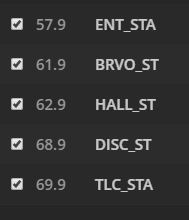


do you need more?
From what I see in the screenshots have you attempted to match up the missing channels? For example, the 107.69-79 are they actual channels that can be viewed? If you click on the checkbox by one of them it will enable the channel and you can select the channel to match it with in the dropdown list to the right. This looks similar to the other user that posted above that also had a bunch of channels all combined (multiplexed) into a single channel.
Yes I have tried to do that but the stations are incorrect. For instance the guide says the property brothers is on but if I tune to that. Station a different network and show will be on.
Any device I have ever used to scan the cable will find the qam stations this does. Not seem to actually do a scan if it did I could match the left and right and be good to go
Plus many station are missing on the left are missing the stations should start at 2
Ok I have cancelled myplex pass renewal if this gets fixed before January. 22 I will renew otherwise dvr is not ready for prime time!!!
Sure is unfortunate that it is impossible to get support. For a product with such potential
@krbaugh said:
Sure is unfortunate that it is impossible to get support. For a product with such potential
Plex staff doesn’t usually respond here… I went three months and ended up having to solve my issue myself. Most of the people commenting are just people trying to help.
It’s likely you’ll have to map all of the 80+ channels yourself… and with the way Plex is made, it’d be an absolute pain. But I might have a solution for you.
You could try dumping unmapped channels from the database (it’s even likely that Plex is showing them as is too, so this step might not be required), and go to sage tv. Since that’s working fine for you, just check the 1008.33 or whatever numbers, and match them up on Plex.
The majority of the channels coming from his cable provider appear to be all combined (multiplexed) into a single channel number 107 with each individual channel identified as a sub-channel: 107.69, 107.70, 107.71, etc. this was seen in his screenshots above and in the logs provided. Pretty much the same situation you had I believe. Saw the same type of entries in his log file trying to determine matches for the 107 channels, your 1008.
I dont mind doing the mapping but I don’t see a way to do it since the channel scanning is not working properly
I do appreciate you guys trying to help!!
@johnm_ColaSC said:
The majority of the channels coming from his cable provider appear to be all combined (multiplexed) into a single channel number 107 with each individual channel identified as a sub-channel: 107.69, 107.70, 107.71, etc. this was seen in his screenshots above and in the logs provided. Pretty much the same situation you had I believe. Saw the same type of entries in his log file trying to determine matches for the 107 channels, your 1008.
I really can’t tell if that’s the same problem or not as Plex did manage to do some of them fine for me. From what has been posted, it just looks like he has a bunch of service-xxx-xxx channels that are hard to map.
@krbaugh said:
I dont mind doing the mapping but I don’t see a way to do it since the channel scanning is not working properlyI do appreciate you guys trying to help!!
Is it just that the channels are missing completely from the left side? When you do a scan, does Plex show that it finds like 80+ channels, then immediately drop them after the scan? Or, are you waiting for the scan to complete, and it finds no channels at all throughout the entire scan?
Are you sure all of the channels are QAM and not NTSC mixed in? (Plex doesn’t support NTSC at the moment, which is separate from ATSC [antenna])
You said earlier that the channels on the left are not matching correctly to the right, is that because the name that is being shown isn’t actually what it is on the right? If so, it could be an issue with out of data channel information from your provider and you just have to fix the issue by finding the correct channel on the right. It could also be possible the EPG is just wrong, and that’s a gracenote issue. I’m not entirely sure which one of these is the problem you’re having at the moment.
@World177 said:
@johnm_ColaSC said:
The majority of the channels coming from his cable provider appear to be all combined (multiplexed) into a single channel number 107 with each individual channel identified as a sub-channel: 107.69, 107.70, 107.71, etc. this was seen in his screenshots above and in the logs provided. Pretty much the same situation you had I believe. Saw the same type of entries in his log file trying to determine matches for the 107 channels, your 1008.I really can’t tell if that’s the same problem or not as Plex did manage to do some of them fine for me. From what has been posted, it just looks like he has a bunch of service-xxx-xxx channels that are hard to map.
@krbaugh said:
I dont mind doing the mapping but I don’t see a way to do it since the channel scanning is not working properlyI do appreciate you guys trying to help!!
Is it just that the channels are missing completely from the left side? When you do a scan, does Plex show that it finds like 80+ channels, then immediately drop them after the scan? Or, are you waiting for the scan to complete, and it finds no channels at all throughout the entire scan?
The scan does not seem to change anything
there are a few channels on the left that look right but most of them are missing. and the ones that are there are wrong
Are you sure all of the channels are QAM and not NTSC mixed in? (Plex doesn’t support NTSC at the moment, which is separate from ATSC [antenna])
Cable has both qam and ntsc my tunners can only see the QAM channels
You said earlier that the channels on the left are not matching correctly to the right, is that because the name that is being shown isn’t actually what it is on the right? If so, it could be an issue with out of data channel information from your provider and you just have to fix the issue by finding the correct channel on the right. It could also be possible the EPG is just wrong, and that’s a gracenote issue. I’m not entirely sure which one of these is the problem you’re having at the moment.
If I go through and match everthing that shows up on the left with the right nothing seems to be the right channel
it is just a HUGE mess. If I could see the actual channels on the left I could match the ones on the right
@krbaugh said:
@World177 said:
@johnm_ColaSC said:
The majority of the channels coming from his cable provider appear to be all combined (multiplexed) into a single channel number 107 with each individual channel identified as a sub-channel: 107.69, 107.70, 107.71, etc. this was seen in his screenshots above and in the logs provided. Pretty much the same situation you had I believe. Saw the same type of entries in his log file trying to determine matches for the 107 channels, your 1008.I really can’t tell if that’s the same problem or not as Plex did manage to do some of them fine for me. From what has been posted, it just looks like he has a bunch of service-xxx-xxx channels that are hard to map.
@krbaugh said:
I dont mind doing the mapping but I don’t see a way to do it since the channel scanning is not working properlyI do appreciate you guys trying to help!!
Is it just that the channels are missing completely from the left side? When you do a scan, does Plex show that it finds like 80+ channels, then immediately drop them after the scan? Or, are you waiting for the scan to complete, and it finds no channels at all throughout the entire scan?
The scan does not seem to change anything
there are a few channels on the left that look right but most of them are missing. and the ones that are there are wrong
Just to be clear though, you’re not having an issue like this?


Are you sure all of the channels are QAM and not NTSC mixed in? (Plex doesn’t support NTSC at the moment, which is separate from ATSC [antenna])
Cable has both qam and ntsc my tunners can only see the QAM channels
You said earlier that the channels on the left are not matching correctly to the right, is that because the name that is being shown isn’t actually what it is on the right? If so, it could be an issue with out of data channel information from your provider and you just have to fix the issue by finding the correct channel on the right. It could also be possible the EPG is just wrong, and that’s a gracenote issue. I’m not entirely sure which one of these is the problem you’re having at the moment.
If I go through and match everthing that shows up on the left with the right nothing seems to be the right channel
it is just a HUGE mess. If I could see the actual channels on the left I could match the ones on the right
Sometimes the numbering gets off when Plex matches them because of duplicates, though I’m not sure if that’s your issue or not. Are you able to get Sage TV to show the physical channels in similar fashion to how Plex is showing them? For example, instead of AMC, it’d be like AMC 108.43. Then in Plex, you could match Service 108-43 to AMC.
@World177 said:
@krbaugh said:
@World177 said:
@johnm_ColaSC said:
The majority of the channels coming from his cable provider appear to be all combined (multiplexed) into a single channel number 107 with each individual channel identified as a sub-channel: 107.69, 107.70, 107.71, etc. this was seen in his screenshots above and in the logs provided. Pretty much the same situation you had I believe. Saw the same type of entries in his log file trying to determine matches for the 107 channels, your 1008.I really can’t tell if that’s the same problem or not as Plex did manage to do some of them fine for me. From what has been posted, it just looks like he has a bunch of service-xxx-xxx channels that are hard to map.
@krbaugh said:
I dont mind doing the mapping but I don’t see a way to do it since the channel scanning is not working properlyI do appreciate you guys trying to help!!
Is it just that the channels are missing completely from the left side? When you do a scan, does Plex show that it finds like 80+ channels, then immediately drop them after the scan? Or, are you waiting for the scan to complete, and it finds no channels at all throughout the entire scan?
The scan does not seem to change anything
there are a few channels on the left that look right but most of them are missing. and the ones that are there are wrongJust to be clear though, you’re not having an issue like this?
no I get the same number of stations before and after the scan
Are you sure all of the channels are QAM and not NTSC mixed in? (Plex doesn’t support NTSC at the moment, which is separate from ATSC [antenna])
Cable has both qam and ntsc my tunners can only see the QAM channels
You said earlier that the channels on the left are not matching correctly to the right, is that because the name that is being shown isn’t actually what it is on the right? If so, it could be an issue with out of data channel information from your provider and you just have to fix the issue by finding the correct channel on the right. It could also be possible the EPG is just wrong, and that’s a gracenote issue. I’m not entirely sure which one of these is the problem you’re having at the moment.
If I go through and match everthing that shows up on the left with the right nothing seems to be the right channel
it is just a HUGE mess. If I could see the actual channels on the left I could match the ones on the right
Sometimes the numbering gets off when Plex matches them because of duplicates, though I’m not sure if that’s your issue or not. Are you able to get Sage TV to show the physical channels in similar fashion to how Plex is showing them? For example, instead of AMC, it’d be like AMC 108.43. Then in Plex, you could match Service 108-43 to AMC.
Yes Sage TV show the physical Channels
2 -50ish are missing in Plex
SageTV also shows the 107 channels but they are the protected channels and I can’t use them
@krbaugh said:
@World177 said:
@krbaugh said:
@World177 said:
@johnm_ColaSC said:
The majority of the channels coming from his cable provider appear to be all combined (multiplexed) into a single channel number 107 with each individual channel identified as a sub-channel: 107.69, 107.70, 107.71, etc. this was seen in his screenshots above and in the logs provided. Pretty much the same situation you had I believe. Saw the same type of entries in his log file trying to determine matches for the 107 channels, your 1008.I really can’t tell if that’s the same problem or not as Plex did manage to do some of them fine for me. From what has been posted, it just looks like he has a bunch of service-xxx-xxx channels that are hard to map.
@krbaugh said:
I dont mind doing the mapping but I don’t see a way to do it since the channel scanning is not working properlyI do appreciate you guys trying to help!!
Is it just that the channels are missing completely from the left side? When you do a scan, does Plex show that it finds like 80+ channels, then immediately drop them after the scan? Or, are you waiting for the scan to complete, and it finds no channels at all throughout the entire scan?
The scan does not seem to change anything
there are a few channels on the left that look right but most of them are missing. and the ones that are there are wrongJust to be clear though, you’re not having an issue like this?
no I get the same number of stations before and after the scan
Are you sure all of the channels are QAM and not NTSC mixed in? (Plex doesn’t support NTSC at the moment, which is separate from ATSC [antenna])
Cable has both qam and ntsc my tunners can only see the QAM channels
You said earlier that the channels on the left are not matching correctly to the right, is that because the name that is being shown isn’t actually what it is on the right? If so, it could be an issue with out of data channel information from your provider and you just have to fix the issue by finding the correct channel on the right. It could also be possible the EPG is just wrong, and that’s a gracenote issue. I’m not entirely sure which one of these is the problem you’re having at the moment.
If I go through and match everthing that shows up on the left with the right nothing seems to be the right channel
it is just a HUGE mess. If I could see the actual channels on the left I could match the ones on the right
Sometimes the numbering gets off when Plex matches them because of duplicates, though I’m not sure if that’s your issue or not. Are you able to get Sage TV to show the physical channels in similar fashion to how Plex is showing them? For example, instead of AMC, it’d be like AMC 108.43. Then in Plex, you could match Service 108-43 to AMC.
Yes Sage TV show the physical Channels
2 -50ish are missing in Plex
SageTV also shows the 107 channels but they are the protected channels and I can’t use them
Sorry, for some reason I thought physical channels were a different thing.
The first thing I would suggest doing is installing WinTv. It should display all of the channels exactly how Plex is. You can then go into the settings on it, and check the physical channel (settings->channel information->details). It’ll be the exact same channel as Sage Tv (I checked on my computer) Then save that name with that number on Plex. And just continue through your long list.
If you’re still missing channels after that, it’s likely because Plex doesn’t support some format or another. It could be like problems with mixing QAM 64 and QAM 256. If you wanted to check for that, Hauppauge offers a tool for it. (which checks signal strength, but also reports how it’s being broadcast)
Since so many physical channels are missing in Plex even if I had the correct pysical channels how would I get them installed on Plex
I was looking at the database there are 2 rows with tv.plex.grabbers.tunerservice I have attached the data from both rows

@krbaugh said:
I was looking at the database there are 2 rows with tv.plex.grabbers.tunerservice I have attached the data from both rows
It seems somewhat unusual that you have two rows with that. Do you have multiple tuners or something? My database only had one, so it’s not something I can easily test for.
If you replace the data from the test.txt with: <?xml version="1.0" encoding="UTF-8"?><MediaContainer size="237"><Channel ch - Pastebin.com
What happens? Does it show more channels to enable? (I might have messed up the syntax, which will cause it to display 0 channels to enable)
How many channels does SageTv have? Because this is showing 237 channels (with a bunch of encrypted ones)
@krbaugh said:
Since so many physical channels are missing in Plex even if I had the correct pysical channels how would I get them installed on Plex
I’m not exactly sure how. I’ve looked online for some sort of documentation to go off of… but I can’t really find anything relevant. and Plex isn’t really open source for me to check how it handles the channels. It’s a combination of the physical channels, frequencies, and other data. To manually tune would require knowing exactly how tuning is occurring normally.
@krbaugh said:
Since so many physical channels are missing in Plex even if I had the correct pysical channels how would I get them installed on Plex
Just to say this again, if it’s just that the channels aren’t showing names on the left, you just need to figure out what it is on the right and that’ll fix it. But if you’re actually missing channels on the left side (not just wrong names) then there could be many different reasons for that. And you’ll need to figure out why those channels aren’t being added. (are they NTSC, Antenna, something other than QAM 256, encrypted, etc?)
ok that help a lot I now have 34 channels that all seem to work with the guide.
All of the local channels that I get from qam cable are missing but Most everything else seems to be there
The other thing I have noticed the video size is small I can’t do a full screen size on my windows 10 PC’s
