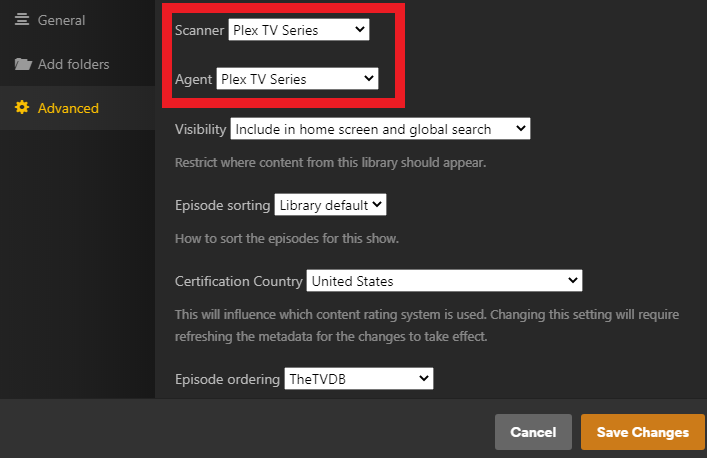
I just finished “Ripping” my new “Friends” Blu-Ray Collection. When I upload it to Plex, the agent recognizes the TV Show “Friends,” but some of the episodes are assigned incorrectly.
Season 4 assumes there is only one “Season Finale,” but it is two episodes. Season 6 assumes that episode 13 & 14 are one episode, and names episodes 14-23 incorrectly, and doesn’t even name episodes 24 and 25.
I used to be able to select a different agent, like TVDB, and it would rescan through the files and name them correctly, but I don’t seem to have that option now.
What gives?
You may have a combination of a few different problems.
The first thing you should do is switch to the TVDB show order
Make sure your shows match what TVDB has here
https://thetvdb.com/series/friends#seasons
Click the pencil on the show poster and go to advanced
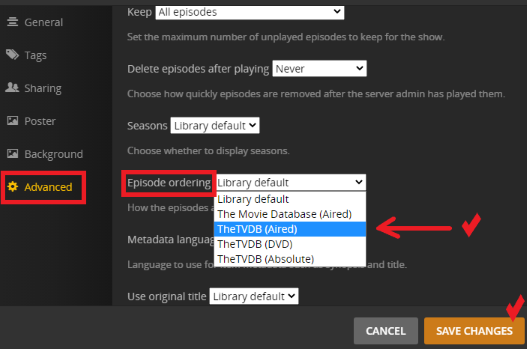
Refresh the metadata if it doesn’t do it automatically
Check your mismatched episodes again
If that doesn’t fix everything review this support article on how to name multipart episodes
https://support.plex.tv/articles/naming-and-organizing-your-tv-show-files/
There is a DVD order on TVDB also which you can check. At first glance it looks identical the the “aired” order but it might match your DVD. You’ll have to look
I did that, and it doesn’t change anything. I also looked very closely at the order on TVDB. My files are EXACT. Nothing changes.
I am starting to think there is a problem with this new version of Plex… I can’t get “theme music” to work either, even though it is checked off in the settings.
How exactly are the episodes named?
I just rebuilt one of my servers a few days ago and everything I added got matched correctly
If you naming is correct the only thing I can suggest is to Plex dance ← click
If that doesn’t work, create a test library using the TVDB show order and just point it at the Friends folder only to see if it works

This is just Season 04. But you can see that things are named correctly.
I just went back over the TVDB Site for the thousandth time. I just noticed something. The episodes that Plex is always a “Part 2” of a 2 part episode, but they have the same “Air Date” on TVDB.
If I would venture a guess… it seems as if Plex is pulling data from TMDB and not TVDB. Regardless of which one you pick, or which agent you have activated.
Yeah I could see that the shows you were having trouble with were all the shows that are different between TVDB and TMDB
What agent are you using now?
The screen shot I showed you above is only for using the new agent. If you are using one of the legacy agents those settings don’t apply to you and will do nothing
3 dots next to the library → Manage Library → Edit → Advanced
If you switch your agents back and forth it can corrupt a library which is why I suggested you try it in a newly created one just to test it