I’m having the same issue on my windows plex server (and clients)
It displays “Starting Soon” and “Upcoming shows” but no “Shows on Now”. It’s probably been like this for about a month. I was hoping it might be resolved in a later update but now I’m currently on the newest server 1.18.5.2309 and it still has not been resolved.
Are there any fixes in the works for this or is my only option to downgrade my server?
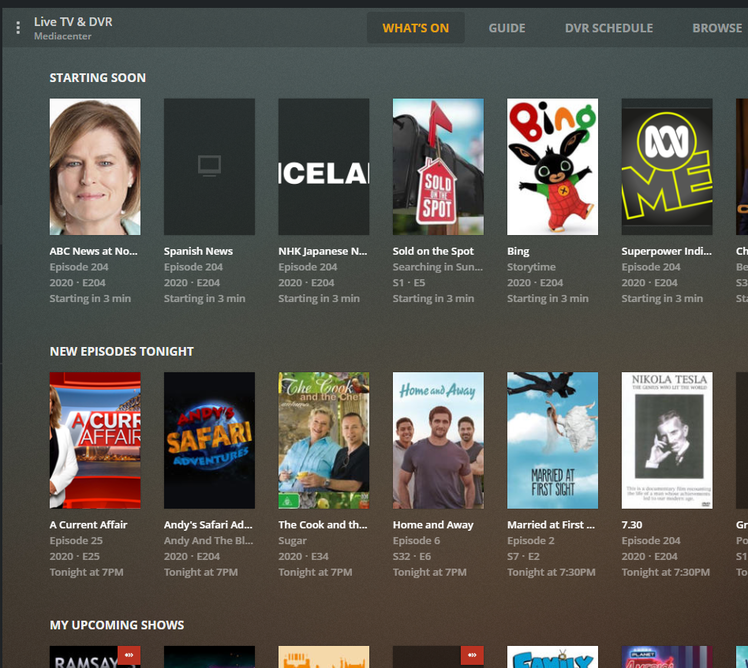
1.18.6 is the most recent beta release; can you try that and see how it works?
Sorry for the late reply.
I updated to the latest beta version 1.18.6.2368 and the issue still persists.
Trentten, did you ever resolve your problem? You had the issue I had in the beginning. For some reason, I feel like that particular issue self-resolved. I don’t know why it started or why it went away. Downgrading to 1.18.3 resolved my second issue, which only seeing a few “On Right Now” selections without a “More” option for the other channels. For the moment, everything seems stable. At one point, I tried going back to the latest version, and my secondary problem returned. So I’m still hanging out on 1.18.3. I see 1.18.7 is out now, so I’m thinking about upgrading to that. Have you tried it yet? If so, how’s it going for you?
I just installed 1.18.7 and it has fixed the missing “more” button issue.
Is it not What’s On?
Or you look at the timeline in Grid view


Also if you enable enhanced guide you will get a timeline with What’s on at bottom posters.

@ihate2sayit @darcilicious I installed the new beta 1.18.7.2415 and it has now resolved the issue. I noted they specifically mentioned fixing this issue in the changelog too.
@SE56 Thanks for the advice. I already had ‘Enhanced Guide’ On and the Grid worked fine but there is no grid version in Windows Plex Player so it made it impossible to see or turn on what was currently playing. The new beta version has now resolved the issue.
Thanks for your help everyone.
1 Like
trentten, thanks for the update. I guess I’ll give it a whirl. It’s always nice to be on the same version as everyone else. LOL.
Well, unfortunately, my missing “more” button returned when I installed 1.18.7. Sigh … I’m starting to think I will be on 1.18.3 for a looooooong time. I’m on a Mac Mini (Mid 2011) running Mac High Sierra (10.13.6). Maybe it’s somehow related to the Mac OS or the computer I use, but for some reason 1.18.3 seems to be the only Media Server version that works for me. I guess I’ll keep trying each new update as it’s release hoping that the bug is fixed at some point. But for now, I’m glad the old version is an option.
I too am having this issue. LG Web os. Can’t see what’s on section
My missing More… button is also back in 1.18.7 but it only shows a small number of channels to pick from in More and of course the one I am looking for at the time isn’t listed. Reverting back to 1.18.3 gets it back to normal.
I had this same issue with the update from 2 months ago. Don’t remember the exact version either 1.18.2.2058, 1.18.4.2171 but it’s when the verbage was changed to What’s On. Tried the app on two different make smart TV’s with the same result. I would only have a few channels under Shows On Now and no More … button. I followed instructions I found under another topic to downgrade to the previous working version which for me was 1.18.2.2029 and I was good.
Here we are a couple months later and I just tried installed the latest update, figuring this issue was resolved and again I came searching for a solution to the same problem.
There seems to be corruption during the install/update that allows the media server to believe the number of valid channels is now way less than before and they are excluded from the What’s On listing. With the channel list being smaller we also lose the more button since there is nothing else to show.
To fix, I had to rescan channels for all of my tuners and save. Once I did this, closed and reopened the Plex app on my tv, more channels were displayed along with the more button to get to all my channels as before. If this doesn’t work for you, add the step of unchecking and rechecking the channels in the scan list.
Same thing here. I had to downgrade to Version 1.18.2.2041 - missing “More” button and it only shows a few chanels for Live TV & DVR - Playing Now.
Well, it’s me — the original poster. After downgrading to 1.18.3, I was happily living in the past. My “more” button was back and my “on right now” was showing shows that were currently airing. But now I’m back to my original problem. I can still see my “more” button, but all of my “On right now” options are future airings, so everything is always “starting” in so many minutes, but never actually on. I think maybe I updated to the latest version of Plex Media Player, so that could have caused it. But I pulled up an old one I had and had the same problem. While I’m in limbo, I thought I might as well update to the latest version of the server and see if that fixed things, but the “check for updates” tab is greyed out, while the “what’s new” info tells me all about the latest version. Sigh … I may have to try a completely fresh install without losing all of my meta data. If I try that, I’ll back it up first. If I go that route, I sure hope it solves the problem. Oy, I miss my trouble free Plex days. I hope this gremlin eventually dies.
Ok, just by way of an update, I used the process I outlined above earlier to replace the contents with a newest version of the server that I had. That solved my “starting” soon but never arriving problem, but re-introduced my missing “more” button. So I downgraded back to the land of 1.18.3 again and all is well. Both problems are resolved. For now, I think I’ll probably stay here where it’s safe. (P.S. While I was on the newer server, I tried @loureed’s solution for rescanning the channels. Unfortunately, that didn’t fix the problem for me. So downgrade-ville it is for me.)
This topic was automatically closed 90 days after the last reply. New replies are no longer allowed.
