Hello there,
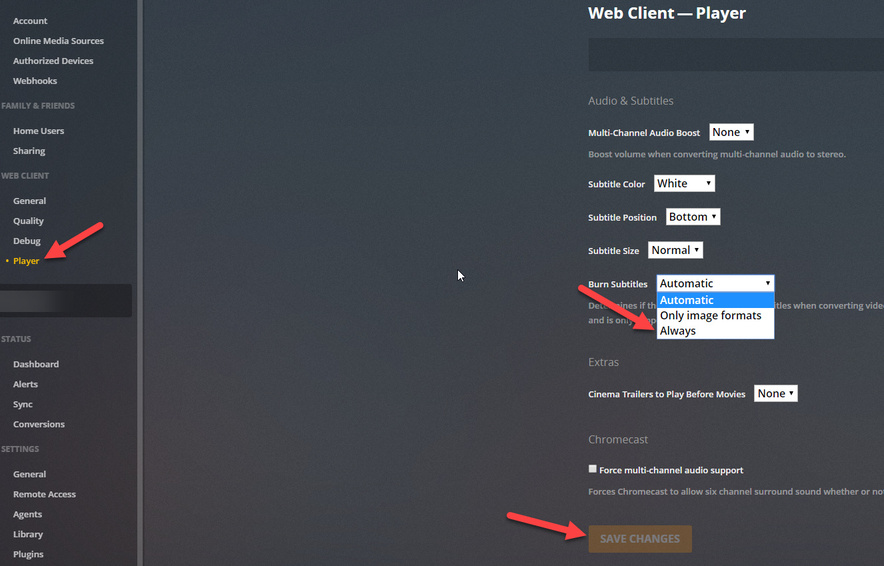
Found myself in the same situation, I changed the burn subtitle option to “Always” and it worked.
I am using the Xbox one Client.
Hello there,
Found myself in the same situation, I changed the burn subtitle option to “Always” and it worked.
I am using the Xbox one Client.
Same problem here.
First the Windows player app was ok, but not anymore.
I also have this issue, running on the latest version off PMS…
How can this bug be years old?! Please fix!
Bug seems to only appear on web client via browser. My config is Chrome on Windows 7 64 bit.
No problem with subtitles on the same file using the Plex Windows Desktop app.
No, it’s not a browser problem. It seems to be happening when the file is being transcoded from one container to another, like MKV to MP4. Players that can’t direct play MKV files, like the Xbox app and web app, will have the same issue.
Still having subtitle problems in Chrome. I’m on the latest version of Plex Media Server too. Been following this thread for the past year hoping there would be a resolution one day.
I was surprised to find this old thread and issue still unfixed.
I’m running Plex on Windows 10 trying to stream locally through the web-app. The subtitles disappear after only a few seconds, regardless of how much I resume/restart/pause/play from beginning/etc. Basically regardless of what I do, the subtitle will be gone in a few seconds. The files I’m play are .avi and the subtitles are .srt.
The only way to solve the issue is to burn the subtitles which is inconvenient since it requires transcoding and it also is a setting which is forgotten every time I close the browser and thus needs to be set every time I start my laptop.
Is there any plan on fixing this in the near future or should I start to seriously consider Plex alternatives?
Also having this issue. Changing burn subtitles to Always fixes it, but then from what I understand there is no such thing as direct play, it has to transcode everything.
Someone earlier wrote this:
“Yeah who cares if selecting to always burn subtitles fix that? It’s forgot after every log out and I have to tell users to keep enabling this ■■■■.”
That’s what I’m experiencing as well. Every time I restart my browser, I need to change the setting again. I’ll admit though, I’m no longer using Plex because it was much too difficult for me to remember and it severely damaged my viewing experience. I’m legitimately surprised to see such an old bug persist.
Which browser were you using? Did you try emptying the cache and delete the cookies etc. ?
I’m using Chrome. Are these settings cache/cookie dependent? If so, it could maybe be explained by the fact that my browser automatically clears cookies and cache every time I close it.
I have similar issue. Everytime I watch something (tv show/movie any codec) I lose subtitles in 3/4 of the video. Close to the end, it shows line of subtitles with timing and some symbols and then subtitles stops working. I tried to install plex on different VM, it worked like 2 days and now it has the same issue.
Used to run plex on Ubuntu 18.04, now on Ubuntu server 18.04. Watching plex in Apple TV app, safari and chrome. Happens in all these players.
Yes. I’m pretty sure that explains it.
Have had this issue myself for a while now. Some mkv-movies with srt-subs loose the subs like 3/4 out in the movie. I play the movie on Samsung TV, with the latest PMS running on Windows 10 x64, and latest Plex Samsung TV App for 2018 TVs. If i change subtitle track, the subtitle works for like 10 seconds, then disappear. If i exit the movie, then resume it again, the subtitle works for like 10 seconds, then disappear.
Really frustrating!
Same issue here, for about 1-2 weeks now. Subtitles disappear after a few seconds.
Is it going to be fixed soon? I have had so many issues with plex, I’m slowly getting to the point where I ll have to move on to something else.
ok guys, i love this app but as im not a english speaker i need subtitle for me and my relatives,can u fix pls this problem or i cancel my subscription,shame on u plex,such a awsome ap and u can’t fix a problem since months now…
Same issue here, only started recently. Quite frustrating.
Looks like this bug has been ongoing for 2 years with limited attention from Plex.
Realistically, I reckon that hints the way forward would be to either live with it, or not use Plex?
Same issue here. Had this issue coming and going for years.
Same issue.
Running Plex Server v. 1.15.8.1163 on Windows Server 2019