Server Version#:DSM 7.1.1-42962 Update 1
Player Version#: 1.21.0-3744
Recently my Synology was updated to DSM 7.1.1-42962 Update 1.
Before the update, PMS would start with no problems.
Once updated when I tried to open the app (from my Synology home page) I would get a connection time out after about 30-40 seconds.
I tried uninstall and manually install but I got an incompatible error.
I checked the firewall and my router to make sure the port is open.
Any ideas on how I can troubleshoot this?
Thanks
Ray
or did you somehow get both installed/confused?
(Accidentally downgrading to 1.21.0.3744 will make a mess such as this)
Oct 19, 2022 19:11:45.067 [0x7f8bed99b8] INFO - Plex Media Server v1.29.0.6244-819d3678c - Synology DS418 aarch64 - build: linux-aarch64 synology-dsm7 - GMT -05:00
Oct 19, 2022 19:11:45.067 [0x7f8bed99b8] INFO - Linux version: DSM 7.1.1.42962-1, language: en-US
Oct 19, 2022 19:11:45.068 [0x7f8bed99b8] INFO - Processor: 4-core AArch64
Oct 19, 2022 19:11:45.068 [0x7f8bed99b8] INFO - Compiler is - Clang 11.0.1 (https://plex.tv 9b997da8e5b47bdb4a9425b3a3b290be393b4b1f)
Oct 19, 2022 19:11:45.068 [0x7f8bed99b8] INFO - /volume1/@appstore/PlexMediaServer/Plex Media Server
Oct 19, 2022 19:11:44.149 [0x7f8fe74038] DEBUG - BPQ: [Idle] -> [Starting]
Oct 19, 2022 19:11:44.168 [0x7f8fe74038] DEBUG - FeatureManager: Using cached data for features list
If you have a big Plex library, which it sounds like you do, it can take as long as 2 WEEKS ! (One customer had a 500 GB Plex shared folder – and needed over 2 weeks UNINTERRUPTED)
The tool never ‘hangs’. It gets the list of files in the shared folder and, one by one, processes each.
Some basic checks at this point.
In the Plex shared folder, Do you have?
Library / Application Support / Plex Media Server
Library / Application Support / Plex Media Server / Preferences. xml
Library / Application Support / Plex Media Server / Plug-in Support / Databases / <A bunch of .db files>
Did you ever customize (upload) posters to the server or did you use / select from those provided ?
Strangest thing. I re-read your reply and realized that I had not checked for the “Migration.log” in the Shared folder area (/PlexMediaServer, /home, /homes, ).
I did a search in all the folders and cannot find a “Migration.log” I even tried searching for the parts of the name “mig”, “Mig”, “log” etc. I cannot find a “Migration.log” file.
So I looked for the following:
Library / Application Support / Plex Media Server -
**could not find under /PlexMediaServer
Library / Application Support / Plex Media Server / Preferences. xml -
**I found a Preferences.xml file BUT it is under /PlexMediaServer/AppData/PlexMediaServer
Library / Application Support / Plex Media Server / Plug-in Support / Databases / <A bunch
**Found 10 .db files
One last item, I did change a few of the posters on my music albums, but a relatively small amount compared to the number of files I have.
Migration.log will only exist in the “Plex” shared folder. I use the Plex shared folder because that’s the only place I know will exist in DSM 7 when I start migration.
Let’s look only at the “Plex” shared folder. What exists in PlexMediaServer does not matter right now.
In the Plex shared folder, If migration ran
– “Migration.log” will exist
– “Library/Application Support/Plex Media Server” – will be gone
– “Library/Application Support” – will be gone if you didn’t put anything in there.
– “Library” will be gone – if you didn’t put anything in there.
If you still have “Library / Application Support / Plex Media Server”
–AND–
[“Plex” shared folder] - “Plex” does not exist. It may be that I’ve set my folders up too leniently as all my folders are considered shared by the Control Panel. That’s why I searched them all. Just was not sure.
This is what I have:
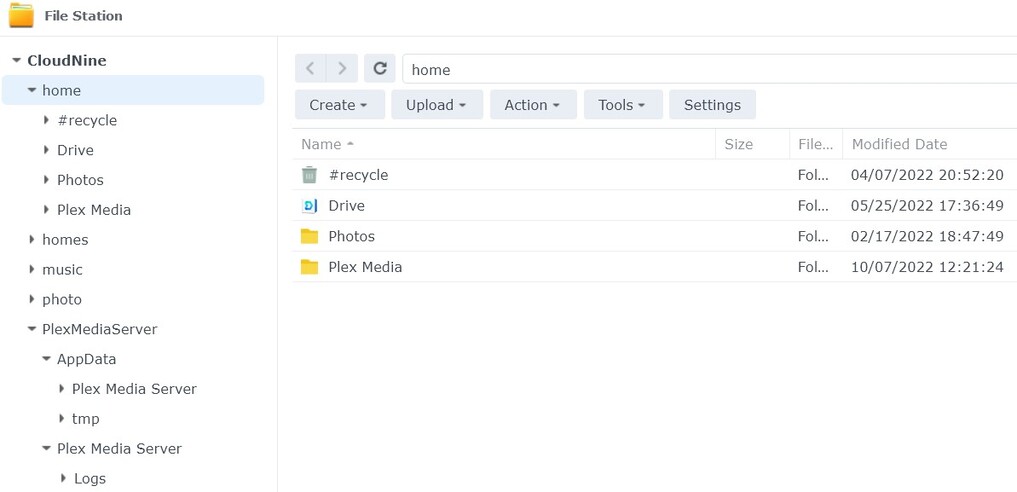
1a.) /home/Plex Media
1b) /PlexMediaServer
But a plain “Plex” folder does not exist.
I do not have a “Library / Application Support / Plex Media Server” folder
I have a /PlexMediaServer/AppData/Plex Media Server folder
Ok. I do have a “Crash Reports” folder AND a “Plug-in Support” folder.
Not sure if you realize this but I am not upgrading from DSM 6 (at least to my knowledge)
When I installed DSM back in March, it was DSM 7.
Since then DMS 7 has updated twice. With the most recent update, Plex stopped working.
If you installed the DSM 6 Plex app, you will have a Plex shared folder.
The only locations I support are the “Plex” share (DSM 6) or the “PlexMediaServer” shared folder (DSM 7)
When migrating from DSM 6 → DSM 7.
I expect the PMS server to exist in the official “Plex” shared folder.
I expect the structure “Library/Application Support/Plex Media Server”, with all the subfolders and files to exist under Plex Media Server per standard.
I am very confused at what you have
There is no /home on DSM (6 or 7). Did you create a shared folder named “Home” ??
I can tell you the exact file system structures used if you wish.
It might be possible to move data around.
It also might just be best make other arrangements.
Hey thanks Chuck,
But I get a “connection has timed out” no matter how many times I try it.
Took a look at the logs and It does say successfully installed.
The crazy high CPU has stopped.
OK. I believe I found the problem.
I temporarily removed the deny all rule from the firewall and Plex started.
When I created the DSM 7 package, I wanted to make something that was more obvious than “Library/Application Support” and all that old baggage from the old DSM 6 package.
That’s how I came up with:
Package name is “PlexMediaServer” (forced change)
Make a “PlexMediaServer” shared folder (forced change there too so pick a good name)
Fix the directory structure so folks don’t think “Library” means to put their media in there (which was almost always fatal to PMS)
Whose video did you find? There was a user who worked with me to make sure he understood how and why I did things this way on DSM 7/