Gotcha.
Whether the following will actually work as a fix for the current SMBv1-related issue in Plex hasn’t been confirmed yet.
If you are going to perform it, please share your experiences.
At least it will help you to avoid the old, proven unsecure SMBv1 protocol (which even Microsoft is disabling on fresh Windows installs now.)
Basically it works like this:
- If the device which is acting as the file server doesn’t support any version of SMB other than v1, check if it can support NFS instead. Chances are good for any Linux-based NAS or other device.
- If Plex server is running on Windows with at least Windows 10, you can teach it to use the NFS protocol. Thus it won’t need to use SMBv1 to get to the media files.
How to activate NFS support in your NAS, I cannot tell you. You’ll have to find out for yourself. Peruse its user manual or go to the techical support website of the manufacturer.
After enabling NFS, you may want to reboot the NAS device.
Open the Windows file explorer and note down the name under which your NAS device is appearing in the network neighborhood.
In my example screenshot, this is the device marked in red:
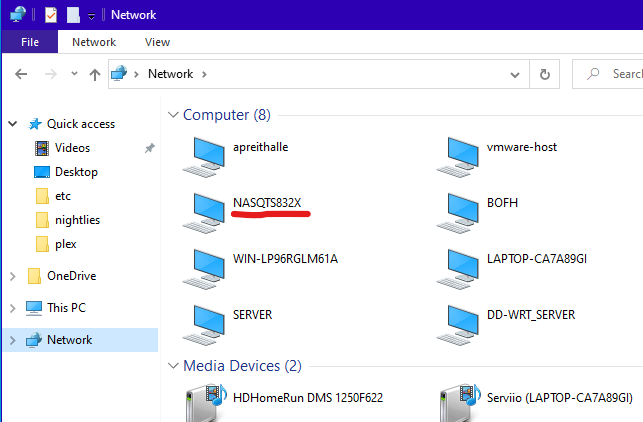
To activate NFS support in Windows, go to the Windows control panel/Settings app and search for “windows feature”. Click on the search result “Turn Windows features on or off”.
Now you should see something like this

Activate “Client for NFS”.
Consider disabling support for SMB 1.0 (unless you use it for other old devices as well)
click OK and
Let it do whatever it must do (download/configuration etc.)
Reboot the Windows machine
After the restart, open the Windows file explorer again and click once into the address bar (marked by the red X)

Now type 2 backslashes (\\) followed immediately by the device name of your NAS device.

(instead of the device name, you can also use the local IP address of the NAS device)
Press Enter.
(If you are now prompted for access credentials, you should consider creating a user account on your NAS device, which uses the exact same username/password combination as you are using to log on to the Windows machine.)
If you can now see a list of the file shares on your NAS box, consider the operation a success.
(your NAS device may appear twice on the network neighborhood. Once per SMB, and once per NFS. You can tell the NFS variety by the backslashes in front of the share names)
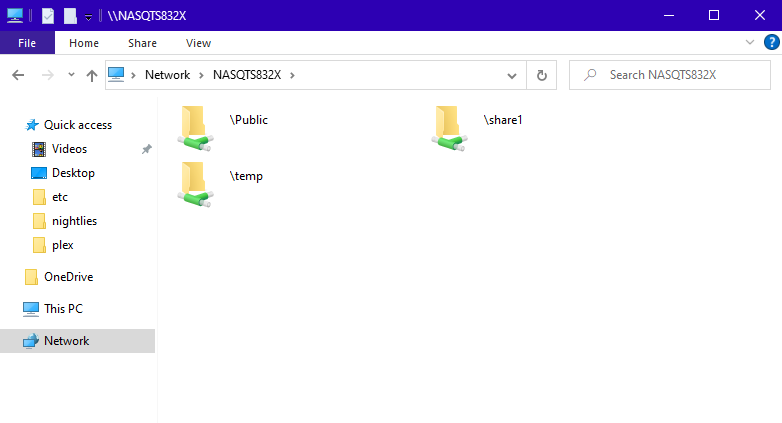
You can now dive down into the shares, to check access permissions
or make a right click on the share names to assign a local drive letter.
