Server Version#:1.15.5.993
Player Version#:Safari
Not sure but it was working fine the other day. All of a sudden today when I try to connect to my PMS via Safari on macOS, it says that it’s unreachable. I have tried restarting my NAS and have even updated to PM 1.15.5.994 as well to see if that fixes the problem. It shows that it’s running under my package tab in the DSM 6.2. I have no idea what has happened. Need help getting my PMS server back up. I really hope it’s recoverable and nothing bad has happened.
Thanks but my question is what caused this problem in the first place and what can I do to prevent it from happening again? It was working fine the other day and all of a sudden this happened. Out of my 5+ years of using PMS, I’ve never had this problem before.
It’s not working for me. I have tried to stop PMS and deleted the preference.xml file as well, neither method is working. Running the claim shell script is giving me:
It shows that its running in Package Center. But when i try to access it via web it times out.
Yes, I see the log in screen
I can log in but it doesn’t find my server.
It’s not responding at all.  Safari says:
Safari Can’t Open the Page “192.x.x.x:32400/web/” because the server where this page is located isn’t responding.
When you start up PMS, shouldn’t it create a new preference.xml
Still not working in either Chrome or Safari. I have tried multiple times and have waited like you said. There is no new Preferences.xml file at all. Something strange is going on.
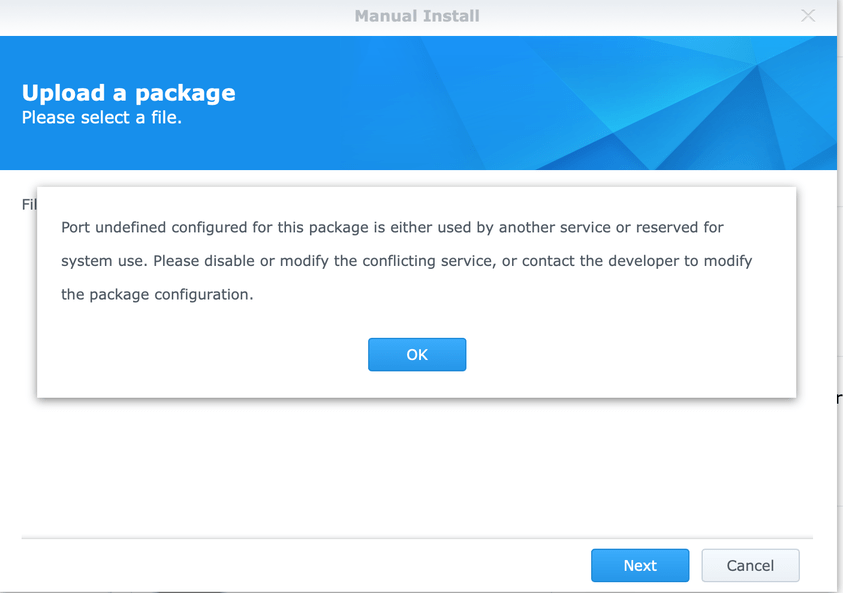
Okay tried to reinstall, still the same thing, web server is not responding. So this time I tried to uninstall and then tried reinstalling again. But then I get this:
I rebooted and retried to install and still get the same message saying that the port is already in use. So I have zipped my Logs folder.
Logs.zip (7.6 MB)
Roughly about 2-3 days ago.
Okay let me give that a try. Will report back.
It keeps saying Port undefined for this package is either used by another service or reserved for system use. Please diable or modify the conflicting service or contact the developer to modify the package configuration.
Okay I just went to where my physical NAS is and took my laptop and tried to do a shutdown and its not even shutting down. So this must explain why it must have not even rebooted all these time. Sigh. I can’t even shut it off.
Reinstall DSM? Does this mean I end up losing everything on my NAS and start all over from scratch? I hope not. I have a lot of stuff.
My drives are all showing up as healthy though. Do you think that there could be some services running that won’t quit? Could that be what’s preventing my NAS from shutting down/reboot?
That will be my last resort. In the meantime do you know how I can issue a command to list all or any process using port 32400 or any processes running plex? I would like to SSH into my NAS to kill those processes manually to see if I can reboot my NAS. I don’t know the commands to do this.
I finally managed to fix the problem. It was the docker app that was messing things up. I tried to shut it down but it wouldn’t. So I manually kill all the processes related to Docker and was finally able to restart the NAS. Then renamed Library.old back to Library and reinstalled the latest Plex Server again and it’s working. Sigh. It was that Docker package all along that was the cause of this entire mess in the first place.
That’s what I did. But now I have a new problem. Accessing my PMS from my iPhone shows everything as offline. But I am able to access it from my computer. Any ideas?
I was going to do that but I couldn’t find out where to sign out.