Hello,
This is my first posting and you’ll have to forgive my ignorance with many things computer related. Often I know just enough to get myself into trouble!
So I tried adding a new movie to my Plex last night and noticed things are not working properly. When I tried to open the server on my desktop (running Windows 10), I got a blank page and ‘404 Not Found’ message. I tried a number of times and got the same result.
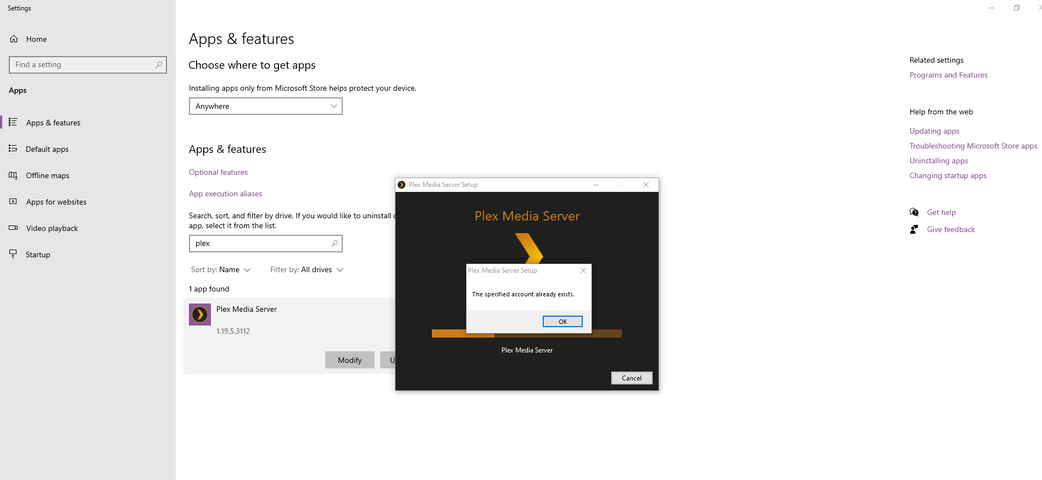
I tried to uninstall Plex so I could reinstall to see if that would fix the issue and for some reason the Plex Media Server wouldn’t uninstall from my machine. I kept getting this message popping up ‘The specified account already exists’ -
I’m happy to provide any other info that is needed, but I honestly don’t know what else to post at the moment.
I’m hoping someone might have an idea about how to get things working again. Any help is greatly appreciated. I know Windows used to have a Fix-it tool that was supposed to assist in deleting stubborn programs but it seems to be unavailable at the moment. I tried using the onboard Troubleshooter but unfortunately that didn’t solve anything.
Thanks!
Matt
