Server Version#: 1.24.4.5081
Player Version#: 1.24.4.5081
Hello
I have a huge problem, and i am pretty new to Plex but i had no problems until recently.
I got myself a new bandwith connection and a new modem, i bought myself a new router and i port forwarded 32400 in plex, but i keep getting the 328p quality no matter what i do. I have a friend who’s been helping me for many hours and his network connection trough Plex works perfectly, he’s got full 1080p or 4k on all movies that we share to one another, but i simply cant reach further than 328p, i have been searching google and nothing works
I did find out that i have some NoCodecvc1 problem in the debug log, and i have also checked that remote play works. I really hope anyone has a solution for this.
Could you share some more details under what circumstances you get that poor quality playback?
You mention in your post that remote access is working – that makes me guess you’re seeing this when playing your media locally?!?
As for your setup… are the server and clients in the same subnet inside your home network?
Hey @tom80H sure i can try, when i stream any movie from my pc to my ps5 or simply just play a movie from my pc from my friends plex server (not anywhere near me) i get super bad quality as in 328p resolution. I forwarded a ton of ports.
UDP: 1900 (access to the Plex DLNA Server)
UDP: 5353 (older Bonjour/Avahi network discovery)
TCP: 8324 (controlling Plex for Roku via Plex Companion)
UDP: 32410, 32412, 32413, 32414 (current GDM network discovery)
TCP: 32469 (access to the Plex DLNA Server)
All these ports are forwarded right now, i have disabled all my of firewalls, antivirus (defender) and removed almost anything that could block the signal to plex.
I am not sure i understand by what you mean by “server and clients in the same subnet” can you elaborate?
Subnets are basically networks inside a network that are treated as a separate area. Usually your home network consists of a single subnet – this is e.g. visible by all local IP addresses having the same 3 leading sections (e.g. 192.168.0.x). Some network components can create their own subnets inside your home network. This can happen if a WLAN access point is not configured in “bridge mode” (=reusing the router’s IP address management) but assigning its own IP addresses to devices in its subnet.
The reason I was asking this is to understand if your PS5 might be considered to be remote for your own server (that’s a consequence of having devices in different subnets). Plex apps have preferences for different video qualities for different streaming scenarios (e.g. local vs. remote). This is mainly to accommodate for bandwidth restrictions in a remote connection.
Can you check the video quality settings of the Plex app on your PS5 – have you configured playback quality for remote / internet streaming to Maximum (or Original) or is it set to a lower quality?
Yeah okay i guess i understand what you are going for. I dont have a router in bridge mode, i just bought a router, plugged it in my modem in port 1 to WAN in router, went in and set up my router and ports, i did the 32400 port and a bunch of others which is now disabled.
I kept getting 328p resolution no matter i did. I can change the resolution inside my ps5 in playback but nothing happens, it allows me to see other options instead of only “328p or lower”
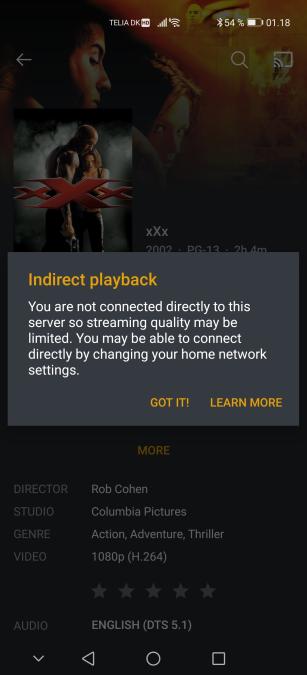
I also gave my phone a try to see if i could get any better resolution there, nope still 328p or lower and it gave me this
My point was not so much about your router/modem but other network components. Sometimes even a router creates different subnets (e.g. WLAN vs. LAN or 2.4 GHz vs. 5 GHz WLAN). Though in a router/modem setup you can end up with the modem establishing its own network and the router creating a subnet inside your modem’s network (even if it only has a single port).
Do you get that same message no matter if you play a video from your friends server or your own?
That depends.
All we know is that your clients cannot establish a direct connection to their server. This can be for a wide range of reasons which makes it hard to diagnose without details.
Basic troubleshooting for remote access issues is described in this support article.
And you are 100% sure it’s not from my side the problem is? I did follow that guide and made sure to follow it step by step. What details do you need from him, i guess i can try and help him do the same thing i did on my part
Remote access is about making your server available outside your network (e.g. for your friend or yourself streaming from your server while outside your home network). This is different from accessing a remote server… for that you don’t need much of a configuration (usually none).
He just needs to enable remote access and maybe open a port 32400 in plex for it to work?
My remote access is “Fully accessible outside your network”
you currently have Remote Access enabled through a manually-specified port. If you wish to disable Remote Access, you will need to remove your manual port forwarding from your router.
Your remote access and your friends have nothing to do with each other.
However… the basic steps are the same.
They should preferably create a manual port forward (automatic forwarding is possible but can be troublesome in certain situations). They need to specify the public port from the port forward in their router in Plex’ remote access settings (Manually specify public port...) – that should be it. They can pick that public port relatively free – no need to use the same port you’ve been using.
As the troubleshooting points out, there’s a number of things that can go wrong due to some external dependencies (e.g. if their ISP isn’t giving them a publicly routable IP address → CGNAT).
Right… so this isn’t really an easy fix i can hear it’s abit more complicated, Is there a way you can step by step try and guide me so i can guide my friend to what port needs to be forwarded, i just went in my router and did what the guide told me to (32400) port and well nothing happens, makes sense if the problem is at his place and not mine.
I don’t know if he has restrictions in his router, i know i did that is why i bought my own router and tried to port forward 32400 and others but nothing helped.
So i can get a direct connection to his server instead of a indirect connection
Also i bought a static IP from my ISP? guess that means who delivers my internet xD?
It can be complicated if there’s some weird configurations on the ISP side.
Basic setup should be very straight forward – but there’s dozens of different router/modem brands each with their very own way to configure a manual port forward. There’s websites which explain how to create a manual port forward on different models (e.g. http://portforward.com/)
In the end it always comes down to specifying a public port (can be pretty much any number – preferably in the range from 20000 to 50000) and the target (internal IP / port of their PMS, where the internal port is fixed to 32400).
Step 2 is even easier: open Settings > [Server Name] > Remote Access in Plex; check the Manually specify... option and enter the number of the public port you specified in the router.
It’s only if that’s not giving a direct connection when things can be troublesome.
Before digging into this… let them review their remote access configuration (router + Plex).
Right… now i am curious if i port forwarded it correct then, the “External Port” port can be anything from 20000 to 50000? and the internal port needs to be fixed to 32400 and then plug in the 32400 in remote access if i understood you correctly? I am sorry i have a hard time understanding what you mean, i aint the smartest when it comes to configuration and setting up routers, servers, ports, and more nerdy ■■■■ than just plug and play.