Server Version#: 1.41.0.9018
Player Version#: 10.22.0.1579
Recently, my Plex Media Server could not start when launching the Plex App (can’t say if following an update or not). Plex Media Server settings was not there in the settings list (only the header was there). I have tried with add PIN/remove PIN/restart issue proposed here and there in the forum as a solution but did not work.
Then decided to do a clean install from start and backup the database just after:
Factory reset of the shield
uninstalled Plex Media Server and Plex apps from shield
restarted Shield
installed Plex Media Server app from Play Store
Installed Plex app from paly store
installed the server, connect ti my plex account, add libraries, tweaked the metadata I wanted // Plex works
Waited for a 24 hours // Plex works
Optimized the database from server settings from PC
Went in server settings on shield and stopped server
Backed-up the database (did a full copy)
wanted to restart the server from server settings on shield
only the server setting are present, not the options within it → I cannot restart the server and use Plex
I have tried multiple solutions:
add PIN/remove PIN/restart issue → plex settings still not there
Yeah. So irritating. And how do you resolve it each time. Full re-install? I’m so fed up of doing that, especially that backups cannot be restored (since once back-up is done, we cannot restart the server).
Note: where it says " ip" that is the assigned ip address of your nividia sheild. Do not type ip.
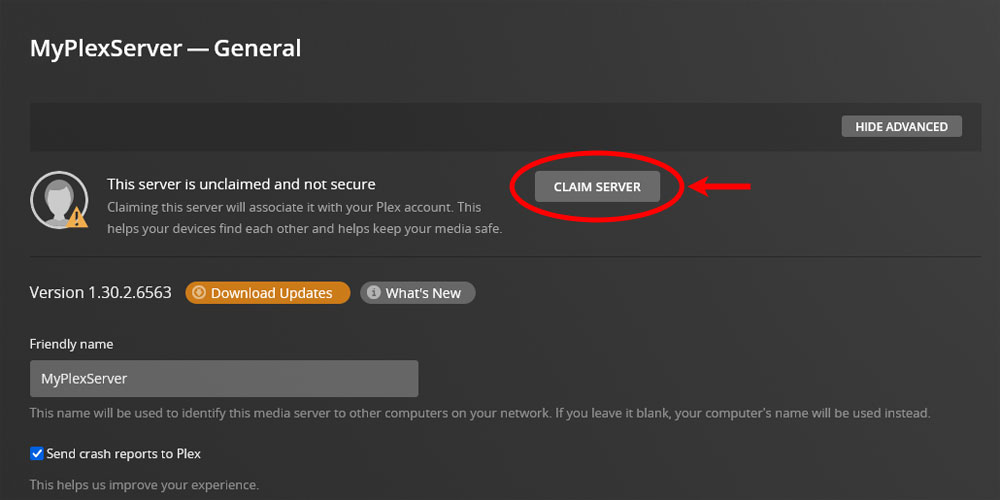
This will take you to the plex website via nividia sheild server using your laptop. Once I was there it showed me that I had a unclaimed server. Check under Settings and General if it doesn’t automatically load you on that page. Click claim server and your plex on nividia sheild should start working again. At least it did for me. Hope this helps.
Thanks, but I cannot do that (I’ve tried, I cannot connect) I guess because my server is off and I cannot start it again, precisely because I don’t have access to the settings of the server in the settings of the plex app.
What I am really looking for is a way to start my plex media server when I cannot access the settings. This drives me crazy.
Thanks. But I don’t have access to the server settings. If I go to plex web (or use a windows plex client for instance) and go to settings, I can go the “general” settings tab but of the plex web or the client, not the server. My server appears on the left, but with the “!” in a red triangle, saying that my server is not accessible. Because it is switched off and I cannot switch it on.
If Plex stops working (most common), yes. If the settings underneath “PLEX MEDIA SERVER” disappear (less common), I set/remove a/the PIN. If the entire “PLEX MEDIA SERVER” row disappears including the “PLEX MEDIA SERVER” heading (least common), I’ll contact @bernardoghazi again and hope he fixes it again.
On the SHIELD, can you please go to ‘settings’ > ‘apps’ > ‘see all apps’ > scroll down and click ‘show system apps’ > scroll down and click ‘plex media server’ > ‘force stop’ > ‘ok’. Then click ‘open’ > ‘open app’. The app will open.
Then, on your computer’s browser, go to {ip}.32400/web/ ({ip} is the local IP of your SHIELD, e.g. 192.168.15.15).
Does it prompt you to claim your server?
I did try that and have just tried it again. It doesn’t work. I cannot connect to anything through the browser and if I go to settings of the app, I still don’t have the ability to see the two icons below the “plex media server” settings.
The only thing that worked for me was to factory reset the shield then go into play store and stop plex media server and plex application from updating. This was the only way for me to see the plex media server settings.
I am in the exact same boat as @J_o_a_c_h_i_m. My server randomly stops and won’t restart. I followed the suggestion from @bernardoghazi, but trying to load Plex in the web browser to claim my server does not work (nothing loads at all), but the Shield does respond to a ping. My server occasionally works, but crashes during playback and most of the time it is gone completely. It’s been this way for months. How can I get it back without rebuilding my Plex library every week?