T-M-F-I
T-M-F-I
I told her, it’s not the speed of the equipment, it’s the location where it’s stored is the problem…
In the plastic cup on your nightstand? 
Yeah, right next to the Viagra bottle 
@trumpy81’s going to look at this thread later today and go WTF are these guys on about…
He’ll be jealous because he didn’t get the last word! LOL
I am getting a NEW 920+ on Friday - Should I use 6.2 or 7.0 DSM? If 7.0, is there procedures on how to install fresh?
The intention is to move my PMS from a Desktop to this 920+.
DSM 7.
If you’re doing a clean, fresh install - nothing special to do. Just install and let 'er rip.
Thanks - Using the BETA under packages, or using the latest direct from Plex.tv? Seems like Plex.tv has a high version number, and I assume using x64?
I don’t know what CPU is in the 920, you’ll have to research that.
For now, use the one on here, as Chuck has made some changes to the structure it creates when it installs and those changes have not gone public yet. But they are changes for the better and it’ll mean no migration later when they do go public, because you’ll already be there.
@ChuckPA - restore complete.
PSA Follows:
Running 4891, with the “new” directory structure.
HyperBackup successfully restored the PlexMediaServer folders.
Upgraded to 4921.
Plex running fine, PID file and logs in the locations they should be.
Looks like a winner to me.
Hi,
I just updated from the 1.24.0.4897-7000, first Packaging 2.0 release, to the new Release Candidate 1.24.0.4921 recently posted. No issues. Thanks!
I am in the middle of moving from an old hard drive (HD1) to a new hard drive (HD2) on my DS220+. Both hard drives are on DSM 7.
I need to copy over Plex Preferences and Metadata from HD1 to HD2.
I tested the newest Forum Preview on HD2 (-4921), and got the PlexMediaServer shared folder, but I see that the files in /volume1/PlexMediaServer/AppData/Plex Media Server/Metadata are under PlexMediaServer user, and I can’t do anything like edit, move, rename, or delete the files.
So how am I suposed to delete the current data on HD2, and import the backed up data from HD1?
That is a limitation of DSM. In my writeup, this is one of the limitations which are known.
I am working on new How-To’s to do this sort of thing.
I am testing DSM moving the shared folder via the GUI
Will post with results as soon as complete

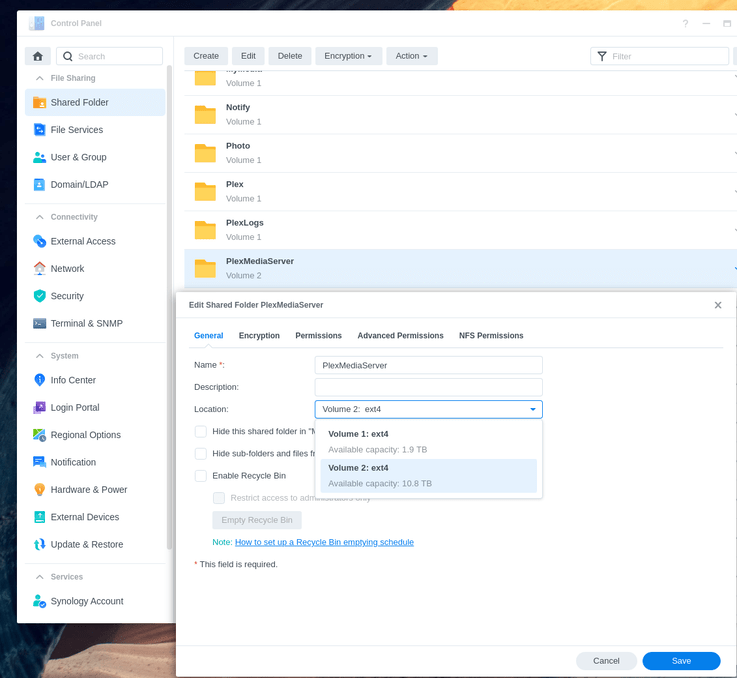
To move the PlexMediaServer shared folder and preserve all permissions
PlexMediaServer → EditLocation (Click it for the dropdown of choices)In my test, 20 GB of metadata required 1.25 hours on an ARMv8 (DS418j)
Thank you @ChuckPa for the reply!
I ended up trying a method with Hyper Backup. (I saw you had mentioned it then updated your post, I had already started by the time you made the edit).
I was able to fix it.
The newest version of Plex Media Center (1.24.0.4921) creates a “PlexMediaServer” Shared Folder when installed. This folder contains the Metadata and preferences and probably a bunch of other stuff related to your PMC profile.
I updated my new HD to the newest PMC version. The folder was created. I closed PMC. Then, I renamed the PlexMediaServer Shared Folder to “PlexMediaServer_orig”. I turned off the NAS and swapped in my old HD (HD1).
I updated Plex Media Center on HD1 to the newest version, which created the PlexMediaServer. I then opened HyperBackup and made a backup of just the PlexMediaServer Shared Folder. I turned off the NAS and swapped in HD2.
I opened Hyper Backup, expecting to see today’s backup of just PlexMediaCenter. It wasn’t there. (Note: I don’t know if this was just my system being weird. If anyone else gets this issue, I re-synced my Synology C2 account (“Restore” > “Data” > “Restore from existing repositories”), and it showed up.) I downloaded that Shared Account (and File Station, which I assume had an update for the PlexMediaCenter Shared Folder).
After my original PlexMediaCenter Shared Folder was restored, I opened up Plex on my Mac. Success! All my Metadata and collections and everything are there.
Given your ordeal, and that HyperBackup does not allow changing location when reloading, Using Control Panel - Shared Folders might be easier (but slower).
The choice is yours .
The caution is all files and directories in the shared folder (AppData) and below, must be owned by PlexMediaServer:PlexMediaServer (system internal user).
As followup, you might want to read my write-up (post #1 this thread) about what I put in there
I’ll definitely check it out. Thanks again for the reply.
I know my way around servers, but both Plex and the NAS system are new to me. Honestly, I’m not entirely sure how to make it so my new and old HDs were both recognized, with the ability to change the location like you posted above. I love being thorough but to be honest I’m so tired after a couple weeks of prep for this NAS file system upgrade, and like 10 hours of making it happening and fixing tiny issues today, that I’m willing to just chalk the way I did it up as a “win” and move on. 
I hope someone else comes across your solution and has it work for them!  PS: Thanks for an incredible piece of software! Much respect.
@mrviper - can you elaborate on what you mean by “I’m not entirely sure how to make it so my new and old HDs were both recognized”? Do you mean by the NAS itself?