Спасибо, буду ждать с нетерпением
Пожалуйста
Если выбрать вот такой вариант, добавленные фильмы на synology не появляются сами в библиотеке.

Если так все хорошо добавляет

в библиотеку
-
Do you need this to add more directories for automatic scanning again ? (DSM 7 upgrade erases what was previously set)
-
“PlexMediaServer” , not “Plex”, has permission to read the files ?
===
-
Это нужно, чтобы снова добавить дополнительные каталоги для автоматического сканирования? (Обновление DSM 7 стирает то, что было установлено ранее)
-
«PlexMediaServer», а не «Plex», имеет разрешение на чтение файлов?
Hi Chuck,
First, Thank you kindly for all your help.
As far as I can tell, the PLEX folder is from the old PLEX install. The PLEXMEDIASERVER folder appears to be from the new PLEX install - the DSM 7 install. I now have both on my Synology 718+ NAS. Evidently, I do not follow instructions well. Is there any way to get rid of the redundant data - assuming it is in fact redundant data?
Many thanks.
All of the PMS packages for DSM 7 now have the “Erase” option on the installer menu.
I never touch the DSM 6 data (all the Plex files in the “Plex” shared folder) except when I’m moving them (migrating to the new DSM 7 configuration).
When everything is done,
-
All the Plex data which is in “Library / Application Support / Plex Media Server” will move over to the new
PlexMediaServer(notice the capitalization please) shared folder into a sub-folder namedAppDataso it’s clear this is Application Data and not media. -
You’ll then find the “Plex” share is empty except for anything you may have placed in it because I only remove what I know I can safely remove.
For you to get this sorted is very easy.
-
You have PMS 1.24.2.4973 installed ?
-
Uninstall the package, add the ERASE option.
-
Let it remove all the errant DSM 7 data.
-
Install 1.24.2.4973 again.
-
If all DSM 7 is removed, (sometimes there are two copies stuck in there if “repair” was used), it will automatically start to “Migrate”
-
It will check the permissions and ownership of the
Plexshared folder. -
If everything is OK, it will move the data (takes a fair amount of time so do not fear and do NOT interrupt regardless what DSM 7 might say)
-
Follow any instructions it gives in the popup messages as it iterates itself into being ready (all permissions compliant) to move.
you can follow along in another browser window looking at the contents of “Plex/Migration.log”. It’s done when it’s finished Clean: /volumeX/Plex
I cannot access the Plex/Migration.log. Is there another way to know when done or is the address wrong? Also, my PMS version was newer: PlexMediaServer-1.24.2.4973. Does that matter.
Hello,
I am new to Synology and Plex (relatively). I have Plex account but never connected it to a server. I recently purchased a Synology DS720+ and tried to install the Plex Media Server from the Plex site. The install seemed to go well, however when it connected to my Plex account and I signed in, it didn’t prompt me to create a server and when I click on add a media server, it took me to the software download page. Can anyone let me know what I am doing wrong? Thank you in advance.
Surab
in response to Synology - DSM 7 Release - Plex Installation Issues - #2330
Thanks Chuck! Just tired those steps with the same result.
I did use the repair function initially- I made the mistake of not reading up on this first 
The odd thing is that the folder now labeled plex media server is the same size as it was when it was in the Plex folder so the data doesn’t seem to have been lost
No, this was my first install.
DSM 7
Correct, this was my first install. I purchased the DS720+ 4 days ago. On my Plex account, my buddy shared his server with me, but thats about it. I disconnected that server long before getting my own NAS. I setup my Plex account a couple years ago, so its possible when I first created the account, I may have connected something, but I don’t remember, and doubt I did because I didn’t have anything to connect it to until now.
No media whatsoever currently
Its working! Thank you! Probably a silly question, but do I need to name the server “media”?
Thank you my friend; I am grateful for your help.
Hi, I have migrated from DSM 6 to 7, upgraded PMS via package app, removed it, downloaded manually from Plex server and and this time manually installed back to my DSM 7.
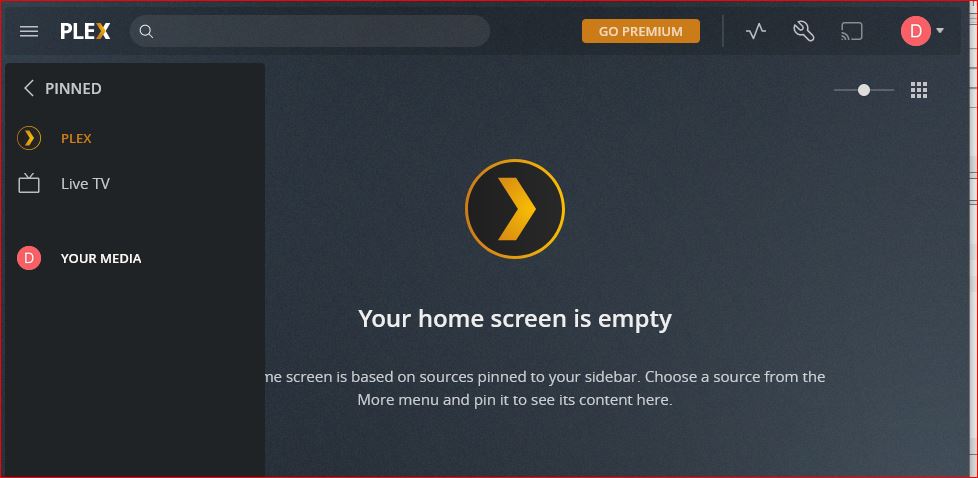
When I Open my Plex on Synology I do not see which folders are shared (picture below) is this normal? I have granted all permission to my shared Media folders to PMS but still does not show anything.
On my TV although I can see new video files which i just uploaded to my Media folder on my synology 916+.
Just one or two suggestions for the living document guide, off my own experience.
-
I know at the end of the document, there is mention of the migration.log file, it is under “Upon completion”. It might be handy to mention the log file at the step 5. " Migration is not instantaneous. AFTER a significant delay (about 1 minute per 1000 items indexed by Plex)". Just saying “there is a log file running here to check progress”. I had no idea about the log file as I was sitting at that step and hadn’t thought to skip ahead to a completed state.
-
I assume, or more so hope, that the message that pops up “The operation failed. Please sign in to DSM again and retry.” relates to the logout timer? I did set my logout timer super high, but have seen this error a twice so far. The first time I panicked and just restarted the NAS. (at that point I didn’t know about the migration.log file…) It might be worth mentioning that if you see it, it means the Synology UI has timed out, and that the migration is still chugging away, you just need to log back into the NAS, and the installation will still be performing. (My migration literally just completed so yes I guess it was still working)
-
The log file is nice, mine had errors at the start of it so I didnt know if that was a bad thing, that caused that logout error or not: chown: changing ownership of ‘/volume1/Plex/Library/Application Support/Plex Media Server/Scanners/Series/@eaDir/Absolute Series Scanner.py@SynoEAStream’: Operation not permitted
Only thing was there was no log entries after about 7 of those error items, so didn’t know if it had failed then or not. It was probably about the same time the UI timed out for me. -
There is possibly a big period of time between “Start: Migrate Plex Media Server” and “Completed: Migrate Plex Media Server”, in my case it was an hour and 16 minutes. I don’t know if it is possible to put a “I’m still working” line in occasionally in the log, just to reassure end users. Maybe also the detail in other areas in this thread that very large servers can take hours, and smaller can be a few minutes.
-
For the dialog boxes I had during install, nothing actually mentioned there was a migration process underway. I just had to assume it was migrating due to it taking a long time spinning the wheels. If the popups actually indicated that an existing install had been found, would have been handy.
-
Pro-tip for people, for the love of god disable Synology Drive Indexing if it fires up and Indexing as well. I suspect that was half my problems with the first few times trying to set this up. They are both going to be going nuts after the DSM7 upgrade and when Plex starts doing stuff as well.
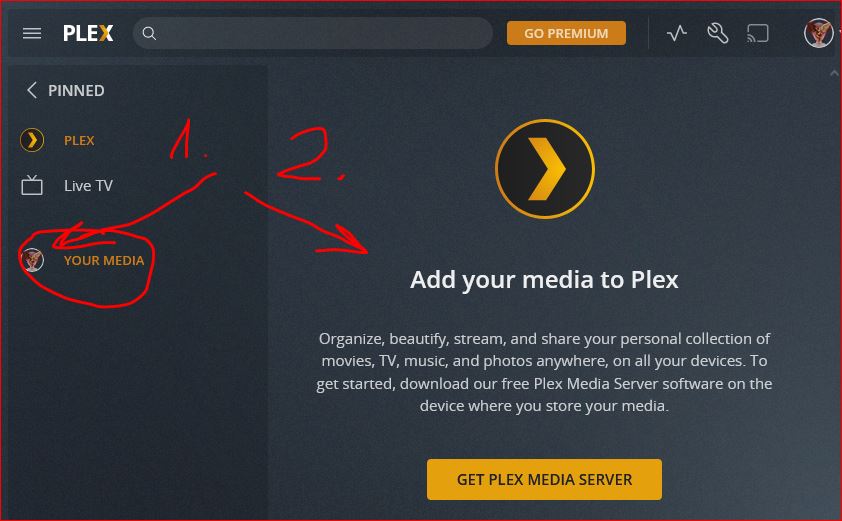
When I click on it I get this as shown on picture, arrow no.2. After I click on GET PLEX MEDIA SERVER icon it moves me to PLEX web page to download PMS

@trumpy81 If you would be a nice girl I would kiss you, thank you so much, It is all back 

