plex-logs.zip (51.5 KB)
I am seeing an error for the domain in these logs, not sure if there’s something in there.
Can you please remove the logs once you have them.
Thanks so much for looking into this. Your help is very much appreciated.
plex-logs.zip (51.5 KB)
I am seeing an error for the domain in these logs, not sure if there’s something in there.
Can you please remove the logs once you have them.
Thanks so much for looking into this. Your help is very much appreciated.
I see HTTP 403 errors attempting to contact Plex.tv
I removed both instances of this server (DSM 7) from Plex.tv
Please perform the following steps
I notice you have 2FA enabled so please do be timely in your actions.
Kapurs,
According to Plex.tv, which has been contacted by your server,
I set everything except your Username, LAN IP, and WAN IP.
I don’t know what you have going on there but there’s something seriously amuck.
Are you using 7.0.41222 ?
Grab the latest log file and attach it. Let me see.
I found it.
Is your ISP IPv6 only?
You show IPv4 on your LAN but IPv6 only on the WAN side. (looking at the forum)
That’s weird. I’ve already followed the advice from here and set the Debug level to Enabled and not to Verbose (check following pic).
Anyway sorry about that. Do you want me to get some trace logs again?
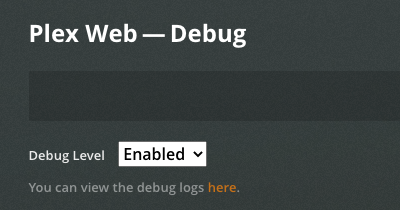
I’ve got a total of 6GB physical RAM.
As far as I can observe, the “Plex Media Scanner” behavior is weird. It starts with a low private memory allocation (~15MB) and then after ~10-15 minutes, pops up to 300MB and continues up to 4GB. Then DSM kills it.
Is there anything I can try? Should I try and rebuild the DB from scratch?
@CvK – You are showing Player settings. You want Settings - SERVER - General
Oh I totally missed that checkbox. My bad. I’ve unchecked it. If there is anything else I can do, please tell me.
Thank you again for your help.
Go ahead now and recreate.
I am still not convinced this is a DSM 7 problem.
I’m running this on a 1 GB ARMv8 system, without issue.
Thanks again for your help fixing the Plex issues on my DSM. Very much appreciate the accurate troubleshooting and promptness in having this fixed. You are top-notch in what you do and Plex should feel proud in having you with them.
To those following this issue:
I will check with Engineering about the EULA requirement when using the Claim Token because a valid Plex account is being used. The EULA might not be required.
If not, I will not force its acceptance again.
Hey @ChuckPa,
Hope I got it right it time. Here’s the logs
If it’s not a DSM 7 or PMS issue, then I guess I’ll build the library/database again.
Thank you again for your patience and help 
For future ref. ZIP files may be uploaded again.
Looking at the logs. It’s not liking some of the WAV files.
This one is corrupted.
Jan 10, 2021 08:22:17.541 [0x7fce6b894bc0] ERROR - Exception analyzing media file ‘/volume1/music/Iron Maiden/Studio Albums/1988. Seventh Son Of A Seventh Son/1988. Seventh Son Of A Seventh Son (1998 EMI 7243 4 96864 0 3, 4 96864 0 UK) Rem/mltimedia/more/audio/album7/track01 (20).WAV’ (Could not parse /volume1/music/Iron Maiden/Studio Albums/1988. Seventh Son Of A Seventh Son/1988. Seventh Son Of A Seventh Son (1998 EMI 7243 4 96864 0 3, 4 96864 0 UK) Rem/mltimedia/more/audio/album7/track01 (20).WAV (error=-22): Invalid argument)
You may have found a bug in the scanner which caused a leak.
See if you can resolve the memory usage by looking through your logs for the error above. You might find more damaged files.
Ok, these WAV files are directly extracted from DVDs. They are part of an extra movie/multimedia file. I guess the scanner doesn’t like them.
Still, I don’t understand why it was not complaining with DSM 6. Anyways, I’ll restrict access or move them outside my music library.
Thank you again @ChuckPa.
Please remember,
DSM 7 is BETA. It’s not the finished product yet. Anything is possible – including erroneous errors with runtime libraries.
Further, my forum preview is exactly that – preview. It is PRE-BETA. (development)
Please don’t expect it to be perfect. I did warn of the risks when using the package.
Yeap, I know that. It was my choice to test the beta DSM 7. I’m not blaming anyone or demand any kind of fix for a preview version. Just trying to provide feedback and contribute in any way I can
As FYI.
I’ve updated the DSM 7 preview package:
I’m having issues opening plex after install. The web browser just times out.
Using DS218play. Have tried completely deleting plex and starting from scratch so not using migration. Struggling with what to do next.


 Download PMS Logs 2021-01-10