Do you show two packages for “Plex Media Server” installed ?
I ask this because, while making a work around for DSM 7.0-41882, I introduced a vulnerabiltiy.
That vulnerability (shaking fist at DSM 7-41882) doesn’t uninstall Plex for DSM 6 – which it must do. (Uninstall stops and removes the old so the new can take over).
What’s left is both try to run .
I can get you through this without losing your library. Have no fear.
Please do let me know what Package Center is showing ? 1 or 2 Plex packages ?
@ExtremeTM - DSM 7 is not a train wreck. It’s beta. If you can’t handle things breaking, don’t run a beta.
I’m using DSM 7 on 2 Synology NAS’s and not having any issues with either. I can hardly tell they’re not full releases. Everything is working perfectly, including Plex. If you’re having issues, I’d suggest you back up your important data to an external USB drive, do a full factory reset and then slowly load things back on, checking functionality after each step.
Don’t get mad at Synology for buggy software when their release notes say “unfinished software, may be buggy and/or result in data loss”.
As for “Synology need to write code that does a backup and then restores to v6” - they do have a built-in backup function. Use it. With regard to rolling back to v6, their release notes state quite clearly that after going to 7 that’s not possible. Again, you accepted the risk. If you feel Synology have wronged you, they have a very good support team and you can log your issues with them by opening a support ticket.
Do you show two packages for “Plex Media Server” installed ?
After upgrading to DSM 7.0, Plex seemed to automatically attempt to upgrade (my memory is fuzzy here). But I absolutely didn’t download a package and install it - I believe I clicked an ‘Upgrade’ button in package manager - after which an error popped up about changing permissions. And No - there is only one Plex installation present in Package Manager. At no point were there ever two. After the above steps (upgraded to DSM 7, found Plex not working) I came to the forums here an learned about changing permissions and upgrading Plex (PMS) to the latest pre-release package.
Help me Obi Wan Kenobi (@ChuckPa ) - You’re my only hope of recovering my movie posters, settings and libraries without starting from scratch. Please tell me what to do! Thanks!
In order to allow DSM 7 “RC” to work, I needed to relax a flag (Syno had disallowed it)
That flag being gone allowed this condition to occur.
The solution will be:
=====
Uninstall the DSM 7 package - Choose the ERASE option to destroy the DSM 7 server instance
When done, install (not upgrade) the DSM 7 Plex package.
You will now be presented with the gauntlet of steps to preform.
All those steps are detailed in the “Forum Preview” thread beginning at post #6
Take your time with it. You will get frustrated because it is extremely detail rich.
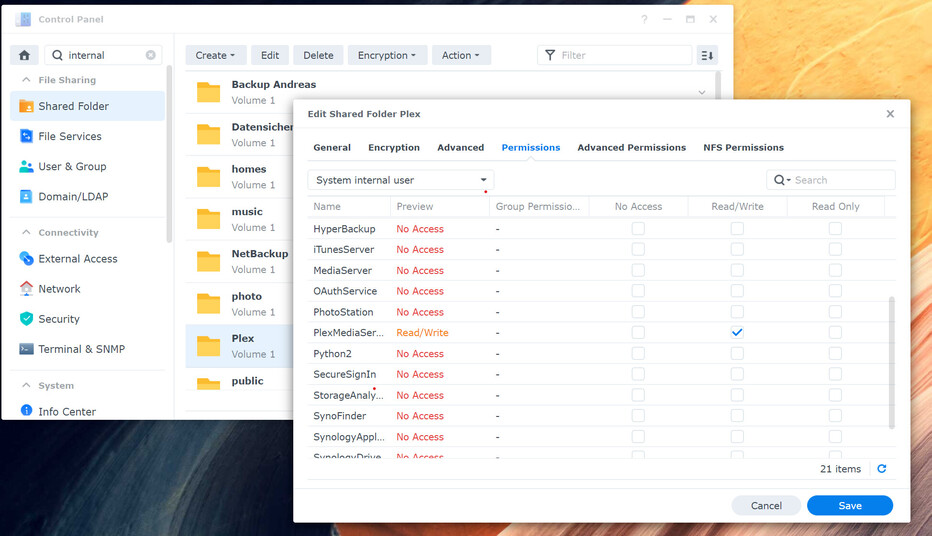
Underneath, we’re setting up ACLs to give migration the permission it needs to change from user Plex to user PlexMediaServer without special administrator login privileges
Let me know if you have difficulties ?
There is a difference between “admin” and “a user with administrative privilege”
One of the two, which I can’t seem to nail down definitively yet, will work.
Uninstall the DSM 7 package - Choose the ERASE option to destroy the DSM 7 server instance
When done, install (not upgrade) the DSM 7 Plex package.
You will now be presented with the gauntlet of steps to preform.
You mean to remove the PMS package for DSM 7, correct? Not DSM 7 Synology upgrade (which isn’t possible)?
And you REALLY want me to choose the ERASE option to clobber everything, correct? And this will somehow avoid losing all of my previous (PMS 6) settings and libraries?
I understand the gauntlet of steps - and feel like I completed all of them already. I’m fuzzy on how uninstalling the PMS DSM 7 and re-performing all the steps I’ve already performed (including the permissions changes that took 20 minutes to complete) will get me into a good state. But with your confirmation of this, I’ll pull the trigger and report back…
I am very sorry this is so confusing. There are insufficient words in the English language to describe my feelings toward this entire process.
BEFORE you uninstall and erase the Plex package for DSM 7…
Check the old “Plex” shared folder.
Do you see “Library/Application Support/Plex Media Server” ?
If you do not ---- then migration has completed successfully – IGNORE all my instructions as you’ve migrated successfully. I can clean up the residual at plex.tv if you wish.
HOWEVER
If you however do see “Plex Media Server”, inclusive of all the usual contents, —
Right-click “Library” → Properties.
Please confirm it is indeed a full PMS installation sitting there and not an empty shell.
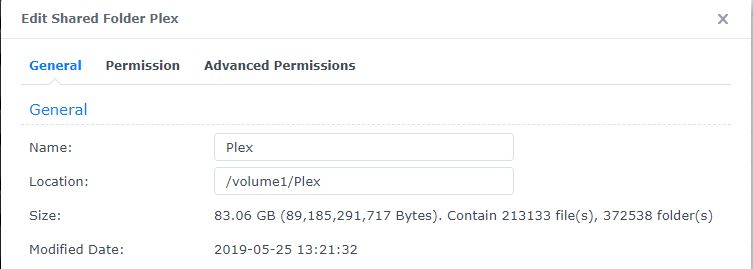
Structure and contents are as follows (and remember, this is a PMS server from the early days - I remember some directories have changed/moved over the years):
I ask because, 13000 files isn’t a lot compared to most users I see in the forums now.
It also looks like it wasn’t done counting when you took the screenshot,
Would you mind getting a final count and storage used result ?
There is one unknown here – what, if anything, exists in the new DSM 7 location?
Since it’s not visible in the GUI, we have to get a little sneaky but can accomplish the same thing:
I would like you do write a Scheduled Task - User Script
Task settings - run as root (not admin)
Save the output to a log file (under General Settings) – or email to yourself
commands
cd /var/packages/PlexMediaServer/home
du -ms .
find . -type f -print | wc -l
find . -type d -print | wc -l
This will tell me what exists in the DSM 7 storage area (how much)
i am logged in as admin.
In the meantime I have installed version 41890 with the hope that it now works.
Still do not have a custom settings option.
Can anyone help me?