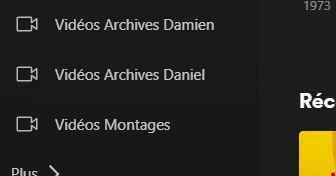
Before i could add library from browser version and set the library type to Movie or Other Videos then it would create a library icon set accordingly (movie film or camera view icon…) which is properly shown on Desktop/Browser app but on mobile it replace library icon with Movie film icon, is it normal behavior or a bug in the app?
I did try resetting the cache, logout/login, uninstall the app and even reset the screen with “Restore Default” but the icons still aren’t matching with the library type i set earlier.
Snapshots below to illustrate the issue:
On browser/Desktop client
Server Version#: 1.41.0.8994
Player Version#: 8.40 (IOS)
<If providing server logs please do NOT turn on verbose logging, only debug logging should be enabled>
All my libraryies are created as Other Videos due to the fact they are home movies, family movies etc. Primarily the Other Video library displays as 3 tiles across, the Movies category displays as 5 or 6 tiles across and is much more difficult for me to read.
the only difference i can see is that the one that remain Other Videos have a default language of NONE whereas the ones that change on the IOS or GoogleTV client display as having a language of English.
I sturuggle to read when the files when the library is 5 or 6 items per line and i am therefore keen to get them all to display as ive set them up as Other Videos.
Sorry if this isnt worded very well, i had a stroke a couple of years ago and writing things can be a challenge,
Hi, thanks for your inputs on similar issue with library discrepancies when created on browser and then accessed via mobile app.
Has anyone figure out what is the issue? i believe it does happen since the last version, before all created library were following “Movie” or “Other videos”… now it seems no matter Videos type you choose at the beginning but does apply “Other videos” icon etc…
Also, some of the libraries are being announced on the client devices correctly as far as the sidebar icons are concerned, However, the video thumbnails are vertical as if it still thinks it is a movie library.