Still having this problem…
Can’t say I’ve seen this error before.
Could you run this command on the same machine that PMS is installed on and see what it outputs:
curl -v --http2 https://metadata.provider.plex.tvI’ll run this in a few hours when I’m back home.
@drzoidberg33 so I ran the test, it doesn’t like the “–http2”

That looks like a FreeNAS system. Is that where your Plex Media Server is running? Earlier you mentioned it’s on an Asustor NAS.
I believe @drzoidberg33 wants to see the output from your Plex Media Server host.
Its hostname is “FreeNAS2”, but it’s not running FreeNAS (just look at the build info of cURL).
It is running Asustor’s ADM 4.0 Beta
Gotcha. I was super distracted by “FreeNAS”.  Sorry!
It’s mildly annoying that the Asustor build of curl doesn’t include http2 support.
YEAH, it’s from 2019 too…
I opened a ticket with their support to ask them to include an up-to-date version of cURL, with http/2 support, for ADM 4.0 final release.
It shouldn’t matter what curl version the system has installed, PMS uses its own (more up-to-date) version.
Could you just run that curl command without the --http2 and post the output?
Here’s the result:
Freeben@FreeNAS2:/volume1/home/Freeben $ curl -v https://metadata.provider.plex.tv
*   Trying 2606:4700::6812:c2f:443...
* TCP_NODELAY set
* Connected to metadata.provider.plex.tv (2606:4700::6812:c2f) port 443 (#0)
* ALPN, offering http/1.1
* successfully set certificate verify locations:
*   CAfile: none
  CApath: /etc/ssl/certs/
* TLSv1.3 (OUT), TLS handshake, Client hello (1):
* TLSv1.3 (IN), TLS handshake, Server hello (2):
* TLSv1.2 (IN), TLS handshake, Certificate (11):
* TLSv1.2 (IN), TLS handshake, Server key exchange (12):
* TLSv1.2 (IN), TLS handshake, Server finished (14):
* TLSv1.2 (OUT), TLS handshake, Client key exchange (16):
* TLSv1.2 (OUT), TLS change cipher, Change cipher spec (1):
* TLSv1.2 (OUT), TLS handshake, Finished (20):
* TLSv1.2 (IN), TLS handshake, Finished (20):
* SSL connection using TLSv1.2 / ECDHE-ECDSA-CHACHA20-POLY1305
* ALPN, server accepted to use http/1.1
* Server certificate:
*  subject: C=US; ST=California; L=San Francisco; O=Cloudflare, Inc.; CN=plex.tv
*  start date: May 20 00:00:00 2021 GMT
*  expire date: Aug 17 23:59:59 2021 GMT
*  subjectAltName: host "metadata.provider.plex.tv" matched cert's "*.provider.plex.tv"
*  issuer: C=US; O=Cloudflare, Inc.; CN=Cloudflare Inc ECC CA-3
*  SSL certificate verify ok.
> GET / HTTP/1.1
> Host: metadata.provider.plex.tv
> User-Agent: curl/7.66.0
> Accept: */*
>
* Mark bundle as not supporting multiuse
< HTTP/1.1 200 OK
< Date: Fri, 25 Jun 2021 08:57:00 GMT
< Content-Type: application/xml; charset=utf-8
< Content-Length: 834
< Connection: keep-alive
< Access-Control-Allow-Origin: *
< Cache-Control: max-age=86400
< Content-Language: en
< Etag: W/"342-o0+tSB614/LHBQIhTpL5zMh1LIU"
< Strict-Transport-Security: max-age=31536000; includeSubDomains; preload
< Vary: Accept, Accept-Encoding, X-Plex-Language, X-Plex-Provider-Version
< X-Frame-Options: SAMEORIGIN
< X-Plex-Timestamp: 1619129644
< X-Plex-Version: b5db98f
< CF-Cache-Status: HIT
< Age: 81951
< Accept-Ranges: bytes
< cf-request-id: 0ae3fc0fff0000a8df99045000000001
< Expect-CT: max-age=604800, report-uri="https://report-uri.cloudflare.com/cdn-cgi/beacon/expect-ct"
< Server: cloudflare
< CF-RAY: 664cfc5ff8c2a8df-CDG
<
* Connection #0 to host metadata.provider.plex.tv left intact
<?xml version="1.0"?><MediaProvider icon="https://provider-static.plex.tv/icons/metadata-560.svg" identifier="tv.plex.provider.metadata" protocols="stream" version="1.3.0" title="Metadata"><Feature type="metadata" key="/library/metadata"/><Feature type="actions"><Action id="addToWatchlist" key="/actions/addToWatchlist" reverseKey="/actions/removeFromWatchlist"/></Feature><Feature type="availability" key="/availability"/><Feature type="availability-platforms" key="/availability-platforms"/><Feature type="location" key="/location"/><Feature type="universalSearch" key="/library/search"/><Feature public="1" type="imagetranscoder" key="https://images.plex.tv/photo"/><Feature flavor="universal" type="playqueue" key="https://play.provider.plex.tv/playQueues"/><Feature type="match" key="/library/metadata/matches"/></MediaProvider>
So, I investigated further, and the Plex package does include its own cURL. Not the full cURL binary, but the lib (libcurl.so).
From what I found, the libcurl.so version packaged with Plex is 7.73.0, and it seems it was built with HTTP/2 support.
So @drzoidberg33, any idea how I could fix this problem ?
Hello,
Was the output of cURL helpful ?
Not entirely. I was hoping to see some weird proxy or something in the chain but doesn’t look like it.
Only strange thing is the request is getting resolved to the IPv6 address which is the only difference I can see to my testing. Is your internet connection IPv6 only?
Also, do you have another system on the network that can run a Plex server? If so, could you try running it there and checking if you get the same problem.
Would be nice to eliminate some variables here.
@drzoidberg33, Regarding IPv6 connectivity, I do have it, but it’s supposed to be disabled on that NAS (but then again, Asustor’s software is a piece of crap).

bond0     Link encap:Ethernet  HWaddr 10:BF:48:8E:0B:C9
          inet addr:192.168.1.90  Bcast:192.168.1.255  Mask:255.255.255.0
          inet6 addr: 2a01:e0a:3dd:xxxx:xxxx:xxxx:xxxx:xxxx/64 Scope:Global
          UP BROADCAST DEBUG RUNNING MASTER MULTICAST  MTU:1500  Metric:1
          RX packets:405693110 errors:0 dropped:0 overruns:0 frame:0
          TX packets:692784220 errors:0 dropped:1 overruns:0 carrier:0
          collisions:0 txqueuelen:1000
          RX bytes:241933582985 (225.3 GiB)  TX bytes:1038486280565 (967.1 GiB)

eth0      Link encap:Ethernet  HWaddr 10:BF:48:8E:0B:C9
          UP BROADCAST RUNNING SLAVE MULTICAST  MTU:1500  Metric:1
          RX packets:59553181 errors:0 dropped:2 overruns:0 frame:0
          TX packets:535898575 errors:0 dropped:0 overruns:0 carrier:0
          collisions:0 txqueuelen:1000
          RX bytes:70518512280 (65.6 GiB)  TX bytes:843523187068 (785.5 GiB)
          Interrupt:134

eth1      Link encap:Ethernet  HWaddr 10:BF:48:8E:0B:C9
          UP BROADCAST RUNNING SLAVE MULTICAST  MTU:1500  Metric:1
          RX packets:346141155 errors:0 dropped:2 overruns:0 frame:0
          TX packets:156887092 errors:0 dropped:0 overruns:0 carrier:0
          collisions:0 txqueuelen:1000
          RX bytes:171415447638 (159.6 GiB)  TX bytes:194963416375 (181.5 GiB)
          Interrupt:143
I do have IPv6 disabled in Plex Server too:
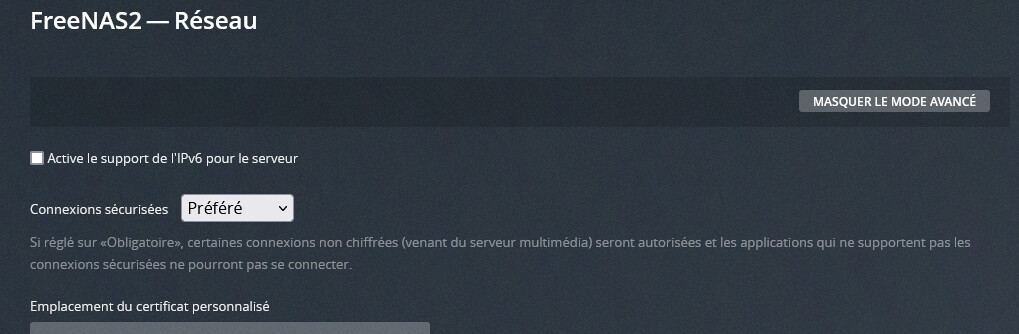
The two 2.5G network ports on my NAS are aggregated using LACP, connected to a NetGear MS510TX, connected using 10G ethernet to my ISP’s router, connected to the internet via fiber optics
I’ll install the Plex Server on my Windows 10 PC, and see how it goes.
Also, here is the output of the cURL request forcing IPv4:
Freeben@FreeNAS2:/volume1/home/Freeben $ curl -v -4 https://metadata.provider.plex.tv
*   Trying 104.18.12.47:443...
* TCP_NODELAY set
* Connected to metadata.provider.plex.tv (104.18.12.47) port 443 (#0)
* ALPN, offering http/1.1
* successfully set certificate verify locations:
*   CAfile: none
  CApath: /etc/ssl/certs/
* TLSv1.3 (OUT), TLS handshake, Client hello (1):
* TLSv1.3 (IN), TLS handshake, Server hello (2):
* TLSv1.2 (IN), TLS handshake, Certificate (11):
* TLSv1.2 (IN), TLS handshake, Server key exchange (12):
* TLSv1.2 (IN), TLS handshake, Server finished (14):
* TLSv1.2 (OUT), TLS handshake, Client key exchange (16):
* TLSv1.2 (OUT), TLS change cipher, Change cipher spec (1):
* TLSv1.2 (OUT), TLS handshake, Finished (20):
* TLSv1.2 (IN), TLS handshake, Finished (20):
* SSL connection using TLSv1.2 / ECDHE-ECDSA-CHACHA20-POLY1305
* ALPN, server accepted to use http/1.1
* Server certificate:
*  subject: C=US; ST=California; L=San Francisco; O=Cloudflare, Inc.; CN=plex.tv
*  start date: May 20 00:00:00 2021 GMT
*  expire date: Aug 17 23:59:59 2021 GMT
*  subjectAltName: host "metadata.provider.plex.tv" matched cert's "*.provider.plex.tv"
*  issuer: C=US; O=Cloudflare, Inc.; CN=Cloudflare Inc ECC CA-3
*  SSL certificate verify ok.
> GET / HTTP/1.1
> Host: metadata.provider.plex.tv
> User-Agent: curl/7.66.0
> Accept: */*
>
* Mark bundle as not supporting multiuse
< HTTP/1.1 200 OK
< Date: Wed, 30 Jun 2021 13:46:26 GMT
< Content-Type: application/xml; charset=utf-8
< Content-Length: 834
< Connection: keep-alive
< Access-Control-Allow-Origin: *
< Cache-Control: max-age=86400
< Content-Language: en
< Etag: W/"342-WP9vNDmXmQLaI85a5B/4NEhEXlo"
< Expect-Ct: max-age=0
< Referrer-Policy: no-referrer
< Strict-Transport-Security: max-age=31536000; includeSubDomains; preload
< Vary: Accept, Accept-Encoding, X-Plex-Language, X-Plex-Provider-Version
< X-Content-Type-Options: nosniff
< X-Dns-Prefetch-Control: off
< X-Download-Options: noopen
< X-Frame-Options: SAMEORIGIN
< X-Permitted-Cross-Domain-Policies: none
< X-Plex-Timestamp: 1624591460
< X-Plex-Version: 0e8d2b4
< X-Xss-Protection: 0
< CF-Cache-Status: HIT
< Age: 12905
< Accept-Ranges: bytes
< cf-request-id: 0afec4d7c7000032b8a22f2000000001
< Server: cloudflare
< CF-RAY: 6677d7393bdc32b8-CDG
<
* Connection #0 to host metadata.provider.plex.tv left intact
<?xml version="1.0"?><MediaProvider icon="https://provider-static.plex.tv/icons/metadata-560.svg" identifier="tv.plex.provider.metadata" protocols="stream" version="1.3.0" title="Metadata"><Feature type="metadata" key="/library/metadata"/><Feature type="actions"><Action id="addToWatchlist" key="/actions/addToWatchlist" reverseKey="/actions/removeFromWatchlist"/></Feature><Feature type="availability" key="/availability"/><Feature type="availability-platforms" key="/availability-platforms"/><Feature type="location" key="/location"/><Feature type="universalsearch" key="/library/search"/><Feature public="1" type="imagetranscoder" key="https://images.plex.tv/photo"/><Feature flavor="universal" type="playqueue" key="https://play.provider.plex.tv/playQueues"/><Feature type="match" key="/library/metadata/matches"/></MediaProvider>
@drzoidberg33 : I installed Plex Server on my Windows 10 PC (same network as the NAS, connected to the same MS510TX network switch), and all works fine. All metadata is fetched properly.
I also removed the IPv6 address on the bond0 interface, so my system only has IPv4 connectivity left.
I re-ran the curl request without forcing IPv4, and it did use IPv4, not IPv6.
But the problem remains the same, only partial metadata is fetched by the Plex server.
Is there no way to have a more verbose output from Plex Server, to see what exactly is going wrong in that request ?
Jun 30, 2021 16:01:59.146 [0x7f4457235b38] Débogage — Activity: registered new activity da14b866-daf5-43a7-9d7c-72dbbd1585af - "Updating Metadata"
Jun 30, 2021 16:01:59.147 [0x7f4457235b38] Débogage — Activity: updated activity da14b866-daf5-43a7-9d7c-72dbbd1585af - completed 49.0% - Updating Metadata
Jun 30, 2021 16:01:59.152 [0x7f4457235b38] Erreur — [MetadataAgent/tv.plex.agents.movie] Error issuing curl_easy_perform(handle): 92
Jun 30, 2021 16:01:59.152 [0x7f4457235b38] Erreur — [MetadataAgent/tv.plex.agents.movie] HTTP -92 downloading url https://metadata.provider.plex.tv/library/metadata/5d77704631d95e001f19d8a0?includeReviews=1&X-Plex-Country=FR&X-Plex-Language=en-US&X-Plex-Text-Format=markdown&X-Plex-Api-Token=xxxxxxxxxxxxxxxxxxxx
Jun 30, 2021 16:01:59.152 [0x7f4457235b38] Erreur — [MetadataAgent/tv.plex.agents.movie] Request for item plex://movie/5d77704631d95e001f19d8a0 has failed
Jun 30, 2021 16:01:59.153 [0x7f4457235b38] Débogage — [JobRunner] Job running: FFMPEG_EXTERNAL_LIBS='/volume1/Plex/Library/Plex\ Media\ Server/Codecs/fa235d6-3858-linux-x86_64/' X_PLEX_TOKEN='xxxxxxxxxxxxxxxxxxxx' '/volume1/.@plugins/AppCentral/plexmediaserver/Plex Media Scanner' '--match' '--type' '1' '--log-file-suffix' ' Matcher' '--item' '27125'
Jun 30, 2021 16:01:59.153 [0x7f4457235b38] Débogage — [JobRunner] Jobs: Starting child process with pid 1863
Jun 30, 2021 16:01:59.317 [0x7f4457235b38] Débogage — Loading information from media bundle for part ID 46536 from "/volume1/Plex/Library/Plex Media Server/Media/localhost/2/987baf7723dec222e80aba5f3d344cb48fe61c1.bundle/Contents/Plex Movie"
Jun 30, 2021 16:01:59.317 [0x7f4457235b38] Débogage — Loaded metadata for Sans un bruit 2 (ID 27125) in 7ms
Jun 30, 2021 16:01:59.318 [0x7f4457235b38] Débogage — Done with metadata update for 27125
Jun 30, 2021 16:01:59.319 [0x7f4457235b38] Débogage — Activity: Ended activity da14b866-daf5-43a7-9d7c-72dbbd1585af.
Thanks, that’s definitely pointing to something weird happening on that box then.
Thanks, I didn’t think that would cause this issue but I’ve seen stranger things 
Not currently anything that would help with this issue, however I can send you a special build that enables verbose output for curl - I’ll DM you when I have this build up.
