Server Version#: 1.24.1.4931
Player Version#: 4.59.2
I’m not sure why but after the last few updates I noticed that my plex wasn’t auto detecting unless I did a manual sync. Samething happened last year which I will link below and I went back to recheck everything I did last time and everything looks normal. I have no idea what has changed since last year apart from me doing updates to the plex server.
Another thing I just noticed, it isn’t just on the media that is added, even media that is deleted still shows up in Plex but says the item is deleted in red. Usually the media would be removed. Not sure if this information helps?
It looks like something is causing the file watches to fail, it should iterate though the entire folder and add each subfolder but it’s getting stopped early on:
@drzoidberg33 I am not sure why it can’t see past the movies/shows folder. But this gave me an idea of how to do a temporary fix.
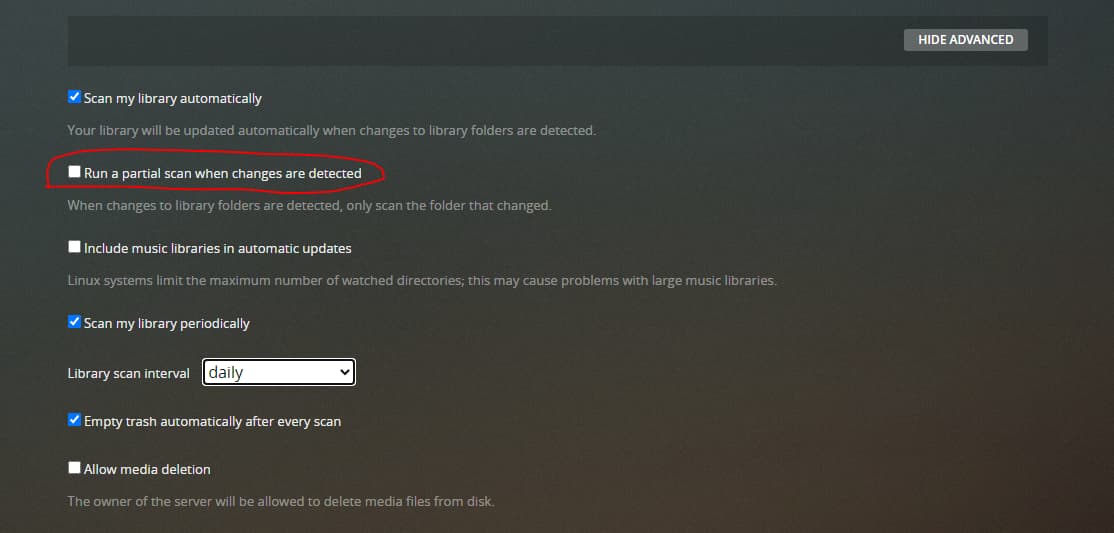
After unticking the “Run a partial scan when changes are detected”, it does a full folder scan of my media and is able to pick up the media added. I however think this is not a good solution, but till the next PMS version arises(with hopefully a fix) I will have to do it this way.
That’s odd. You’re using a Synology NAS? Maybe an issue in the OS is preventing it from notifying the app that a file change was detected. I’ve got a Synology NAS for my Plex and so far it’s working just great for detecting new changes. But I’m on server version 1.24.0.4930. Maybe it’s started happening with the later server versions? Have you rebooted the NAS lately? Maybe fs.inotify is failing to run.
In the mean time, you can scan a library after something has been added by pointing at a library on the left-hand side of the home menu (Web or Windows player), click the triple dot, and choose scan library.
Are the files local to the NAS, or are they a share from another fileserver on the network?
Do you have a large library? If you do, you might be hitting up against the max number of watched directories. It says so under the “Include music libraries in automatic updates” button below your circle. But if your video library is absurdly large, perhaps you hit that limit just from videos?
Alternatively, try changing the “library scan interval” drop-down further down to something more frequent. You can lower it to check as often as every 15 minutes.
I have just set it up so it auto scans the library every hour as I use sonarr to import my media automatically
The files are local to the NAS
I do have a huge library and have gone through the steps from last year that ChuckPA gave to check which I have screenshotted the image and posted it in my first post.
This is what I have had to do since the partial scan does not go past the second level. It seems to be getting stuck at /volume1/Movies and /volume1/Movies. If I remove the partial scan it then scans the whole tree everytime I add/remove something. In combination with unticking the partial scan I have also change the frequency in the scan interval to 1 hour
With DSM 7, the inotify table will have been reset during upgrade.
You will need reapply the changes to /etc/synoinfo.donf and /etc.default/synoinfo.conf
I’m not sure if this is related or not, but for some reason, for the last few days now Plex seems to be turning itself off or something or my Synology is turning Plex off and I have to start it again every morning.
I am having similar/related issues lately, but I am running on Linux with the libraries mounted from a CIFS share. Recently I noticed that some shows imported via Sonarr were not showing up in Plex, but I also noticed that Plex is almost constantly scanning all libraries that were TV Shows. I’ve tried “Run a partial scan when changes are detected” checked/unchecked without any noticeable change.
I’ve noticed that the “Update Library” option in Sonarr’s Plex notification thing is kicking off the entire scan of all TV libraries (without this checked, Plex never sees the new episodes until a scheduled scan, so Plex doesn’t seem to be able to detect folder changes). With this option checked, the notifications seemed to just tell Plex about the new episodes and no folder scan was even needed. This seems to be broken now and Plex is always scanning. Not sure what changed recently. Sonarr build is still from June, and this seems a recent issue in the last couple weeks.