Plex Not Detecting New Files but only in TV Shows

Well, I’ve tried this and run into trouble.

I’m not quite sure if the command line to stop and start Plex is working but I think I stopped it, and restarted it. Just in case, I restarted the whole Centos server, and the command
service plexmediaserver status reports that the server is running.

I renamed the /var/lib/plexmediaserver/Library to Library.keep.

I created a new Library folder, and changed owner to john:john.
This is just where Plex keeps its database, isn’t it?

I then renamed my original shared plexmedia folder to plexmedia0 using the VMware console and Midnight Commander.

I then created a new media directory with the same name as the old one, in /home/john/plexmedia which starts empty.

Then I added a couple of Murdoch Mysteries episodes (just the .mp4 files) to the new TV Programmes in that folder, creating a new folder to put them in, and recursively changing the owner to john:john:
home/john//plex2/video/TV programmes/Murdoch Mysteries/Season 01

As before I’ve checked that all folder permissions are 0755 and all .mp4 files have permissions 0764, and I’ve also checked that the change of owner is reflected in all the subfolders and files.

When I first try to reconnect, using Chrome browser, I get ‘Plexserver is unvailable’, although Diskstation still there, and opens as the default Plex connection.

The Centos Pleserver is at IP address 192.168.0.31, but when I browse directly to that on port 32400, I get an XML text page displayed, not the Plex window.

However, if I browse direct to 192.168.0.31/web/:32400 I do get to an empty Plex page, which invites me to Add Library.

So I’ve done that, and pointed it at the new TV programmes folder.

Plex doesn’t automatically rescan the folder, and when I tell it to rescan, still doesn’t detect the files at all.

???

What next?

I attach the logs.

Plex Media (129.1 KB)

PS. Looking in the old and new Library and Library.keep subfolders
Application Support/Plex Media Server
I see that the new Library has no folders for Media or Metadata.

Am I right in thinking that these would have been created if Plex had detected the added media in my new TV programs folder?
Because my hard disk is getting a little low on media space, I have bought a new bigger disk.

Would it help to install this, copy over all the media files, update the Plex Server to the latest version, and tell it to scan the new libraries?

I’ll hold off doing that, though, pending trying any further suggestions you may have to fix the existing issue of no longer detecting new files on the existing disk in TV shows (or TV programmes, depending which way I named them in old or new library folders).

I made them different names both in Plex and on the disk so I could more clearly tell the difference between old and new library folders and files.

  1. Library.keep is the entire existing metadata database. I had you rename it to preserve it in its entirety
  2. There was no need to recreate a Library directory. PMS does this automatically with the correct ownership.
  3. 192.168.0.31:32400/web is the correct URL format. (IP:port/endpoint)
  4. Uninstall PMS (the package)
  5. Delete the Library directory. Do not delete Library.keep
  6. Restart the host
  7. Reinstall the package.
  8. Perform the new setup again.
  9. Turn on automatic update in Settings - Server - Library
  10. Let it scan to completion.
  11. Capture the zip.
  12. Attach

Will do, and hope to finish tonight.

Done that quicker than I thought would be the case. Installed tha latest version.

Have just pointed the new server to TV Shows only, and am waiting for it to finish scanning them, which it started automatically by default.

It found the one episode (10) of Murdoch Mysteries that I’d left on the server.

Added the previous 9 episodes, and rescanned. This time Plex sees them all.

Thanks so much for helping me get this sorted.

PS. Should I now delete the Library.keep folder from the server?

After you’ve added each library (one at a time and allowing to complete before adding the next), with Music / photos last,

Then you can delete Library.keep

I don’t think you did it right. The logs you provided show every library being scanned, so the one for this issue is getting lost and I can’t see what is going on.

Also, you created this new library wrong. When you create a library, you need to point it to the parent folder of the show, not the show itself. The way you have your files organized, you can’t create a library just for Young Sheldon. You already have a library that points to “series favoritas” so it’s going to duplicate Young Sheldon. Your new library points to “Young Sheldon” so the show it sees is “Season 1” and “Season 2”. This is wrong. If you want to just test this show, move the folder to a totally different location and point the library to 1 up from “Young Sheldon”.

No need to do the dance but do this instead.

  • delete this new library
  • clear bundles and empty trash
  • move Young Sheldon folder to another location
  • create new library pointing to 1 up from “Young Sheldon” folder
  • get logs

All seems well so far, and I’ve now added all the libraries. Will delete the .keep folder when I’ve browsed around a bit, and checked all that I expect is there, and any new additions I make in the next few days show up when expected.

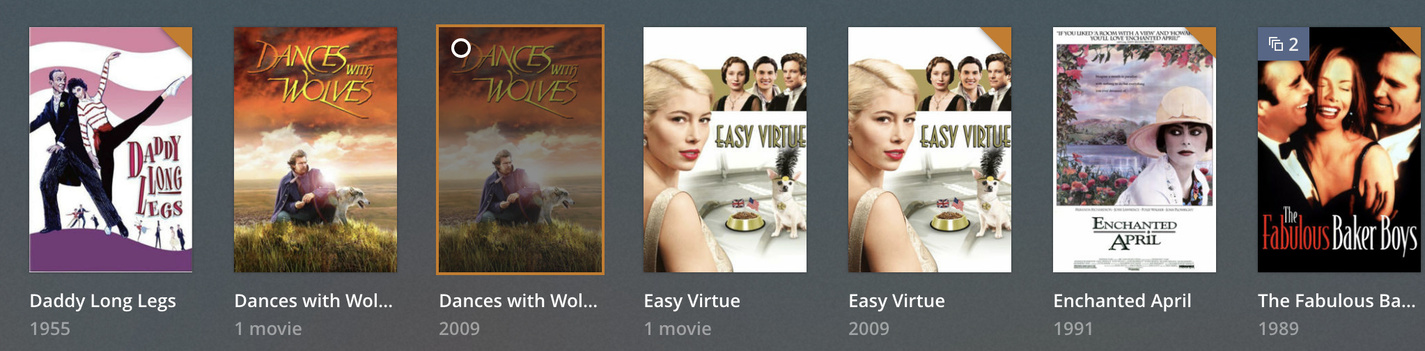
A small oddity. Some of the films I have already in the media library have duplicate entries. One has the poster and says below it " 1 movie" and the other has the same poster image, but the text below shows the year of publication instead - e.g., 2016.

I find I can delete the “1 movie” entry and not delete the film .mp4 file itself, and it doesn’t seem to affect all entries, just relatively few.

Here’s a couple of examples:

And here are the folder contents for two - one without the duplication, the other with.

Why might this be happening? I can’t see any obvious difference in the two folders - they both have one .mp4 file, both have two .nfo files, one with the name, the other just movie.nfo

The ones labeled “X movie” are collections. Edit each library and under the advanced setting pick how you want collections to be shown.

Untitled

That’s helpful to know. I can change the setting as you suggest.

But why does Plex think they ARE in collections? AFAIK the films were stand alone. I haven’t knowingly marked them as Collections, either.

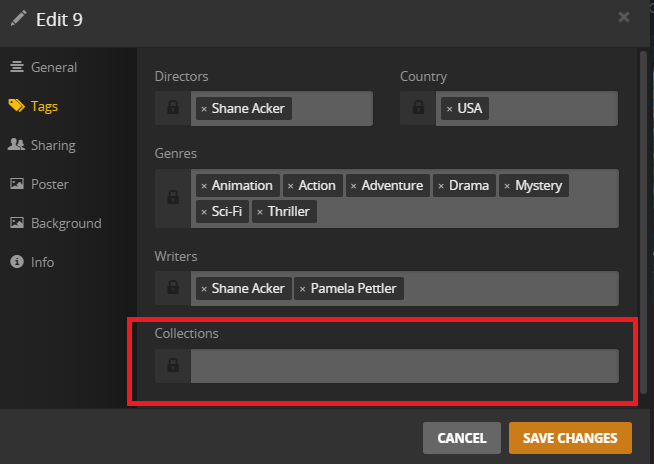
Edit the movie and see if this field is populated.

Untitled

That’s what tells PMS if it should be listed as part of a collection. Then check this.

Untitled02

If that is enabled, the above collection field is automatically populated when you add movies.

Well, for some reason I don’t understand, Dances with Wolves (to take the first item in my previous post) shows this:

How did the entry in Collections get there? I certainly didn’t explicitly add it.

I can Hide collections as you suggested in your earlier post, without loss of info, since AFAIK none of the films I have are in a collection of any kind.

Or I could look for the duplicate poster images, or the ‘1 movie’ entries, and edit the information to delete anything in the Tags/Collections field.

I suppose I’m mostly curious as to how the apparent ‘Collection’ got added in the first place.

Did you see part 2 of my comment above?

Looking at your second post, I couldn’t immediately see the entry in my own Plex settings - I see I now that I have to scroll down to see the checkbox.

But when I do, it is unchecked.

I’ve solved the issue for the most part by choosing ‘Hide items which are in collections’.

Thank you for taking the time to enlighten me.

Maybe it was checked at some point before when you added these files and have since changed. These don’t get removed if you change the setting after the fact.

That might explain it, but I don’t know how it got checked earlier. These two movies have been in my Plex media folder for ages. I only noticed the issue yesterday when adding one new film, and it showed duplicate posters, one of which I now understand said it’s a collection.

But I think I have the thing sorted now - thanks to your help.

If I remember correctly, if you used TheMovieDB agent, that was enabled by default. I think that only changed when the Collections view became a thing.

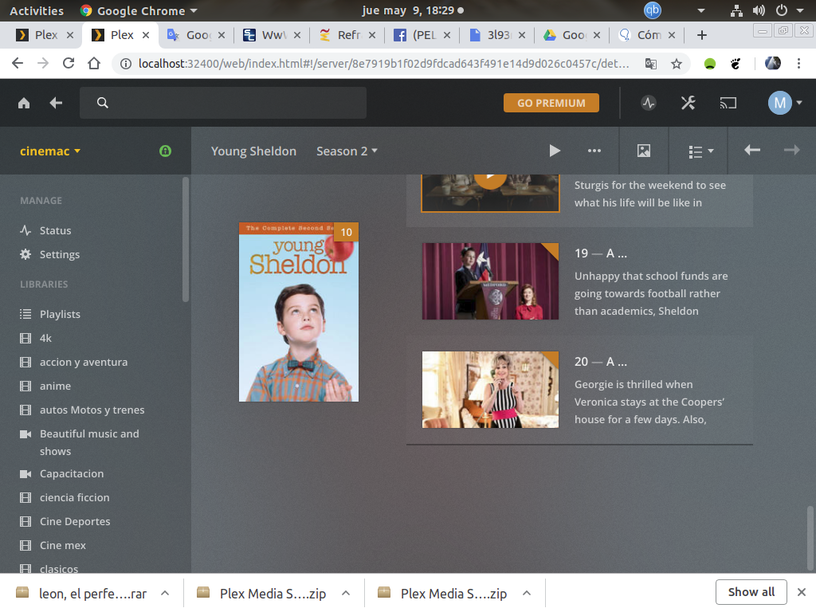
Hi team, finally i resolved the problem in TV Shows, Young Sheldon, first i rename the subdirectory name from Season 01 and 02 to Young Sheldon S02 and S02, next step was chage with chmod to 777 to this directory in recursive form and tara… the winner is


now PMS identify ok serie and look chapters 19 and 20.
thanks for your help

Hey, everyone, I’ve found a workaround this issue…
I’ve tried everything I could think of and can’t get the “TV Shows” library to detect anything. I’ve put .wtv and .mp4 files in the directory for TV shows and the Plex library function always indicates “There are no items In this library”. I’ve read the naming structure and have tried many different filenames and directory structures… still nothing.

BUT, I found out that if I put everything in the movies folder it all works… I put all my TV shows in the folder /Movies/TV, all my movies in /Movies/Movies, my personal videos in /Movies/Family Videos and at least I can get my TV shows on the Plex Server now. The only downside is I have to do some post editing of the item I put in the folder. For example I created a sub folder Movies/TV/AmericanWoodshop and put episode 1, 2, 3 etc in there. It all works great!

There’s obviously something really broken with the way the TV Shows are indexed and I’m tired of messing with it. This is a great workaround.

Enjoy!

When you specified the path to “TV Shows”, did you double quote the entire path or add the “” in front of the space?