Yes, after the change version, now my disks are mounted under /media, but one point, if i put a new movie, i don’t have problems, only under TV Shows
And now remember (just in case) so many days ago, my server (CineMAC) was lost, then i made a new server (PMS), the user’s dont lost, only the PMS, one week after, PMS is gone and CineMAC return, waf… very weird but that’s how it was, please check my log please
On Ubutnu, if PMS does not run as your username, and the automounter is used (no /etc/fstab entry), problems occur. The root cause of this is Gnome Nautilus.
Please go back to Settings - Server - General and turn VERBOSE logging back OFF.
It is off by default.
VERBOSE only makes my job tougher. It also limits the logs to 2 minutes of elapsed time.
I cannot see what’s happening.
With them back on DEBUG only, Please recreate again and then gather a fresh set.
Hi again ChuckPA
i was made some actions for the debug, i send a log and DB file
best regards and thanks for your attention
Plex Media Server Logs_2019-05-07_00-18-30.zip (3.3 MB)
Macx99,
Thank you for the logs. I did not need the database so removed it.
I am finding damaged metadata files in your library. One example is:
May 07, 2019 00:15:04.790 [0x7f10177fe700] DEBUG - Migrating metadata settings from local://17134 -> com.plexapp.agents.thetvdb://80379/4/9?lang=es
May 07, 2019 00:15:04.790 [0x7f10177fe700] WARN - Unable to load episode file ["/var/lib/plexmediaserver/Library/Application Support/Plex Media Server/Metadata/TV Shows/6/cae999ffa7965bea65b6cc3c68cbd907c7a9fcb.bundle/Contents/_combined/seasons/4/episodes/9.xml"]
May 07, 2019 00:15:04.791 [0x7f10177fe700] DEBUG - Item 17134 (Episode 9) Scanning metadata graphic elements in XML file "seasons/4/episodes"/9.xml
May 07, 2019 00:15:04.791 [0x7f10177fe700] ERROR - Error parsing XML: Empty or non-existant file..
May 07, 2019 00:15:04.792 [0x7f10177fe700] DEBUG - Item 17134 (Episode 9) Scanning metadata graphic elements in XML file "seasons/4/episodes"/9.xml
May 07, 2019 00:15:04.792 [0x7f10177fe700] ERROR - Error parsing XML: Empty or non-existant file..
May 07, 2019 00:15:04.796 [0x7f10177fe700] DEBUG - Loading information from media bundle for part ID 36173 from "/var/lib/plexmediaserver/Library/Application Support/Plex Media Server/Media/localhost/3/64baa3b9b87cb875f36896cffacad2be62a2ec9.bundle/Contents"
May 07, 2019 00:15:04.796 [0x7f10177fe700] DEBUG - There was a change for metadata item 17134 (Episode 9), saving.
May 07, 2019 00:15:04.796 [0x7f10177fe700] DEBUG - Updating metadata item (save) () with ID 17134
May 07, 2019 00:15:04.910 [0x7f1015ffb700] DEBUG - Request: [127.0.0.1:54632 (Loopback)] GET /:/metadata/flushMetadataCounterCache (14 live) GZIP Signed-in Token (Macx99)
May 07, 2019 00:15:04.910 [0x7f109d2b5700] DEBUG - Request: [127.0.0.1:54634 (Loopback)] GET /library/changestamp (14 live) GZIP Signed-in Token (Macx99)
May 07, 2019 00:15:04.910 [0x7f10877fe700] DEBUG - Completed: [127.0.0.1:54632] 200 GET /:/metadata/flushMetadataCounterCache (14 live) GZIP 0ms 166 bytes
May 07, 2019 00:15:04.911 [0x7f1087fff700] DEBUG - Completed: [127.0.0.1:54634] 200 GET /library/changestamp (14 live) GZIP 0ms 469 bytes
May 07, 2019 00:15:05.057 [0x7f10177fe700] DEBUG -  * Hey, we learned an index key for an episode (S04E09), adding to map.
May 07, 2019 00:15:05.057 [0x7f10177fe700] DEBUG -  * Season 4 (-1) Episode 10 (-1) (1900-01-01)
May 07, 2019 00:15:05.057 [0x7f10177fe700] DEBUG - Looking up season and index for an episode, indexKey=S04E10 dateKey=.
May 07, 2019 00:15:05.057 [0x7f10177fe700] DEBUG -  * Found episode s04e10
May 07, 2019 00:15:05.057 [0x7f10177fe700] DEBUG - Calculated media file path for path [upload://]: ["/var/lib/plexmediaserver/Library/Application Support/Plex Media Server/Metadata/TV Shows/9/344a2b67743c077f0169b01a822067b0a5e552d.bundle/Uploads"]
May 07, 2019 00:15:05.057 [0x7f10177fe700] DEBUG - Calculated media file path for path [upload://]: ["/var/lib/plexmediaserver/Library/Application Support/Plex Media Server/Metadata/TV Shows/6/cae999ffa7965bea65b6cc3c68cbd907c7a9fcb.bundle/Uploads"]
May 07, 2019 00:15:05.057 [0x7f10177fe700] DEBUG - Migrating metadata settings from local://17135 -> com.plexapp.agents.thetvdb://80379/4/10?lang=es
May 07, 2019 00:15:05.057 [0x7f10177fe700] WARN - Unable to load episode file ["/var/lib/plexmediaserver/Library/Application Support/Plex Media Server/Metadata/TV Shows/6/cae999ffa7965bea65b6cc3c68cbd907c7a9fcb.bundle/Contents/_combined/seasons/4/episodes/10.xml"]
May 07, 2019 00:15:05.057 [0x7f10177fe700] DEBUG - Item 17135 (Episode 10) Scanning metadata graphic elements in XML file "seasons/4/episodes"/10.xml
May 07, 2019 00:15:05.057 [0x7f10177fe700] ERROR - Error parsing XML: Empty or non-existant file..
May 07, 2019 00:15:05.058 [0x7f10177fe700] DEBUG - Item 17135 (Episode 10) Scanning metadata graphic elements in XML file "seasons/4/episodes"/10.xml
May 07, 2019 00:15:05.058 [0x7f10177fe700] ERROR - Error parsing XML: Empty or non-existant file..
May 07, 2019 00:15:05.060 [0x7f10177fe700] DEBUG - Loading information from media bundle for part ID 36174 from "/var/lib/plexmediaserver/Library/Application Support/Plex Media Server/Media/localhost/0/9b03ee19dd9384e9431422d149df8d029394ff5.bundle/Contents"
I would like your next step to be Refresh all Metadata for the existing “TV Shows” library section.
As for your mount point under /media, every time this problem occurs it resolves as soon as the mounts are moved away from /media to something else. As example /plexmedia, /disks, etc. Any directory which isn’t reserved by Nautilus or the OS works…
The conflict with Nautilus is the root case and has been this way since Gnome 3.0
Hi Chuck, so many few minutes ago i was made a refresh and scan but the situation is the same
i Sentd the last logPlex Media (3.4 MB)


i have 20 files in this directory, but Plex only see the first 18, don’t update the last 2 files
Thanks again
Would you mind taking screenshot(s) of the directories (folders) you include in the library section?
I have a suspicion I’d like to verify. I think you have overlap or are one level too deep somewhere. It’ll confuse PMS.

I’m sorry, I wasn’t clear enough. My apologies:
This folder list.

As for the directory listing, your naming isn’t correct.
Young Sheldon.S02E01.any title here
The real title does not have a . in it.
As example, I cite:
-rw-r--r-- 1 chuck chuck 1101862801 May 27  2018 Star Trek.S00E01.The Cage (Original Pilot).mkv
-rw-r--r-- 1 chuck chuck  722977754 May 27  2018 Star Trek.S01E02.Charlie X.mkv
-rw-r--r-- 1 chuck chuck  798864906 May 27  2018 Star Trek.S01E03.Where No Man Has Gone Before.mkv
-rw-r--r-- 1 chuck chuck  675096579 May 27  2018 Star Trek.S01E04.The Naked Time.mkv
-rw-r--r-- 1 chuck chuck  639545179 May 27  2018 Star Trek.S01E05.The Enemy Within.mkv
-rw-r--r-- 1 chuck chuck  672329753 May 27  2018 Star Trek.S01E06.Mudd's Women.mkv
-rw-r--r-- 1 chuck chuck  718485422 May 27  2018 Star Trek.S01E07.What Are Little Girls Made Of.mkv
-rw-r--r-- 1 chuck chuck  725713301 May 27  2018 Star Trek.S01E08.Miri.mkv
-rw-r--r-- 1 chuck chuck  682244374 May 27  2018 Star Trek.S01E09.Dagger of the Mind.mkv
-rw-r--r-- 1 chuck chuck  689355562 May 27  2018 Star Trek.S01E10.The Corbomite Maneuver.mkv
-rw-r--r-- 1 chuck chuck  627409936 May 27  2018 Star Trek.S01E11.The Menagerie (1).mkv
-rw-r--r-- 1 chuck chuck  721960616 May 27  2018 Star Trek.S01E12.The Menagerie (2).mkv
-rw-r--r-- 1 chuck chuck  558838293 May 27  2018 Star Trek.S01E13.The Conscience of the King.mkv
-rw-r--r-- 1 chuck chuck  682709838 May 27  2018 Star Trek.S01E14.Balance of Terror.mkv
-rw-r--r-- 1 chuck chuck 1001683850 May 27  2018 Star Trek.S01E15.Shore Leave.mkv
-rw-r--r-- 1 chuck chuck  682161009 May 27  2018 Star Trek.S01E16.The Galileo Seven.mkv
-rw-r--r-- 1 chuck chuck  675407049 May 27  2018 Star Trek.S01E17.The Squire of Gothos.mkv
-rw-r--r-- 1 chuck chuck  944427342 May 27  2018 Star Trek.S01E18.Arena.mkv
-rw-r--r-- 1 chuck chuck  660387458 May 27  2018 Star Trek.S01E19.Tomorrow is Yesterday.mkv
-rw-r--r-- 1 chuck chuck  699091905 May 27  2018 Star Trek.S01E20.Court Martial.mkv
-rw-r--r-- 1 chuck chuck  617371724 May 27  2018 Star Trek.S01E21.The Return of the Archons.mkv
-rw-r--r-- 1 chuck chuck  694143604 May 27  2018 Star Trek.S01E22.Space Seed.mkv
-rw-r--r-- 1 chuck chuck  625721648 May 27  2018 Star Trek.S01E23.A Taste of Armageddon.mkv
-rw-r--r-- 1 chuck chuck  778454020 May 27  2018 Star Trek.S01E24.This Side of Paradise.mkv
-rw-r--r-- 1 chuck chuck  646723665 May 27  2018 Star Trek.S01E25.The Devil in the Dark.mkv
-rw-r--r-- 1 chuck chuck  657579295 May 27  2018 Star Trek.S01E26.Errand of Mercy.mkv
-rw-r--r-- 1 chuck chuck  732473852 May 27  2018 Star Trek.S01E27.The Alternative Factor.mkv
-rw-r--r-- 1 chuck chuck  666384389 May 27  2018 Star Trek.S01E28.The City on the Edge of Forever.mkv
-rw-r--r-- 1 chuck chuck  656533076 May 27  2018 Star Trek.S01E29.Operation -- Annihilate!.mkv
[chuck@lizum Season 01.85]$

Thanks. That looks good. I trust the rest of the directories are all unique and none are subordinate to a previous one.
I do think we’ve found your matching problem in the names and structure itself.
You also show
Young Sheldon S02 This is not correct.
Young Sheldon/
   Season 02/
    Young Sheldon.S02E01.any title here.ext
This type work is best done with a renaming tool. Two most common here are FileBot and TheRenamer.
I use FileBot and never have matching problems.
your reasoning is correct, but the question is because if you see 18 files well and the last 2 do not, in the previous image, (cli command), the previous files have an * at end of the name, the last 2 files don’t have this asterisk, this mean something?
Please look at your naming AGAIN:
/media/plex/20181/cinemac2017/series favoritas/
Your structure is not correct. The structure from here and all series should be
Name/
  Season  ss/
    Name.SxxExx.title
    Name - SxxExx - title    (both these formats are valid)
Before making any further changes:
- Scan files
- Settings - Server - Troubleshooting - Download Logs
- Attach that ZIP file
I will check one more time for file permission errors.
Sorry Chuck im out of office, i will send the files in a few hours, an apology for it
Sorry to interrupt, but the steps mentioned above won’t help. Your library has already scanned your Young Sheldon files so it won’t do anything else with them so any issues won’t be logged. You need to re-add that show to your library so the logs can capture what happens with each file. Please perform the steps from Plex incorrectly identifying TV episodes and provide a new PMS log afterwards.
Sorry team, i am very grateful for your help but i feel there are a bug in PMS. i was made the Plex dance and now, PMS change the name, from Young Sheldon to The Ellen degeneris and too dont see in Season 2 the chapters 19 and 20
Plex Media (3.5 MB)
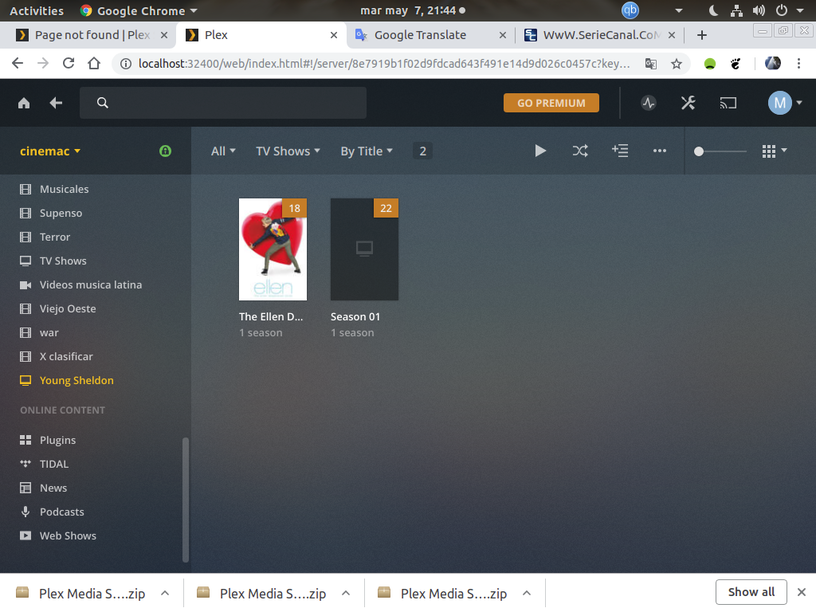
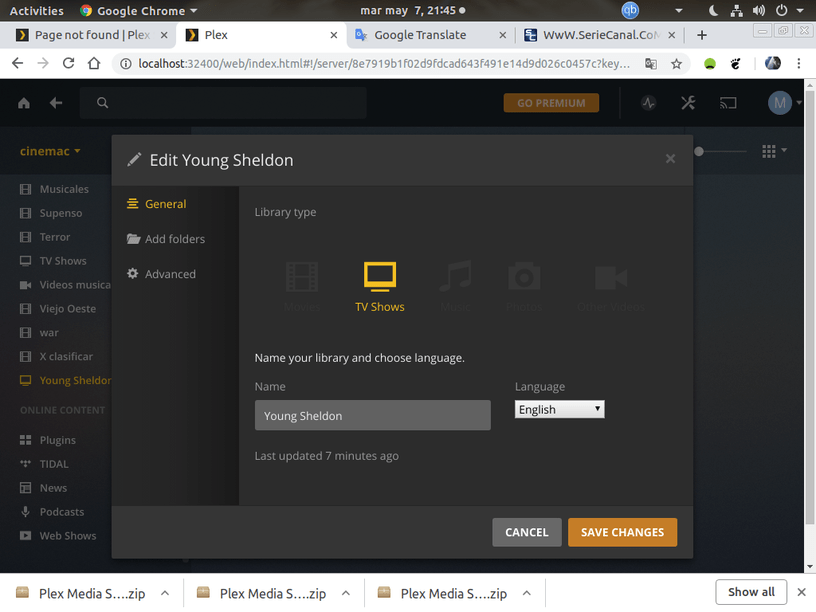


Did you rename it in place or “Plex Dance” it?
Renaming in place does nothing because PMS keeps the file’s fingerprint (Checksum).
To make it start the process completely over:
- Move media files to an unmonitored directory
- Scan files
- Empty Trash
- Clean bundles
- Move Media back
- Scan again if not auto scanned.
It’s not Plex, nobody else has this problem, sorry. 99.99% of this type problem is rooted in Naming, Structure, and incorrect media curation procedure.
Hi Chuck, i was made the Plex dance. i move the files to other directory, then delete the original directory, next, IN PMS, delete Young Sheldon structure, refresh all metadata in TV Shows, the next step was copy again the sheldon directory to the original structure, and sorprise, now Sheldon is Ellen Deg… and the worst, the chapters 19 and 20 in second season are ghost again … oops, is an rare case, but don’t worry, i don’t have problem with the names, the only situation are the ghost… let me try again and i will share the results, thanks again
