Hi,
In the last month or so Plex does not find any of the files on my WD server. This happened all of a sudden and I can’t find why and how to fix this.
Anyone help please?
Thank you in advance.
Hi,
In the last month or so Plex does not find any of the files on my WD server. This happened all of a sudden and I can’t find why and how to fix this.
Anyone help please?
Thank you in advance.
It was probably a software patch or a PLEX update that changed permissions. If everything died its probably near the top. Check that PLEX has permissions starting a the root
Thanks,
I will probably sound like a complete idiot but how to do that?
Every set up is different and from what little you’ve said here is some generic guidance.
If you are working with linex: Linux Permissions Guide | Plex Support
If you are working in windows, go to the top of your mapped drive and right select to get the properties and assure the user “Everyone” has full privileges, work your way down to your media checking each level (this is my external WD HDD set up)
If no content at all is being found or you’re unable to see particular directories when trying to set up a library, you may be encountering permission issues (which prevent Plex from being allowed to see/access the content). The user account under which your Plex Media Server is running needs to have “permission” to access your content.
For Windows or OS X installs, this will almost always be the user account logged into the computer. For NAS- or Linux-based Plex Media Server installs, it will usually be the plex:plex user.
If using a network share, you need to ensure that the share is under a user that has appropriate access permissions.
The user account needs to have at least read and execute permission for the directories and content.
Related Page : File system permissions (Wikipedia)
You might also look at: Why does Plex Media Server say my content is unavailable? | Plex Support
Thank you for the detailed answer.
I am using My Cloud Home which in my windows 10 file explorer is shown as a network location. All folders in my pc has the security tab in properties, however the network location does not have it at all.
Apologies in advance for the basic questions here, I hope I will be able to get Plex to be working as it was before.
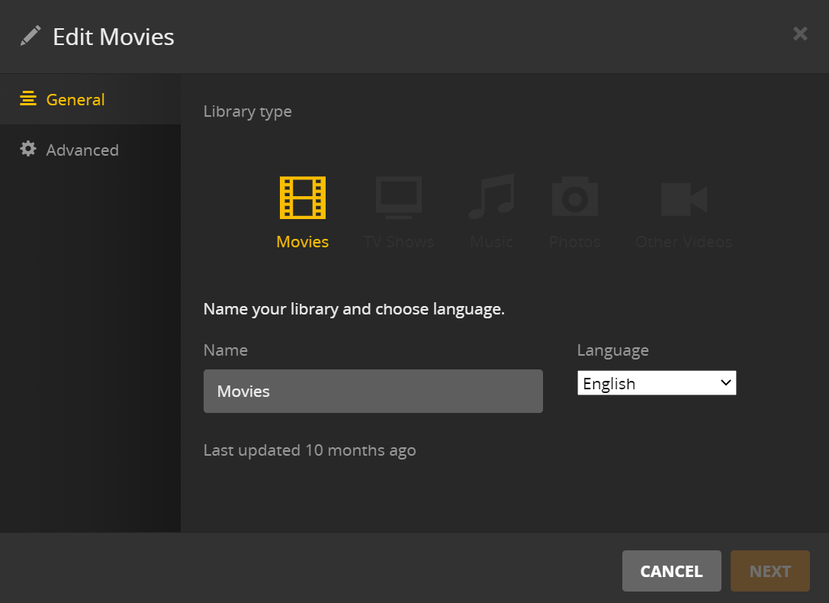
My understanding is you need a mapped drive for the PLEX library to point at, and this would reveal the security permissions. Can you show us the folder path you are using (see below)? It may be it is looking for an invalid path, you might have lost a mapped drive, etc.
Even a network path would be displayed as a Windows structure with permissions on a security tab, so I’m a bit lost here with the info on hand.
Thanks.
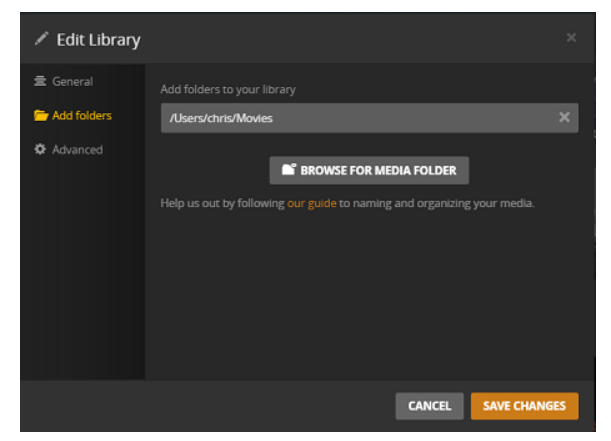
I can’t see the option Add Folders. This is what I have:
Seems like all the paths have disappeared totally.
Can you create a new library and see the add folders?
I’m running out of media path ideas. I went into my servers and tried each type of library and they each had an add folders link in the left column which you are clearly missing. I might suggest its a database problem that you might be able to rectify: Repair a Corrupt Database | Plex Support
I’m not finding your specific problem in the support pages. Troubleshooting the DB might bring back the add folders link. If it does you might have to create a mapped drive to your media, or you might be able to give a network address - this is something I’ve never done since i’ve only used mapped drives in windows
All of a sudden during the night most of the content became visible again! Not all of it but big part of it. Now It seems that Scan Library Files option is not working when I try to search for the missing content.
When I try to find out the database I can’t find any of the paths as per the instructions.
I am not an expert here however I am sure that this should not be so complicated!
Would you recommend me to uninstall everything including my profile and register again from scratch or is there a chance that PLex will do a wonder and find the rest of the files and work properly again?
Million thanks for your patience!
If your content came back can you discover what happened? Is your “Add Folder” appearing again in the Edit Library menu? Is the content all located in the same location? If not, assure each path is in the add folder of the target library.
I do not recommend starting from scratch until you get a better grasp of the problem or as a very last resort - although if you have a smallish media collection it might be an option. I have a lot of customized collections and comments so starting from scratch would not be for me
I’ve been having the same issue with my iCloud home device can’t find folders don’t know where they’re at it’s really frustrating they need to fix the issue because I’m getting tired of it
All of a sudden all came back into place and a week later every single file disappeared again.
I gave up and I stopped using Plex at all.
Seems it is pretty useless unfortunately. Very, very disappointing.
Hi again,
I had pretty small window of time to digg in and find out what the issue was,
Also I am not sure I am the one who shold use so much time to discover what the issue is. I know that I am usign a free version of Plex however I am the end user. You have been kind and helpful for which I am really thankful, of course!
I gave up and stopped relying and using Plex. There must be Plex support who should work on the issues and find out how to fix it.
I also have had exactly the same problems as Anton_Damianov, feels good not to be alone about this, but it is very disappointing! I have no Add folder option, maybe it is a feature of My Cloud (no Home)?
Does anyone know of another way to have a music player access music files on My Cloud Home, without Plex? I am giving in on the combination WD and Plex, but would prefer not having to buy a new NAS.
I may add, a couple of years ago I had a My Cloud NAS, no problems ever and no Plex around. The music player found the files and played them without problems. Actually, I thought I bought the same thing when I bought My Cloud Home, but oh what a difference …
Oh my, now I discovered DLNA was deactivated, I activated it and it works just fine to play music with my music player! I promise, I will return in a few days with an update how things go.
I have never turned off DLNA, I know that much…
For the time being, happier! 
Hi Anders, my DLNA was also deactivated. Now because of your comment I did activate it, however nothing changed so far (days after). Did you manage to fix this issue by activating the DLNA?
Actually, activating DLNA was my third step.
I know that before the deactivate-activate routine of Plex on My Cloud Home, DLNA was activated but it still did not work.
Now when I log in to Plex (I have the free version too) there are two My Cloud Home , one with an error message and one without where my music is available. I can’t get rid of the one that does not work. But, now it has been working for three consecutive days which has only happened on rare occasions before, so I dare not change anything at all. I will update here for a while so that anyone with this problem (we are a bunch, I notice on this forum) can see how it evolves. As I said, I had it working before but never for long.
Good luck with your attempts, Anton, please let me know if you manage to work it out. It is extremely frustrating!