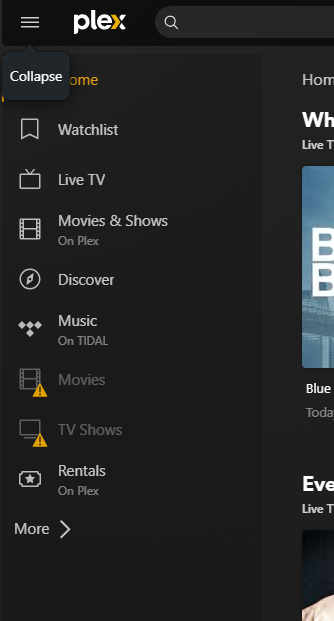
I use a windows 10 machine to run plex with it pulling my media from a synology NVR over my network. It has been working just fine a few weeks ago but noticed a few days ago we cannot watch any of our media. My media is not even showing up greyed out on any of my apps (Apple TV, Firestick) it is showing greyed out on my iphone app. I do see my friends server even though his is down right now. How do I get my media to show up again? I restarted my media storage synology and made sure windows computer was running and logged into Plex. What do I do to reconnect to my media.
Clarifying: It is not pinned to the side bar on left (Apple TV/Firestick) when I look at MORE it is not there also for me to re pin it.
Same goes for when I access from my computer that is hard wired and running the plex server. Not seeing my media
You mention that your server is logged into Plex – can you verify that the client app is signed in with the same account?
Are those devices on the same network (subnet)?
Do you see your server and its media if you use Plex Web (on both the hosted web app and the bundled version from your Win10 machine → e.g. http://127.0.0.1:32400/web while you’re on the same machine)?
I only have one account and I went directly to my Win10 machine, started plex signed in, made sure my synology was signed in. These are on the same network. On my Win10 machine file explored I see my synology in the network and it is running.
Maybe I need to go add a library again to pull in the media? But I can’t seem to find where that is anymore on plex. Not sure why the library would be taken off…software update maybe?
http://[PMS IP address]:32400/web if you’re on a different machine in the same network
If you’re not currently signed into your account on that browser, you might need to sign-in.
Please double-check if the server and libraries will show up in the sidebar from there.
Also… from that address / browser – can you see your server under Settings in the left sidebar?]