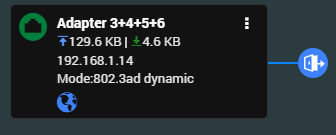
I get this on my QNAP also for multiple releases over the last few months including this one just now. I always just then install the last good one (PlexMediaServer-1.27.0.5897-3940636f2-x86_64.qpkg). I’ve tried stopping and starting PMS after install but it still never works. It’s just a pain. Here’s my logs in case it helps. I just reinstalled the old version mentioned and it loads to no problem. BTW, QNAP says PMS is started but I get a 404 page error when trying to get to it.
I tried applying the version mentioned originally. 1.28.0.5999-97678. I did this earlier today and then I get the 404 error when trying to load Plex in the web browser like I always do. So I can’t get the logs through the web Plex interface. I stopped and restarted PMS through the QNAP which seems to go fine. Then I reinstall the older version and everything works again. Then I pulled the logs hoping they would have all the info from the new install and the old reinstall. I think I saw somewhere on Plex’s site how to manually get the logs, so I will try that before reinstalling the old version.
Networking: I use the two built in 1Gbe and two 2.5Gbe ports on an internal QNAP card that also holds 2 2TB NVMe M.2 chips for cache. All four ports are port trunked into one with a managed switch. Is there some specific you would want to know about it? Though I and some friends get a message that the connection is indirect and may affect performance or something like that. Not sure when that started. Maybe when I disabled UPnP due to getting ransomware. We can still watch everything though and haven’t noticed a performance issue.
I am not running QuFirewall. I assume that’s the one you’re talking about. It’s not installed.
It’s a new switch as my old one got fried by lightning a couple months ago. I would think it does as I checked the QNAP and have it set to 802.3ad dynamic according to the screen shot.
It’s a Netgear GS316EP. I just looked at the admin page and find no mention of it. I also downloaded the manual and find no mention of 802.3ad. So maybe I have the QNAP set wrong?
Aug 04, 2022 18:29:24.827 [0x7f3b55c6f0d0] DEBUG - HttpServer: Listening on IPv6 as well as IPv4.
Aug 04, 2022 18:29:24.827 [0x7f3b55c6f0d0] ERROR - HttpServer: Error binding acceptor: Address in use
Aug 04, 2022 18:29:24.827 [0x7f3b55c6f0d0] ERROR - HttpServer: Error opening acceptor on IPv6, falling back to IPv4: Address in use
Aug 04, 2022 18:29:24.827 [0x7f3b55c6f0d0] ERROR - HttpServer: Error binding acceptor: Address in use
So something is still listening on the ports
So first of all, do you really use IPv6?
And if not, then suggest you disable it, and restart QNAP afterwards
I don’t use IPv6. Didn’t know it was enabled. I will disable it. I unplugged the 3 port at the managed switch instead of from the back of the Qnap as that’s much easier to access. That wouldn’t make a difference, would it?
*I accidentally replied through my email and didn’t realize that I got a bouncer back till now.
And yes, I do know how to use SSH to connect. I will try to reboot in a bit. I just disabled IP6 and will double check the 802.3ad to see if it’s supported by the switch. If not I will set it to another mode.
After screwing up my networks setting regarding LACP and having to get in to the command line directly plugged, I got all the network stuff reset. It’s back to 802.3ad which might not be right but works. Doc says my switch does not support LACP but the web admin for has a toggle for it. So I would think that network stuff is the same. I did disable the IP6 and reboot. The newest version of PMS then worked after installation.