I am behind CGNAT and I’m trying to have my PLEX instance accessible outside my network. It’s running the latest PLEX version and latest QNAP firmware. I set up a wireguard tunnel via QNAP and set it as the default gateway for the whole QNAP. The tunnel works fine I can ping outside world. I set up port forwarding which also works fine (I tested it by accessing another service from the outside). However, plex remote access won’t work. It just says unknown IP, no access. Is this PLEX bug or am I doing something wrong?

I forgot to mention that I tried this on 2 different PLEX instances on 2 different QNAPS, same results.
The only way I could Plex to be seen on the outside was to get a static ip address from my ISP.
That was 3+ years ago…
I have PLEX on a qnap NAS.
Things may have changed and others can get it to work but I still have the static IP so it is not a concern . 
Good luck 
Sadly static IP is not an option.
Remember what WireGuard is on your QNAP: It provides the tunnel from Outside back IN TO your LAN. If you have it always active then your phone will always be on your lan via the WireGuard tunnel.
Don’t make it Outbound. It’s Inbound.
Your mobile device connects from Outside , through the tunnel, to your LAN.
Once “inside”, you connect to anything on your LAN (including PMS) AS IF LOCAL
I have WireGuard setup .
-
WireGuard runs independent (in parallel) of the main networking. It’s not the “default gateway” because it’s receiving connections from the outside.
-
With WireGuard active, I open my server by its LAN IP address on my phone. My phone app thinks it’s on the home LAN
-
PMS does not have or need Remote Access enabled. Open it by the LAN IP instead.
My ISP provider is TMO. PLEX is on QNAP behind CGNAT. I installed QVPN on QNAP. I set up a WG tunnel on QNAP via QVPN to a server outside my network with static IP. On that server, I set up port forwarding. QVPN has an option to use WG tunnel as the default gateway.
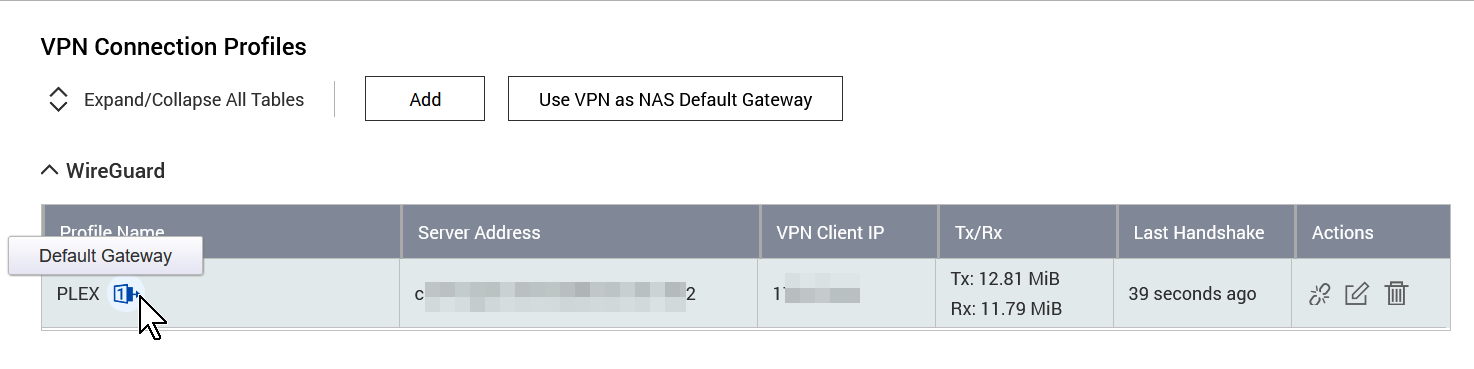
QNAP is using that gateway for all outbound traffic, it also accepts whatever ports are being forwarded from the outside server. I have tested this and it is working. I exposed tautulli and was able to access it without a VPN from the outside by going to the external server IP and using the correct port. I can’t do this with PLEX. Port forwarding works on other QNAP apps except for PLEX.
This is your key.
If that server is port forwarding as you say,
You can have PMS publish this static IP with your server credentials(Settings - Server - Network - Show Advanced)
You also set the manual port (which matches the external port you mapped).
By doing this, you’re manually bypassing Plex’s “Remote Access” automatic brokering service and setting up your own.
PMS & Plex.tv will publish the Access URL info you specify.
For my server,
- I have a FQDN with cert assigned to my public IP (which is effectively static)
- I give PMS that access URL
- I also give PMS the port number I’ve mapped through the firewall (the port you forward through the tunnel)
- The last I do is give PMS the certificate (with CA included in the P12).
I think if you use that remote server with Static IP as your “relay / entry point host”, you’ll be ok.
Traffic will go to that server:port,
Be forwarded down the tunnel to your QNAP
Exit the tunnel and target port 32400 on the host where PMS is waiting
Thank you for your input! I really do appreciate it.
“You can have PMS publish this static IP with your server credentials(Settings - Server - Network - Show Advanced)”
By that you mean Custom server access URLs? I tried that as well. Or do you mean something else? What do you mean server credentials?
Also, do I need FQDN? Will it not work with just IP? Will it not work without security certs?
Yes Custom Server Access URL. It’s fickle.
In my configuration, I put the URL (without the port)
I then go to Remote Access and Manually Specify the port even though I don’t use Plex’s remote access broker. The Apps get the URL and port number. Magic occurs
Plex.tv (and all the apps) put the two together.
I end up with https://myplex.mydomain.tld:myport which gets DNS-resolved to my WAN IP address and enters at myport – which I have mapped to 32400 on my end of the firewall (NAT / tunnel )
If that IP is static, you’re good without any FQDN / DDNS
Without FQDN / DDNS involvement, just like being on your LAN, PMS will assert its certificate to you and secure the connection.
It only gets exacting when FQDN or DDNS names are involved.
It wants to know those names are genuine and certified (hence the cert).
You can do it if you want but it shouldn’t be necessary if your port mapping is right.
Thanks again for additional info.
The farthest I can get is when I go to the static IP with custom port in browser it does open PLEX interface. I can log in but then it says it cannot access my server. It either says that it’s not available or not authorized. These screencaps are from the public facing IP


I did get a little further. Now it shows library if I go to the public facing ip via browser and it seems to play music but movies give error Error code: s1003 (Network). Also all apps still show the server offline when outside of local network, can’t access anything (including music), even if I add the IP manually in advanced settings.
This topic was automatically closed 90 days after the last reply. New replies are no longer allowed.
